1
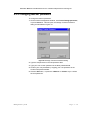
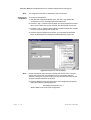
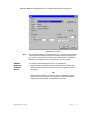
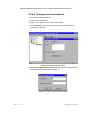
Destination MATH PC User Manual Version 4.0 2001 Riverdeep Interactive Learning Ltd. 2.3.2 Changing teacher password To change the teacher password: 1 On the teacher management window, click Tools>Change password, or press <Alt+t+c>. This will open the Change Teacher Password dialog, as illustrated in Figure 40. Figure 40 Change Teacher Password dialog 2 Type the old password in the Old password field. 3 Type your new chosen password in the New password field. 4 Confirm your new password by retyping your new password in the Confirm new password field. 5 Click the OK button, or press the <Return> or <Enter> key to confirm the new password. Man a g e m en t s y s te m P a g e 2 - 59