1
Installation Guide
3.3.2
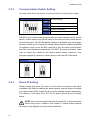
Communication Switch Setting
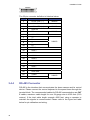
The table below shows the function of each pin within the Communication Switch.
Communication Switch
SW 1
SW 2
RS-485 Setting
SW 3
Termination
SW 4
Line Lock
SW 5
System Initialization
SW 6
Reserved
RS-485 is the interface that communicates the dome camera and its control
device; for this reason, the RS-485 setup of the dome and the control device
must be the same. The RS-485 default setting is half-duplex (see the diagram
follows). Please do not change the default setting without qualified specialist
or supplier’s notice. As for the SW 3 and SW 4, they are used for termination
and Line Lock adjustment respectively. The SW 5 is mainly used when users
want to restore the camera to the factory default status; moreover, once
firmware upgrade is carried out, users need to reset the SW 6 afterward.
RS-485 Setting
Half-duplex
3.3.3
Full-duplex
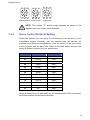
Dome ID Setting
Please change the dome ID if there is more than one dome on the same
installation site. Before installing the dome camera, use the switch to change
your speed dome ID by turning the arrow to the desired number respectively.
For instance, if the dome ID is 123, the ID switch should be set as shown
below.
NOTE: No two domes should be given the same ID, or communication
conflict may occur. In addition, the number “0” should locate upwards
as shown in the diagram for correct switch definition.
14