1
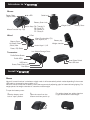
Introduce to VenomX
TM
Mouse
Power/Start
/Option/Menu
▲/▼: ± DPI
Cable Lock
Battery Cover Lock
Action Keys: R4:
R5:
Mouse Function Key: F(R)
R6:
R7:
Wand
Weight Cover
Triangle/Y
Circle/B
Square/X
Cross/A
Battery Cover
D-Pad
Wand Function Key: F(L)
Left Joystick/L3
Battery Cover
Battery bay
Weight chamber
L4:Select/Share
/Back/View
Action Keys: L1,L2
Power/PS/Guide
Iron Weight Storage Cover
Transceiver
Profile Select Button
Profile LEDs
Host Select Switch
Host USB Jack
USB Jacks
Power/Data/Pairing LED
Pair Button
Install VenomX
TM
Mouse
Venom-X mouse functions in wireless or wired mode. It will automatically switch modes depending if the mouse
USB cable is connected to the console or PC.
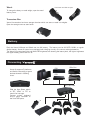
Venom-X mouse comes with 3 battery covers that ergonomically adjusting grips for better tailored gripping. Put
weight pieces into weight chamber to customize mouse weight.
To open the battery cover:
1.
Slide the battery cover
lock to "open" position.
2.
Open the cover from the
bottom and then push it up.
Put weight pieces into weight chamber
to get comfortable mouse weight :