1
2.Basic Functions
d. Settings
[General]
1
2
3
4
5
6
7
8
1
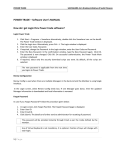
Settings Button
Tap to open settings.
2
General
This tab allows you to manage or preset your display settings and order conditions.
3
Always On Display
You may select up to 4 currency pairs to be shown and updated at all times at the top of each main
section including the Home menu.
4
Auto-Update
Choose from the 7 time intervals to customise how often you would like to have all information
updated automatically: OFF, 1, 3, 5, 10, 30 or 60 seconds. (Please note that you cannot
customise the update frequency for each section.)
5
Save Order Settings
Set to “ON” to save order conditions for the order window.
6
Skip Order Confirmation
Set to "ON" to skip order confirmation window.
7
Save User ID
Set to “ON” to save User ID in the login page.
8
Save Password
Set to “ON” to save password in the login page.
14 November 2015
Copyright © GMO-Z.com Forex HK Limited All rights reserved.
7