1
User Manual
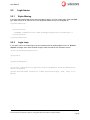
Print Settings
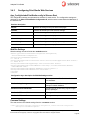
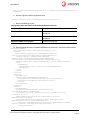
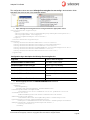
Print Web Service settings are stored inside the <printstudioexplorer>section:
<printstudioexplorer type="Sitecore.PrintStudio.Configuration.SettingsSection,
Sitecore.PrintStudio.Configuration">
<settings hint="raw:AddToSettingsList">
<setting name="PrintStudio.MetaFields" value="Description|Start date|Due date" />
<setting name="PrintStudio.MetaSections" value="ProjectMeta"/>
<setting name="PrintStudio.PrintHasWorkbox" value="True"/>
<setting name="PrintStudio.ReportItemMinUsageCount" value="2" />
<setting name="PrintStudio.PublishingCachePath" value="C:\APSPublishing\PublishingCache\" />
<setting name="PrintStudio.PrintDashboardServiceType" value="InDesignServer"/>
<setting name="PrintStudio.PrintDashboardServiceMethod" value="Publish"/>
<setting name="PrintStudio.PrintResponseType" value="WithLinks"/>
<setting name="PrintStudio.PrintServiceProvider"
value="Sitecore.PrintStudio.WebServices.Providers.SitecorePrintProvider"/>
<setting name="PrintStudio.FontsFolderPath" value=" C:\APSPublishing\Fonts\"/>
<setting name="PrintStudio.FontsListXmlPath" value=" C:\APSPublishing\Fonts\FontsList.xml"/>
</settings>
</printstudioexplorer>
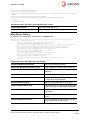
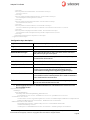
Configuration keys description for printstudioexplorer section
PrintStudio.MetaFields
List of meta fields shown on UI.
PrintStudio.MetaSections
Item sections that contains meta fields shown
on UI.
PrintStudio.PrintHasWorkbox
Value that indicates if workbox node will be
added to the content tree in the Print Studio
Explorer application.
PrintStudio.ReportItemMinUsageCount
Minimum usages of Images shown in Report
tab in Print Studio Explorer.
PrintStudio.PublishingCachePath
Path to Publishing Cache folder.
PrintStudio.PrintDashboardServiceType
SOAP message service type sent to
dashboard.
PrintStudio.PrintDashboardServiceMethod
SOAP message service method sent to
dashboard.
PrintStudio.PrintResponseType
SOAP message response type sent to
dashboard.
PrintStudio.PrintServiceProvider
The Service Provider to be used for data
manipulation.
PrintStudio.FontsFolderPath
Path to fonts folder.
PrintStudio.FontsListXmlPath
Path to fonts list XML.
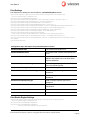
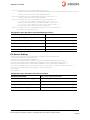
Print Studio Engine Settings
<printstudioengine type="Sitecore.PrintStudio.Configuration.SettingsSection,
Sitecore.PrintStudio.Configuration">
<settings hint="raw:AddToSettingsList">
<settings hint="raw:AddToSettingsList">
<setting name="PrintStudio.ProjectsFolder"
Sitecore® is a registered trademark. All other brand and product names are the property of their respective holders. The contents of
this document are the property of Sitecore. Copyright © 2001-2012 Sitecore. All rights reserved.
Page 19