1
12.The normalfunction of the prodrdmy be disturbed
by strong electro-magnetic irttrelel( so,
simply rest the product to resurE rsrfrr, operalion
by following the instruction manrd_ kr cese the
function could not resume, pleaseusel0reproduct in
other location.
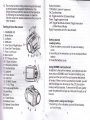
Getting to know the camera
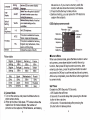
1. CHARGER LED
2. Mode Button
3. Up Button
4. OK Button
5. Face Detect / Right Button
6. Down/Self-Timer Button
7. Flash / Left Button
8. Menu Button
9. TFT Display Screen
10- T-Zoom in Button
11. W-Zoom out Button
121314.
15"
1617.
Shutter Button
Speaker
Power Button
USB Port
SD/MMC Socr(et
OUT Plug
18. Focal Length Button
,9.Lens Ring
2O. Lens
21. Flash Strobe
22. Battery Cover
23. Battery Cover Switch
24. Microphone
W
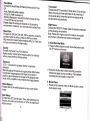
Button functions
T/W Button: zoom in / zoom out
OK: Confirm/enter
Up: Toggle resolution (Camera Mode)
Down : Toggle capture mode
Left: Toggle flash/back-forward, Toggle resolution
(Video Record Mode)
Right: Face detect on/off or fast-forward
Getting started
Loading battery
1. Slide the battery cover switch to open the battery
cover.
2. According to the
indication, put in an enclosed lithium
battery.
3. Close the battery cover.
Using SD/MMC card (optional)
ln addition to the built-in memory, your camera can also
store data on SD/MMC card. To insert a memory card,
gently push the card until the card reaches the bottom
of the slot. When a card is successfully inserted, you will
see the storage icon showing on the LCD, the built-in
memory will be disabled. To remove the SD card, genfly
push the card and it will pop up, then pull the card out of
the slot.
Charge battery using seat charger
1. According to the indication, put in a lithium battery,
pull out the plug.