1
1.
TH E
M A I N SC R E E N
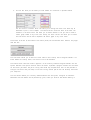
W h e n you first run C A T C H , you wi l l be greeted what we call the mai n interface. In this mai n interface
you wi l l be able to perfo r m all of C A T C H ’ s functi o ns and vie w the results generated by the C A T C H
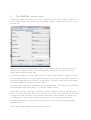
algori t h m . The mai n interface looks like this:
This is the mai n screen, when there are no datasets loaded (aligned or other w i se). There are four
maj o r aspects whi c h are im p o rta n t to kno w right awa y. They are num be re d one throu g h four.
1.
This list sho w s the unal i g ne d datasets. W h e n more than one set is loaded it wi l l allo w you to
select the set you wish to use. A n unali g n e d dataset is a dataset that has not yet been run
throu g h the C A T C H algori t h m and can contai n one or more tracks. Once loaded, the tab
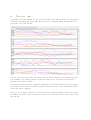
mar ke d ‘graphs’ wi l l beco m e acti ve and wi l l sho w all the tracks as graphs.
2. This list sho w s the aligned datasets. W h e n more than one set is loaded it wi l l allo w you to
select the set you wish to use. A n aligne d dataset is a dataset that has been run throu g h the
C A T C H algori t h m . Once an aligne d dataset is loaded or created (more on that later) the tabs
‘cluster vie w ’ and ‘branc h vie w ’ wi l l beco m e acti ve and allo w you to vie w the cluster tree
created by the C A T C H algori t h m , as wel l as perfor m vari o us functi o n s on the result. These
wi l l be discussed in more detail in the appro p r i ate chapter.
3. This box sho ws the full name of the loaded dataset if a dataset is loaded. The butto n to the left
wi l l allo w you to make the box editable, and input a new name for the dataset. The change
wi l l be conf i r m e d when you press the button again. This can be used for personal reference.