1
Running Your XAI Environment
Running Your XAI Environment
The XML Application Integration (XAI) module provides the tools and infrastructure that businesses require for
integrating their third-party systems with the application.
This section describes the pages used to manage incoming and outgoing information via the XAI tool.
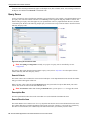
XAI Staging Control
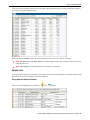
Refer to Staging Control for more information about the purpose and functionality of this page.
Navigate to this page using Main Menu > XAI > XAI Staging Control.
Description of Page
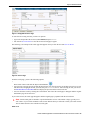
The XAI Staging Control ID is a system generated unique identifier of this record.
The XAI Staging Control Status indicates the current state of this record.
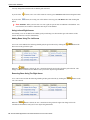
Pending This status indicates that this record needs to be processed.
In Progress This status indicates that the background process, which uploads the staging records, is currently
processing this record.
Error This status indicates that the background process found a problem with this record. When the data related to
this record has been fixed, change the status back to Pending so that it will be processed again.
Complete This status indicates that this record has been processed.
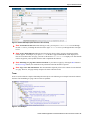
The Number of Uploaded Records indicates how many XAI staging records related to this staging control record
were uploaded.
The Run Date Time indicates the date and time this record was processed by the upload process.
The User, who created this staging control record, is captured.
If the data to be uploaded is found in a file, indicate the Upload File Name, which should include the directory path
and file name.
Note Character Encoding. Refer to Sequential Input File for information about specifying character
encoding for a file.
Note Complete File. MPL expects this file to be complete. If the file is in the process of being copied into the
directory, MPL still attempts to process it and may issue an error for the incomplete file. The staging control
record should only be created once the complete file is ready for upload.
Enter a description of the XAI Interface Name. This is simply information and is not used by the system.
Turn on Sequential Execution if you want the XAI upload staging records related to the staging control record to
be processed in sequential order (instead of multithreaded). Some records, such as LDAPImport requests, must be
processed in sequential order.
Oracle Utilities Application Framework Business Process User's Guide • 69