1
I
P
indicator
operate handle 9, 10
Standby 7
tape in use 9, 10
use cleaning tape 9, 10
write protect 9, 10
inserting a tape cartridge 21–22, 23
interlock switch 7
inventory 33
power switch 8, 20
R
receptacle, power 8
removing tape cartridges 23
S
L
light fixture 25–26
load port 1, 2, 6, 22
unloading 36
M
main display
control panel 3
SCSI address command 29–30
SCSI ID guidelines 30
structure 14
main display area 5
moving cartridges 32
N
numbering conventions 10
O
off-line 21
on-line 21
operate handle indicator 9, 10
operator screen 27
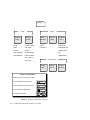
menu structure 28
overview screen 16
44
Sun StorEdge L1800 Operator’s Guide • May 1998
safety information xiii–xiv
screens
operator 27
overview 16
tapes 17
SCSI address, library 29, 30
SCSI interface 2
SCSI ports 8
SCSI-2 medium changer commands 2
shell prompts xii
Standby button 7
Standby indicator 7
status display area 38
status messages 38
status/control panel, tape drive 1, 9–10
Stop button 7
Sun StorEdge L1800 Diagnostic Software User’s
Manual xi, 8, 37
Sun StorEdge L1800 Facilities Planning and
Installation Guide xi, 8
Sun StorEdge L1800 Field Service Manual xi, 7, 37
Sun StorEdge L1800 Software Interface Guide xi
Sun StorEdge L1800 Unpacking Instructions xi