1
Installation Guide
2.7
Internal/External Backup Battery
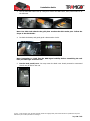
Internal Li-Polymer backup battery can handle temperatures up to 65 °C (149 ºF). In countries
with hot climate this can be an issue. To ensure device proper functionality, it is highly
recommended to use external lead battery backup, please see Tramigo accessories.
The internal backup battery can be removed and backup power is supplied from external lead
battery.
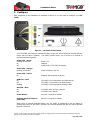
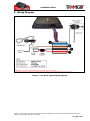
The external backup battery power is supplied through pins 2 and 4.
Note: If external backup battery is used, do not use internal backup battery at the
same time.
2.8
Recommended Installation Sequence
The following installation sequence is recommended. Please refer to the instructions elsewhere
in this document for further details.
1. Plan the whole installation and determine suitable locations, mounting arrangements and
cable routes for all hardware items.
2. Connect Fit SIM card. Temporarily mount the main T23 FLEET unit and temporarily
connect all wiring, while still able to see the status lights on the unit.
3. Configure the unit.
4. Test that all hardware features are working.
5. Mount Complete the permanent installation and wiring.
o Perform final test of T23 FLEET functions.
o Test that all vehicle buttons and switches still work.
© 2007 - 2013 Tramigo™ Ltd. All rights reserved. Under the copyright laws, this manual cannot be reproduced in any form
without the prior written permission of Tramigo™.
Page 6 of 23