1
Installation Guide
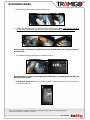
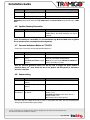
2. Push the battery lock to lift the battery and remove it.
3. Pull the SIM card holder lock up a bit just to loosen the SIM holder. Note: When SIM card has Micro
or Nano model embedded to Mini SIM card, lift the plastic SIM holder up at least 30 degrees. Then
push forward to fit the SIM card.
Note: Put SIM Card wherein the gold plate touches the SIM reader pins. Follow the shape of
the SIM holder.
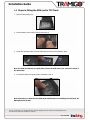
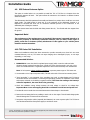
4. Put back the battery and gently push it downward to lock it.
Note: Remember to check first the GSM signal stability before assembling the unit back, the
RED light should be OFF.
5. Put the back panel/cover. You may return the back cover loosely screwed or unscrewed since it
may fit well on the unit.
© 2007 - 2014Tramigo™ Ltd. All rights reserved. Under the copyright laws, this manual cannot be reproduced in any
form without the prior written permission of Tramigo™.
Page 13 of 30