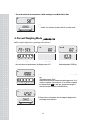
1
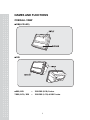
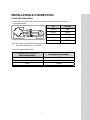
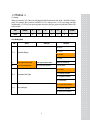
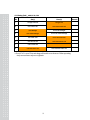
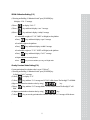
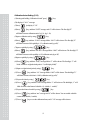
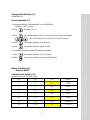
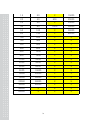
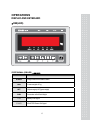
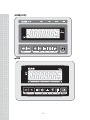
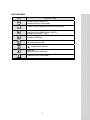
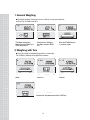
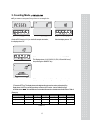
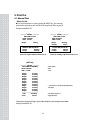
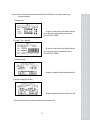
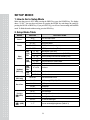
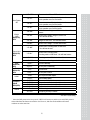
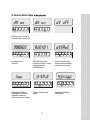
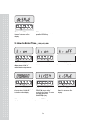
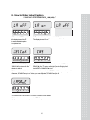
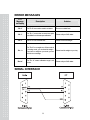
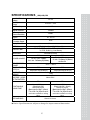
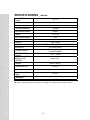
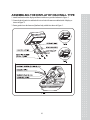
7 2 CONTENTS PRECAUTIONS ............................................... 4 PREFACE........................................................... 5 NAMES AND FUNCTIONS ........................... 6 INSTALLATION & CONNECTION ........... 7 CALIBRATION ................................................ 8 OPERATIONS................................................. 15 1. General Weighing ........................................ 18 2. Weighing with Tare ....................................... 18 3. Counting Mode ............................................ 19 4. Percent Weighing Mode ................................ 20 5. Hold Function(Weight Mode ONLY) ............. 21 6. Cumulative Weight Sum ............................... 21 7. Weight Comparison Function(HI/OK/LOW) . 23 8. Print Out ..................................................... 26 9. Battery Charge............................................. 29 10. Unit conversion(Kg, lb, oz, g) ....................... 29 SETUP MODE................................................. 30 1. How to Go to Setup Mode............................. 30 2. Setup Mode Table ......................................... 30 3.TIME Setup Mode ........................................ 32 4. How to Enter Date ........................................ 33 5. How to Enter Time ....................................... 34 6. How to Enter Label Caption.......................... 35 ERROR MESSAGES ..................................... 36 SERIAL INTERFACE ................................... 36 SPECIFICATIONS......................................... 37 ASSEMBLING THE DISPLAY OF DB-II WALL TYPE .................................................... 39 3 PRECAUTIONS 4 PREFACE Thank you for the purchasing of CAS DBI(LCD) / DDI Indicator. This series have been designed with CAS reliability, under rigid quality control and with outstanding performance. Your specialty departments can enjoy with CAS products. We hope that CAS product meets your needs. The user manual is designed to guide you to understand product operation and proper care of product. 5 NAMES AND FUNCTIONS OVERALL VIEW DBI(LCD/LED) DDI * DBI (LED * DBI (LCD) / DDI = = FOR DBI (LED) Version. FOR DBI ( LCD) & DDI Version. 6 INSTALLATION & CONNECTION Load cell connection Connect load cell connector to load cell port which is in the backside of the indicator. * Connecting method IN COLOR 1 (EXC+) RED 2 (EXC-) WHITE 3 (SIG+) GREEN 4 (SIG-) BLUE 5 (SHIELD) SHIELD Note. Wire color can be different depending on the loadcell’s manufacturer or it’s model. * Load cell output to Resolution 5V impression to loadcell Max. load cell output Recommended resolution 4 mV 1/4,000 8 mV 1/8,000 10 mV 1/10,000 7 CALIBRATION General Calibration Pressing and holding calibration switch press [POWER] key to go to calibration mode. User can move to other mode by using [HOLD],[PRINT] key in the calibration mode. Please simply follow below procedure to move to other mode. User also moves to other sub-modes for each mode by using [TARE] key. _* DBI (LED) ● Calibration Mode: Pressing and holding “Calibration Switch” press [POWER] key. ● It displays “CAL 1” after “onE”. ● Selecting menu: press [HOLD],[PRINT] ● ENTER(Setting) : [SAMPLE] key MODE Function CAL 1 Display normalized AD CAL 2 Display Keypad infomation- CAL 3 [SAMPLE] → “Zero” → Weight Setting Mode (Zero Weight) [SAMPLE] → “MID” → [SAMPLE] after loading for 1/3 weight → [SAMPLE] → “FULL” → [SAMPLE] after loading for Full weight → [SAMPLE] → “MID” → [SAMPLE] after loading for 1/3 weight → “END” CAL 4 Option Setting ( Table 1 ) CAL 5 Display filtered Raw AD CAL 6 N/A CAL 7 % Calibration CAL 8 Battery calibration Gravity constant CAL 9 CAL 10 Set calibration factor “Unit” [SAMPLE] select 0, 1 (0:kg, 1: lb) [SAMPLE] “CAPA” [SAMPLE] select capacity [SAMPLE] “MID” [SAMPLE] select mid-capacity [SAMPLE] “W-dP” [SAMPLE] Select Decimal Point [SAMPLE] “ 1 d ” [SAMPLE] Select division [SAMPLE] “Dual” [SAMPLE] Enable dual interval (0:disable, 1:enable) “tare” [SAMPLE] Enable custom tare (0:disable, 1:enable) [TARE] Set nation( 99: Default) CAL 11 8 < Modes > C4 Setting When you entered CAL-4, the scale will display 8 Bits Hexadecimal value in the “Total Price Display panel. For example, B0(16) presents 10110000(2). In C41 setting, it sets (+/-)10% zero range, last digit invalid enable, (+/-)2% key zero percent, proper successive tare type, gross zero indication. Please refer to below table. Bit 7(MSB) 6 5 4 3 2 1 0(LSB) Value 1 0 1 1 0 0 0 0 C4-1 Setting (AD) Bit Set (1) Clear (0) Remark 00 : ±2% 7, 6 01 : ±3% Initial Zero Range 10 : ±10% 11 : ±5% 5 Last Digit Invalid Enable Last Digit Invalid Disable Same as 4-4 3rd bit 4 ±2% Key zero percent ±3% Key zero percent For Sri Lanka 00 : Proper 3, 2 01 : Positive Direction Successive Tare Type 10 : Negative Direction 11 : All Direction 00 : Gross zero indication 1, 0 Zero mark type 01 : Net zero indication 10 : Both zero indication 9 C4-3 Setting (Sale) _* DBI (LCD) / DDI Bit Set (1) Clear (0) 7 Dot type Comma Dot type Dot 6 Use Preset Tare Don't Use Preset Tare 5 Use Backlight Don't Use Backlight 4 Use Head Message Don't Use Head Message 3 Use Gram Unit Don't Use Gram Unit 2 Use Ounce Unit Don't Use Ounce Unit 1 Use Pound Unit Don't Use Pound Unit 0 Use Kilo Gram Unit Don't Use Kilo Gram Unit * Even if C4-3 is set to 5F the unit change will not able to use because of Max capa setting And you must choose only two weight unit. 10 Remark SPAN Calibration Setting (C-3) (1)Pressing and holding “Calibration Switch” press [POWER] key. It displays “CAL 1” message. (2)Press [ ] to display “CAL-3”. (3)Press [ ] key and then it displays “zero ” message. (4)Press [ ] key and then it displays “midup” message ● Load middle weight (ex:”C-10” “MID” set Weight) on the platform ●Press [ ] key and then it displays “span ” message ●Load full weight on the platform ●Press [ ] key and then it displays “middn” message ●Load middle weight (ex:”C-10” “MID” set Weight) on the platform ●Press [ ] key and then it display “CAL 3” message ●Weight Calibration is normally finished. ●Press [ ] key two times and then you can go to Weight mode. Gravity Constant Value Setting (C-9) Current gravitational Acceleration value is set to 9.7994 m/s2 . (1)Pressing and holding “Calibration Switch” press [POWER] key. It displays “CAL-1” message. (2) Press [ ] to display “C-9”. (3) Press [ ] key, and then “ G-1“ message and “9.7994” will be shown. The first digit,”9” will blink. (4)Input a gravitational acceleration value by using [ (5)Press [ blink. key. ] key, and then “G-2” message blinks. “9.7994” will be shown. The first digit,”9” will (6) Input a gravitational acceleration value by using [ (7) Press [ ] ] key. ] key to save the gravitational acceleration value, and “C-9” message will be shown. . 11 Calibration factor Setting (C-10) (1)Pressing and holding “Calibration Switch” press [ ] key. (2)It displays “CAL-1” message. (3)Press [ ] to display “C-10”. (4)Press [ ] key, and then “UNIT” message and “0” will be shown. The first digit,”0” will blink. It means calibration unit is “kg” (0 : kg, 1 : lb) (5)Input a calibration unit by using [ (6)Press [ ] key. ] key, and then “CAPA” message blinks. “0015” will be shown. The first digit,”0” will blink. It means a full-capability is “15 (calibration unit, kg or lb)” (7)Input a capability by using [ (8)Press [ ] key. ] key, and then “MCAPA” message blinks. “0005” will be shown. The first digit,”0” will blink. It means a mid-capability is “05 (calibration unit, kg or lb)” (9)Input a capability by using [ (10)Press [ ] key. ] key, and then “W-예” message blinks.“3” will be shown. The first digit, “3” will blink. It means a weight decimal point is “3 (will display 0.000)” (11)Input a weight decimal point by using [ (12) Press [ ] key. ] key, and then “1d “”message blinks.“0.005” will be shown. The third digit,”0” will blink. It means a division is “0.005 (calibration unit, kg or lb)” (13) Input a division by using [ (14) Press [ ] key. ] key, and then “dual” message blinks.“1” will be shown. The third digit, “1” will blink. It means a dual interval is disable. “(0 : disable, 1 : enable)” (15) Input a dual interval enable by using [ (16) Press [ ] key. ] key, and then “tare” message and “0” will be shown. You can enable or disable custom tare (0:disable, 1:enable) (17) Press [ ] key to save the calibration factor, and “C-10” message will be shown. 12 Displaying Real A/D Value (C-5) Display Raw AD Percent Calibration (C-7) (1) Pressing and holding “Calibration Switch” press [POWER] key. It displays “CAL 1” message. (2) Press [ ] to display “CAL-7”. (3) Press [ ] key and then it displays “Per 10” message. Select the percent value using the [ ] key. You can choose 10, 20, 30, 40, 50, 60, 70, 80, 90 percent. (4) Press [ ] key and then it displays “zero” message (5) Press [ ] key and then it displays “pspan” message (6) Load choice percentage weight of full weight on the platform (7) Press [ ] key and then it displays “CAL 7” message (8) Press [ ] key two times and then you can go to Weight mode. Battery Calibration (C-8) - Engineer MODE Calibration factor Setting (C-10) MAXIMUM CAPACITY SETTING TABLE kg lb oz gram 1 2 X 1000 2 5 80 2000 3 6 X 3000 5 10 160 5000 6 15 X 6000 10 20 400 10000 12 25 X 12000 13 15 30 X 15000 20 50 800 20000 25 50 X 25000 30 60 1000 30000 50 100 X 50000 60 150 X 60000 100 200 X X 150 300 X X 200 500 X X 300 600 X X 500 1000 X X 600 1500 X X 1000 2000 X X 2000 5000 X X 3000 6000 X X 5000 10000 X X 10000 20000 X X 15000 30000 X X 20000 50000 X X 30000 60000 X X 50000 X X X 60000 X X X 14 OPERATIONS DISPLAY AND KEYBOARD DBI(LED) STATE SIGNAL ( DBI LED) _* DBI (LED) STATE STABLE DESCRIPTIONS Weight measurement state is stable. ▶●◀ Current weight is “0” kg NET ON(net weight), OFF(gross weight) SUM Summation of the Each Weight LOW Battery Low Signal POWER ADAPTER Power ON Signal 15 DBI(LCD) DDI 16 KEY FUNCTIONS KEYS DESCRIPTIONS Used to set the zero point to 0.00. Used as an ESC key in Setup Mode. Used to enter a tare weight and used to cancel a tare weight. Used to convert the mode as below. [kg] [pcs] [%] [WEIGHT LIMIT ON/OFF] [COUNT LIMIT ON/OFF] [kg] Used as an ENTER key. Used to calculate a unit weight of a sample.. [▶] Used to enter next digit. Used to display average weight. [ ] Used to have number up. PRINT key. [▼] Used to have number down. Used to turn ON or OFF the power. 17 1. General Weighing ■ The display indicates if the scale is at zero or if there is a tare entered into the scale by way of a ZERO and NET. ① Turn on the power. The display shows 0.00. Make sure that STABLE and ZERO lamps are on. ② When the display is not zero though there is nothing on the platter, press the ZERO key. ③ Place an item on the platter. When the STABLE lamp is on, read the weight. 2. Weighing with Tare ■ Tare is the weight of container being used for a commodity. The TARE key subtracts the weight of the container. ① Place the container on the platter. ② Press the TARE key, NET lamp is on. ③ Place an item in the container. ④ To release the TARE function, remove an item and container from the platter and press the TARE key. 18 3. Counting Mode _* DBI (LCD) / DDI ■ If you want to count parts, first you have to set sample size. OR ① Press the MODE key until the display shows “PCSSET”. Make sure that PCS lamp is on. If you have set sample size before, the display shows “0”. ② Press the SAMPLE key, then the display shows “10”. ③ If you want to increase sample size, press the SAMPLE key. The display shows 10, 20, 30, 40, 50, 100, 150 and 200 every time pressing the SAMPLE key. ④ If you set sample size to 10, place 10 samples on the platter. ⑤ Press the SET key. The display shows unit weight and then shows the number of samples. If the display shows “LACK”, the counting result may not correct. (LCD version : Lack of Unit lamp is On) If the display shows “ Low ”, it is impossible to count samples because the unit weight is too small. (Refer to Table 1) (Example) 15kg 30kg 60kg 150kg 300kg Range of Lack (Single) MaxCapacity 2g ≥Lack ≥0.1g 6kg 5g ≥Lack ≥ 0.1g 10g≥Lack ≥0.1g 20g ≥Lack ≥1g 50g ≥Lack ≥1g 100g ≥Lack≥1g Range of Lack (Dual) 1g ≥Lack ≥0.1g 2g ≥Lack ≥ 0.1g 5g ≥Lack≥ 0.1g 10g ≥Lack ≥1g 20g ≥Lack ≥1g 50g ≥Lack ≥1g Range of Low 0.1g ≥Low 0.1g ≥ Low 0.1g≥ Low 1g ≥Low 1g ≥Low 1g ≥Low < Table 1 > 19 * The small value that can escape from ‘LACK’ message is over MAX CAPA / 3000. ⑥ Place parts on the platter, then the display shows the number of parts. You can also use tare function in counting mode. 4. Percent Weighing Mode _* DBI (LCD) / DDI ■ The weight is displayed as a percentage of the reference. OR ① Press the MODE key until the display shows “PErSEt”. If you have set reference sample before, the display shows “0.0”. ②If you want to use container, place it and press the TARE key. ③ Place reference sample on the platter and press the SAMPLE key. The display shows “100.0”. Make sure that reference sample should be bigger than 3% of maximum capacity. If it is lower than 3% of maximum capacity, the display shows “Low”. In this case, increase the weight of reference sample and press the SAMPLE key. ④ Place an item on the platter, then the weight is displayed as a percentage of the reference. 20 5. Hold Function(Weight Mode ONLY) _* DBI (LCD) / DDI ① Place an item on the platter and then press the HOLD key. ① “HOLD” is shown on the display. ② Average weight is shown on the display. ■ To release HOLD function, press the HOLD key or remove the item from the platter. 6. Cumulative Weight Sum The function of cumulative weight sum is to be showing the aggregate times and weight as adding the value of weighing a several times. Even though power is off, the scale stores data. This function is only available in weighing mode. ① Place an item on the platter. ② To add this weight, press the SAMPLE key. Make sure that SUM lamp is on. ③ The display shows cumulative weight sum and aggregate times every time pressing the SET key. The SUM key is flashed. 21 ④ To cancel last added weight, press the SET key to display cumulative weight sum or aggregate times and then press the SAMPLE key. The display shows “S SUB”. ⑤ You can delete cumulative weight sum or aggregate times. Press the SET key to display cumulative weight sum or aggregate times and then press the ZERO(ESC key). ⑥ To print out cumulative weight sum, press the SET key to display cumulative weight sum or aggregate times and then press the PRINT key. 22 7. Weight Comparison Function(HI/OK/LOW) _* DBI (LCD) / DDI 7-1. How to compare weight ① Press the MODE key until the display shows “WL OFF”. It means that weight limit function is deactivated. ② Press the HOLD key to activate this function, the display shows “WL ON”. ③ Press the SET key to set up low value, the display shows “L000.00”. ④ Press the HOLD(▲) or PRINT(▼) key to have number up or down. To enter next digit, press the SAMPLE key. ⑤ Press the SET key to set up high value, the display shows “H000.00”. ⑥ Press the HOLD(▲) or PRINT(▼) key to have number up or down. To enter next digit, press the SAMPLE(▶) key. ⑦ Press the SET key, the display shows “WL ON”. ⑧ If you set up LOW/HIGH limit wrong, “WL ERR” will be shown on the display. Then you have to set it up again. For example) LOW=100.00kg HIGH=90.00kg High limit is lower than Low limit. ⑨ Press the MODE key to go to weighing mode. ⑩ Suppose that the High limit of 70kg and the Low limit of 30kg are set up. In this condition, OK lamp is lighted on if the weight is 40kg, HI lamp is lighted on if the weight is 80kg and if the weight is 20kg, LO lamp is lighted on. It beeps as fixed on User Setup Mode. 23 (Refer to Setup Mode Table on page 30) 7-2. Counting comparison function ① Press the MODE key until the display shows “CL OFF”. It means the counting comparison function is deactivated. ② Press the HOLD(▲) key to activate this function, the display shows “CL ON”. ③ Press the SET key, the display shows “L00000”. ④ Press the HOLD(▲) or PRINT(▼) key to have number up or down. To enter next digit, press the SAMPLE(▶) key. ⑤ Press the SET key, the display shows “H00000”. ⑥ Press the HOLD(▲) or PRINT(▼) key to have number up or down. To enter next digit, press the SAMPLE(▶) key. 24 ⑦ Press the SET key, the display shows “CL ON”. ⑧ If you set up LOW/HIGH limit wrong, “CL Err” will be shown on the display. Then you have to set it up again. For example) LOW=00100, HIGH=00090 or LOW=00100, HIGH=00100 ⑨ Press the MODE key to go to counting mode. ⑩ Suppose that the High limit of 200 and the Low limit of 80 are set up. In this condition, OK lamp is lighted on if the weight is 120, HI lamp is lighted on if the weight is 220 and if the weight is 60, LO lamp is lighted on. It beeps as fixed on User Setup Mode. (Refer to Setup Mode Table on page 17) 25 8. Print Out 8-1. Manual Print * DBI (LCD) / DDI ■ You can print out data every time pressing the PRINT key. You can setup print function depends on your need. Refer to Setup Mode Table on page 30. Sample format(DEP-50): -Weighing Function- -Counting Function- ======== WEIGHT ======== WELCOME TO CAS DATE . 07/30/2007 TIME. 17:35:58 ======== COUNT ======== WELCOME TO CAS DATE. 07/30/2007 TIME. 17:35:58 Weight : 0.000 kg Weight : Quantity : - WEIGHT LIMIT SET VALUE Limit(H): 40.000 kg Limit(L): 30.000 kg 40.200 kg 50 pcs - COUNT LIMIT SET VALUE Limit(H): 2000 pcs Limit(L): 1000 pcs When ‘the weight comparison function’is set. When ‘the counting comparison function’is set. -Cumulative Weight Sum Function(DEP only) ======== WEIGHT ======== WELCOME TO CAS[DB-2] DATE . 07/30/2007 TIME. 17:35:58 Label Caption Date Time Weight : 40.180 kg Weight : 40.200 kg Weight : 40.200 kg Weight : 40.200 kg Weight : 40.200 kg Weight : 40.200 kg Weight : 40.200 kg Weight : 40.200 kg Weight : - 40.200 kg Weight : 40.200 kg Weight : 40.200 kg Weight : 40.200 kg -------------------------Total : 401.980 kg Count : 10 times - means that you cancel the weight right before this weight. Cumulative weight sum Aggregate times ※ Please take a reference of page 11(cumulative weight sum) for printing process details. Sample format(DEP-50): 26 Notice. 4 kinds of Print forms should downloaded to the DLP Printer to use all the features and Function smoothly 1. Weight + tare ※ In order to use the above label format, Barcode set as OFF and weight comparison function as OFF in SETUP MODE 2. Weight + Tare + Barcode ※ In order to use the above label format, Barcode set as ON and weight comparison function as OFF in SETUP MODE 3. counting function ※ Quantity Comparison Functions should set as ON 4. Weight comparison function ※ Weight comparison functions should set as ON ※ When using DLP printer, it could not print in the percentage mode 27 * DBI (LED) -Weighing Function======== WEIGHT ======== DATE . 07/30/2007 TIME. 17:35:58 Weight : 0.000 kg -Cumulative Weight Sum Function======== WEIGHT ======== DATE . 07/30/2007 TIME. 17:35:58 Label Caption Date/Time Weight : 40.180 kg Weight : 40.200 kg Weight : 40.200 kg Weight : 40.200 kg Weight : 40.200 kg Weight : 40.200 kg Weight : 40.200 kg Weight : 40.200 kg Weight : - 40.200 kg Weight : 40.200 kg Weight : 40.200 kg Weight : 40.200 kg -------------------------Total : 401.980 kg Count : 10 times - means that you cancel the weight right before this weight. Cumulative weight sum (SAMPLE KEY) ( After each weight sum, it use PRINT KEY.) Aggregate times 8-2. Auto Print ① To use auto print function, you have to set printer menu to “Pr AUt” in setup mode. Refer to Setup Mode Table on page 30. ② If the weight is stable, it is printed out automatically. And You can print out data every time pressing the PRINT key. * DBI (LCD )/DDI ① To use auto print function, you have to set printer menu to “Pr Str” in setup mode. Refer to Setup Mode Table on page 30. 8-3. Stream Print ② If the weight is stable, it is printed out continuously 28 9. Battery Charge * DBI (LCD) / DDI ■ Warning massage is shown when the battery voltage is very low. ( ) * DBI (LED) ■ Warning massage is shown when the battery voltage is very low. ( ) ■ At this time, charge the battery. (a charging battery only) ■ The display will show a red lamp and the battery will begin a fast charge automatically. - Use only the ac adapter which comes with the scale. Other AC adapter may cause damege. 10. Unit conversion (Kg, lb, oz, g) _* DBI (LCD) / DDI ① Press 5 on MODE key at weighing mode. The display shows “U kg”. (or your last unit) ② Use “HOLD key” or “PRINT key” you can set which unit you want to use.Kg, lb, oz. ③ Press “SET key” and “CHAnGE” will display. ④ Press the “MODE” key to go to the weighing mode. ※ Tare, Unstable, when the display weight is not when change is not working. Leave the platter empty, and weighing is at Zero and stable, the scale should work. 29 SETUP MODE 1. How to Go to Setup Mode Make sure that power is OFF. While pressing the PRINT key, press the POWER key. The display shows “U SEt”. You can select each menu by pressing the MODE key and change the setting by pressing the HOLD or PRINT key. If you press SET key, you will save current setting and finish this mode. To finish this mode without saving, press the ZERO key. 2. Setup Mode Table MENU DISPLAY “ b on ” Buzzer Printer Print method “ b oFF ” Barcode (DLP only) Baud Rate Backlight *DBI (LCD) *DDI “Pr oFF” Do not use printer. DLP50 printer interface. (Label) “Pr DEP” DEP50 printer interface. (Ticket) *DBI (LCD) *DDI *DBI (LCD) *DDI DBI (LED) “Pr key” Manual print. (DLP, DEP) “Pr AUt” Auto print when the scale is stable. (DLP, DEP) “Pr Str” Ptint continually when the scale is stable. (DEP) “P kEy” Manual print. “P AUt” Auto print when the scale is stable. “P Str” Stream print when the scale is stable. LF1~LF9 Linefeed “LF 1” 1 line feed “LF 9” 9 line feed “BC on/off” Print out barcode on/off. “br 48” 4,800 bps _* DBI (LCD) / DDI “ br 96 ” 9,600 bps “ br 192 ” 19,200 bps “ br 384 ” 38,400 bps “ bL on ” Use back-light. “ bL 10 ” Back-light is on 10 seconds. “ bL 30 ” Back-light is on 30 seconds. “ bL oFF ” Brightness *DBI (LCD) *DDI You cannot hear buzzer. “Pr DLP” DBI (LED) Linefeed (DEPonly) DESCRIPTIONS You can hear buzzer. “ 1 ~7 ” Do not use back-light. You can set backlight brightness. (Default : 3) 30 “ AP oFF ” Auto Power Off “ AP 10 ” “ AP 30 ” “ AP 60 ” “ WL M0 ” Weight Limit *DBI (LCD) *DDI Count Limit *DBI (LCD) *DDI Date *DBI(LCD) *DDI Time *DBI (LCD) *DDI Label Suspend Mode *DBI (LED) Default Do not use Auto Power Off function. Power turns to be off automatically when the scale is not in operation over for 10 minutes. Power turns to be off automatically when the scale is not in operation over for 30 minutes. Power turns to be off automatically when the scale is not in operation over for 60 minutes. HIGH Limit ≥ Weight ≥ LOW Limit - You will hear buzzer. “ WL M1 ” HIGH Limit ≤ Weight, Weight ≤ LOW Limit - You will hear buzzer. “ WL M2 ” Weight ≤ LOW Limit - You will hear buzzer. “ WL M3 ” HIGH Limit ≤ Weight - You will hear buzzer. “ CL M0 ” HIGH Limit ≥ Counting result ≥ LOW Limit - You will hear buzzer. “ CL M1 ” HIGH Limit ≤ Counting result, Counting result ≤ LOW Limit - You will hear buzzer. “ CL M2 ” Counting result ≤ LOW Limit - You will hear buzzer. “ CL M3 ” HIGH Limit ≤ Counting result - You will hear buzzer. “ dy on ” Print out date/day. “ dy oFF ” “ ti on ” Do not print out date/day. Print out time. “ ti oFF ” Do not print out time. “ LA off ” Do not print out label caption. “ LA on ” Print out label caption. “SUS00” “SUS20” “SUS40” “ SUS60 ” “ dF no ” “ dF YES ” Do not use Sleep Mode. Suspend mode is activated after 20 seconds. Suspend mode is activated after 40 seconds. Suspend mode is activated after 60 seconds. Default setting is released. Everything is setup in default. ※ Italic Bold : Default Setting ※Select the DEP printer in the Set up mode, LINE Feed Features are enable to use and if DLP printer is selected then Barcode features are enable to use. However, both Line Feed and Barcode features could not use at the same time. 31 3. TIME Setup Mode _* DBI (LED) While pressing the ZERO key, press the POWER key. The Next Display is “ tiME” . (1) Year Setting Mode “tiME” -> SET Key -> “ YAr00” -> Change the setting by pressing the HOLD or PRINT key. If you press SET key, you will save current setting. Next Mode is Month Setting Mode. (2) Month Setting Mode “ MtH00” -> Change the setting by pressing the HOLD or PRINT key. If you press SET key, you will save current setting. Next Mode is Day Setting Mode. (3) Day Setting Mode “ dAy00” -> Change the setting by pressing the HOLD or PRINT key. If you press SET key, you will save current setting. Next Mode is Hour Setting Mode. (4) Hour Setting Mode “ Hor00” -> Change the setting by pressing the HOLD or PRINT key. If you press SET key, you will save current setting. Next Mode is Minute Setting Mode. (5) Minute Setting Mode “ Min00” -> Change the setting by pressing the HOLD or PRINT key. If you press SET key, you will save current setting. Next Mode is Second Setting Mode. (6) Second Setting Mode “ SEC00” -> Change the setting by pressing the HOLD or PRINT key. If you press SET key, you will save current setting and finish this mode. 32 4. How to Enter Date _* DBI (LCD) / DDI ① Press the MODE key until the display shows “dy ON”. It means that date is printed out. ② If you do not want to print out date, press the HOLD(▲) key. ③ Press the SAMPLE(▶) key, the display shows “00,00,00”. ④ Press the HOLD(▲) or PRINT(▼) key to have number up or down. To enter next digit, press the SAMPLE(▶) key. ⑤ Press the SET key to save. “dysave” is shown on the display and then the display shows a day of the week. ⑥ You can change the day by pressing the HOLD(▲) or PRINT(▼) key. If you set up a day of the week wrong, “Wk err” is shown on the display. ⑦Press the SET key to save. “Wksave” is shown on the display. ⑧You can change the date by pressing the HOLD(▲) or PRINT(▼) key. 33 Press the SET key to save. If you do not want to save, “dtsave” is shown on the display. press the ZERO key. 5. How to Enter Time _* DBI (LCD) / DDI ① Press the MODE key until the display shows “ti ON”. It means that time is printed out. ②If you do not want to print out time, press the HOLD(▲) key. ③ Press the SAMPLE(▶) key to set up time, “00,00,00” is shown on the display. ④ Press the HOLD(▲) or PRINT(▼) key to have number up or down. To enter next digit, press the SAMPLE(▶) key. ⑥ If you do not want to save time, press the ZERO key. 34 ⑤ Press the SET key to save. “tisave” is shown on the display. 6 . How to Enter Label Caption / aximum 24characters _* DBI (LED) / ① Press the MODE key until the display shows “LA off”. It means that label caption is not printed out. ②To print out label caption, press the HOLD (▲) key. The display shows “LA on”. ③ Press the SAMPLE(▶) key, “WELCOM” is shown on the display in default. ④ You can program label caption by pressing HOLD(▲) or PRINT(▼) key. To enter next digit or previous digit, press the MODE or SAMPLE(▶) key. ⑤ You can enter alphabet or special character by pressing the TARE key. When you enter special character, STABLE lamp is on. When you enter alphabet, STABLE lamp is off. ⑥ Press the SET key to save. “LA save” is shown on the display. ⑦ If you do not want to save, press the ZERO key. 35 ERROR MESSAGES Error Message on Display Description Solution “Err 0” The "Err 0" occurs when scale is not stable. Remove unstable facts. “Err 1” The "Err 1" occurs when a current zero point has shifted from the last span calibration. Please call your CAS dealer. “Err 3” The "Err 3" is an overload error. Please remove the weight. “Err 9 “Err 14” The "Err 9" is no weight error. When scale is in counting mode, you must load the weight. If you have no weight on your scale, you can see this error message. The "Err 14" means calibration range is not correct. SERIAL INTERFACE 36 Please load the weight on your tray. Please call your CAS dealer. SPECIFICATIONS _* DBI (LCD) / DDI Load Cell Excitation Voltage Zero Adjustment Range DC 5V 0.05mV ~ 5mV Input Sensitivity 2uV/D A/D Internal Resolution A/D External Resolution 1/60000 1/3000 Division X1, x2, x5 A/D Conversion Speed 8 Hz Display Below Zero Minus DISPLAY DISPLAY LAMP LCD 6 digits 10mm(W) X 22mm(H) STABLE, ZERO, HOLD, NET, HI/OK/LO, lb, oz %, PCS, SUM, kg, Low Battery INTERFACE RS-232C(Printer) DBI POWER SOURCE TEMPERATURE RANGE PRODUCT SIZE (WDH)mm -10°C ~ +40°C DBI DDI 220(W)X174(D)X240(H) 220(W)X159(D)X107(H) PRODUCT WEIGHT MINIMUM VOLTAGE LEVEL OF THE BATTERY CONTINUOUS USING TIME DDI DC 12V 1.25A Adaptor 6V 4Ah Pb Battery, Dry Battery AA Size X 4 DC 12V 1.25A Adaptor 6V 3.3Ah Pb Battery, Dry Battery 1.5kg About 5.6V DBI About 100 Hours (Back light Off) About 25 Hours (Back Light On / Brig7 / 100mA) *The load Cell Specification can have a effect on using time. RECHARGING DDI About 150 Hours (Back light Off / 20mA) About 14 Hours (Back Light On / Brig7 / 250mA) *The load Cell Specification can have a effect on using time. About 12 Hours ▶Notice: Specifications are subject to change for improvement without notice. 37 SPECIFICATIONS _* DBI (LED) Load Cell Excitation Voltage DC 5V Zero Adjustment Range 0.05mV ~ 5mV Input Sensitivity 2uV/D A/D Internal Resolution 1/60000 A/D External Resolution 1/3000 Division X1, x2, x5 A/D Conversion Speed 8 Hz Display Below Zero Minus DISPLAY DISPLAY LED LAMP LED 5 digits STABLE, ZERO, NET, SUM,LOW, POWER LED INTERFACE RS-232C(Printer) DC 12V 1.25A Adaptor 6V 3.6AH Pb Battery POWER SOURCE TEMPERATURE RANGE MINIMUM VOLTAGE LEVEL OF THE BATTERY -10°C ~ +40°C About 5.6V WEIGHT About 1.5kg kg Rechargeable Time 12 Hour Consumption Current About 50 mA Battery Consumption Time PRODUCT SIZE (W D H)mm 50 Hour 220 x 177 x 87 ▶Notice: Specifications are subject to change for improvement without notice. 38 ASSEMBLING THE DISPLAY OF DB-II WALL TYPE 1. Attach head bracket to the display and fasten it with screws provided asshown in Figure. 1. 2. Connect both of grand wire and load cell wire to load cell connector at thebackside of display as shown in Figure. 2. 3. Fasten grand wire to the bottom of platform body with bolt as shown in Figure. 3. 39 40 뒷표지 41