1
I)
Introduction
Norse Systems Inc. strives to provide clients, and their employees, with application
software, which focuses squarely on bottom-line performance. To that end we have
compiled a very simple, yet very powerful set of object-oriented methods, which provide
a standard approach for operating the various components of the systems. This
standardized set of methodologies is called ‘ScreenDriver.’
It is the goal of these standardized methodologies to enable you, the operator, to become
fully functional across all the basic operations very quickly, and to also provide featurerich ‘power-tools’ which will be mastered over a longer period of time.
To accomplish the ‘Quick-Start’ we strive for three things: 1-Respect for user
preferences, 2- Intuitive operations, and above all, 3-Standardized methods.
Respect for user preferences starts with your choice of Screen Driver operating ‘Mode.’
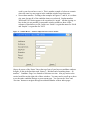
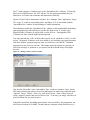
When you first sign on to the Norse System, you will be presented with a window of
‘settings’ which you can change, and which will govern how the system will work with
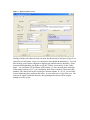
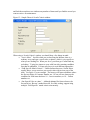
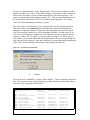
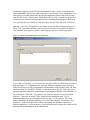
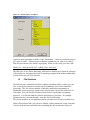
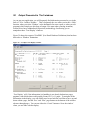
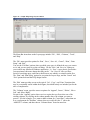
you during the session. This ‘Settings’ window is shown in Figure 1.
Figure 1 - Screen Driver 'Session Parameters'
The ‘Help’ button will explain most of the fields. Please take notice of the 4th field –
‘Windows Preference’. If you specify ‘Y’es, you prefer a user interface based in
Microsoft Windows (GUI Mode), than that will be the case throughout your session. If
on the other had you would rather work with the older style of user interface, sometimes
called ‘Green Screens,’ then choosing a Windows Preference of ‘N’o, will cause that to
be the case.