1
3. Settings
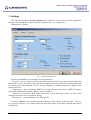
The user should choose System->Settings menu option in order to fine tune the application.
Settings can be changed by a user with rank „administrator” or „configurator”.
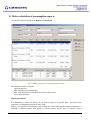
Settings has 3 sections:
fig. 3.1 Tuning the application
In section „General” user can choose several parameters:
- Timeout – this is a value in milliseconds which can be used to lower the processor load from
the threads. Lower value means more load and is adequate only when meters are connected directly
to a serial port of the computer. In case of large telegrams or modem connection a higher value
might be the case
- Logging type – has 2 meanings: DEBYG or Normal. Normal is the choice. DEBUG produces
much more details and normally is used to locate a problem.
- Repetition to read data – How many times to try to read data from a meter? If none of the
attempts succeed an error is registered in logs.
- Max log size – is the maximum size of the log file.
In section “Reports” user can fine tune the behaviour of the reports. In the first part – “Reports
for registered measures” are settings which are used when report on the data collected from meters
is generated:
MBUS Communicator v.1.3 – USER MANUAL
5 / 26