1
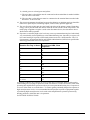
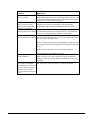
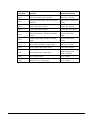
Problem
What to do
Waves on image
If the output image has waves, especially if the waves move up
or down, check that all devices and components (video players,
computers, etc.) are grounded properly.
Static or waves become
stronger when connecting
using RCA connectors
Possibly due to incorrect grounding. Check grounding
immediately. This could cause damage to the VSC device.
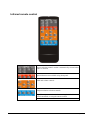
Remote control not working Check that the batteries are inserted correctly. Check that the
batteries are charged. Replace batteries as necessary.
RS-232 control not working Check that the baud rate on the VSC device matches the baud
rate set on the connected device.
When a computer is being used, check that the COM port set on
the computer matches the COM port set in the OSD on the VSC
device.
Make sure the serial port is in good working condition.
Try swapping the TX and RX at one one.
Power LED unlit
Make sure the power cord connection is good, and that the
adapter (if used) is working. Make sure that there is power at
the outlet.
Device does not respond
The VSC device may need repair. Contact your dealer.
when buttons are pressed on
the front, when the remote
control is used or when
RS-232 communications are
active.
12
Version 1.7.0a.1
February 6, 2014