1
Maintenance
5.2.3 Procedure for changing the battery
• Disconnect the power supply to the Power Panel.
• Touch the housing or ground connection in order to discharge any electrostatic charge from your body.
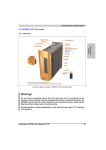
• Remove the battery cover from the top of the Power Panel device using a screwdriver (1).
1
Figure 12: Changing the battery - Removing the battery cover
• Carefully remove the used battery from its fitting by pulling the removal strip (2).
2
Figure 13: Changing the battery - Removing the battery
• In order to prevent a short circuit, do not touch the new battery with pliers or uninsulated tweezers. The
battery should not be held by its edges.
Incorrect
Correct
Figure 14: Battery handling
24
Data sheetV 1.00 4PP065.0571-B00