1
Sync to Channel – AC4490 and CL4490
Application Note
How do I configure Sync to Channel?
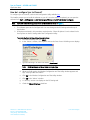
To configure Sync to Channel, use the Laird Configuration Utility available here.
The installer prompts you to install the software on your PC. Once the install is completed, you can open the
software from Start -> All Programs -> Laird Technologies Wireless -> Laird Technologies Config.exe.
Note:
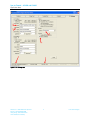
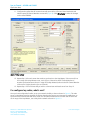
Items 2-6 in the following list correlate to the numbered items in Figure 3.
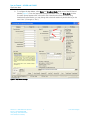
1. The software opens to the Configure tab. You must change to the PC Settings tab at the top of
the window.
2. RF Options mentioned in this procedure require that the "Show All Options" box is selected in the
Security Pane on the PC Settings tab of the Configuration Utility.
To enable the Security Pane follow these directions:
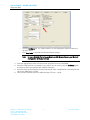
a. From the PC Settings tab, click About.
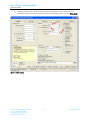
b. In the “About” window, click anywhere next to the lines of text. A blinking cursor displays.
\
c.
Type the following in all lower case letters: showframe!
Note:
Nothing displays on the window when you type.
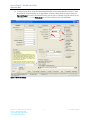
d. When you finish typing, the Wireless Configuration and Test Utility window appears and
says “Security Frame now visible”.
e.
Click OK in the Wireless Configuration and Test Utility window.
f.
Click OK in the “About” window.
g. A “Security” section now displays on the PC Settings tab.
h. Check the Show All Options check box.
Americas: +1-800-492-2320 Option2
Europe: +44-1628-858-940
Hong Kong: +852 2923 0610
www.lairdtech.com/ramp
3
Laird Technologies