1
OrgPublisher
EChart Thin
Client
Implementation
Guide
OrgPublisher EChart Thin Client Implementation Guide
Table of Contents
Table of Contents
Introduction .................................................................................................... 3
OrgPublisher Thin Client Architecture .................................................................. 4
EChart Thin Client Server Requirements .............................................................. 5
EChart Thin Client Org Chart Authentication ........................................................ 6
EChart Field/Role-based Security .................................................................... 7
Configuring Automatic Microsoft Active Directory Authentication ......................... 7
Thin Client Security Tokens ............................................................................ 8
Thin Client Printing ........................................................................................... 9
PDF Format ............................................................................................... 9
Troubleshooting EChart Thin Client Log Files ................................................... 10
Searching Thin Client Charts ............................................................................ 11
Customizing EChart Thin Client ........................................................................ 12
Publishing Options ....................................................................................... 12
Modifying the Look and Feel of the Published Chart ......................................... 12
Customization Example 1 .......................................................................... 13
Customization Example 2 .......................................................................... 13
Thin Client URL Parameters .......................................................................... 13
EChart Rich Client/Thin Client Feature Comparison ....................................... 15
Copyright 2015, PeopleFluent. All rights reserved. Proprietary and confidential.
PeopleFluent and the PeopleFluent and OrgPublisher logos are trademarks or registered trademarks of PeopleFluent. All
other brand and product names are trademarks or registered trademarks of their respective holders.
7/20/2015
2
OrgPublisher EChart Thin Client Implementation Guide
Introduction
Introduction
The purpose of this document is to cover the topics specifically pertaining to
OrgPublisher EChart Thin Client.
Unlike OrgPublisher EChart Rich Client, Thin Client does not require an ActiveX
control. This makes deploying the published thin client chart easier from a rollout
perspective. Not using an ActiveX control means that the Web server that serves the
published thin client chart is doing more work, and often requires more server
resources.
For EChart server implementation and Web server setup, refer to the OrgPublisher
EChart Server Setup document.
Copyright 2015, PeopleFluent. All rights reserved. Proprietary and confidential.
PeopleFluent and the PeopleFluent and OrgPublisher logos are trademarks or registered trademarks of PeopleFluent. All
other brand and product names are trademarks or registered trademarks of their respective holders.
7/20/2015
3
OrgPublisher EChart Thin Client Implementation Guide
OrgPublisher Thin Client Architecture
OrgPublisher Thin Client Architecture
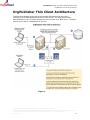
The following diagram shows the recommended architecture for thin client
publishing. Dual load balanced Web servers are shown. The OrgPublisher Web
Administration server is used to access the source charts on a Web server. The data
source can be either a database of a text file.
Figure 1.
Copyright 2015, PeopleFluent. All rights reserved. Proprietary and confidential.
PeopleFluent and the PeopleFluent and OrgPublisher logos are trademarks or registered trademarks of PeopleFluent. All
other brand and product names are trademarks or registered trademarks of their respective holders.
7/20/2015
4
OrgPublisher EChart Thin Client Implementation Guide
EChart Thin Client Server Requirements
EChart Thin Client Server
Requirements
EChart Thin Client uses the server rather than individual user work stations to
process the org chart. The EChart Thin Client server hardware requirements can
vary, depending on a number of factors, such as records charted, number of custom
fields, concurrent users, whether or not the servers are dedicated to only this
function, and so on. Load testing in the working environment determines the final
configuration.
The following table contains recommendations that can serve as a starting point for
estimating hardware requirements for Thin Client.
EChart Thin Client
Number of Records
Up to 1,000
1,001 to 5,000
5,001 to 15,000
15,001 to 25,000
25,000 and up
Dual Load Balanced
Servers
Processor
GHz
Memory
i3
i3
i3
i5
i5
3
3
3
3+
3+
2MB
2GB
2GB
4GB
4GB
(or
(or
(or
(or
(or
compatible)
compatible)
compatible)
compatible)
compatible)
Dedicated vs
Shared
Server
Memory
3GB
3GB
3GB
4GB
4GB
Copyright 2015, PeopleFluent. All rights reserved. Proprietary and confidential.
PeopleFluent and the PeopleFluent and OrgPublisher logos are trademarks or registered trademarks of PeopleFluent. All
other brand and product names are trademarks or registered trademarks of their respective holders.
7/20/2015
5
OrgPublisher EChart Thin Client Implementation Guide
EChart Thin Client Org Chart Authentication
EChart Thin Client Org Chart
Authentication
Organizational chart authentication is accomplished via the EChart Thin Client
publishing option. EChart publishing offers security options at the chart and field
level.
Chart security options control authentication methods. The options are:
Unsecured
–
All users can view the entire chart.
Active Directory® authentication
–
–
–
When a user accesses the chart, a prompt asks for the user ID and
password of the logged in user.
The credentials are entered and the operating system is queried to
determine the domain user ID of the user of that computer.
The formats for the User ID field are:
o
o
o
–
–
–
The server grants access to the chart to any user ID on the user machine.
This is not a secure setting. The chart opens at the user’s box. This
option requires a custom field containing the user ID of the computer.
This option is not secure because it uses whatever ID is logged on to the
computer. It can be a local computer account, which can be created by
anyone with appropriate access to the computer.
Chart
–
–
–
The user is then placed in the chart at the starting point defined by the
publishing definition.
This option requires that there be a custom field containing the Windows
Domain user ID in the input data file.
System user ID/box Linkage
–
User ID only
Domain/User ID
Domain.company.com/User ID
The server prompts each user for a user ID and password in order to open
the OrgPublisher EChart. The user IDs and passwords are present in the
input file and selected in the Publishing Wizard when activating this
security type.
This method can be used with portals for single sign-on
This method requires a custom field containing the value of the user ID
and another custom field containing a password value. This password may
be randomly generated and fed into the chart data by an external
program.
Reverse Proxy
–
The user ID is supplied in an HTTP header. When a user access the chart
URL, a reverse proxy Web server intercepts the request and, through an
Copyright 2015, PeopleFluent. All rights reserved. Proprietary and confidential.
PeopleFluent and the PeopleFluent and OrgPublisher logos are trademarks or registered trademarks of PeopleFluent. All
other brand and product names are trademarks or registered trademarks of their respective holders.
7/20/2015
6
OrgPublisher EChart Thin Client Implementation Guide
EChart Thin Client Org Chart Authentication
–
–
authentication program/method, supplies the appropriate user ID as a
variable in the HTTP header and then sends it to the original destination.
The EChart uses this variable value provided in the header to perform a
lookup in a specified custom field containing the user IDs.
An alternate option allows the variable to be passed as a cookie.
In addition to chart security options, ECharts also control the starting point in the org
chart. Options are:
Top of chart
Supervisor’s box
User’s box
Box ID specified by a particular custom field
Finally, the Allow users to drill up from starting box option allows users to
navigate to levels above their box in the chart. Clear the check box if you do not
want users to navigate above their own chart level.
EChart Field/Role-based Security
EChart security also provides field level security, field level security allows, or
disallows, users to view information based on whether or not users are members of a
particular group.
For example, if you have a chart with salary information, you may want only
members of the “HR” group to have access to that field. In OrgPublisher, you define
a group called HR, which is based on criteria that queries the chart data and defines
who should be a member of HR. When you authenticate to and view a chart, if you
are a member of that group, you can see the salary field.
Note: Style level security, which control whether or not you can see certain
styles, is not enabled in EChart Thin Client.
Additional information on how to use these security features can be found in the
OrgPublisher application help file. Select Help from the OrgPublisher menu, then
User Manual. Open the Search tab and type field level security and click List
Topics. All associated topics display in the lower pane.
Configuring Automatic Microsoft Active
Directory Authentication
EChart Thin Client security allows you to control authentication into the chart, as well
as field level security. With thin client security, the default requires that you log in
manually to access the chart, even with Active Directory authentication.
However, if you don’t want this prompt, you can:
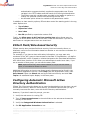
1. Verify the web server is running IIS.
2. Turn off Anonymous Access to the web folder so the web server knows the
identity of the clients.
3. Verify that Integrated Windows Authentication is selected.
4. Set IIS Application Protection to low.
Copyright 2015, PeopleFluent. All rights reserved. Proprietary and confidential.
PeopleFluent and the PeopleFluent and OrgPublisher logos are trademarks or registered trademarks of PeopleFluent. All
other brand and product names are trademarks or registered trademarks of their respective holders.
7/20/2015
7
OrgPublisher EChart Thin Client Implementation Guide
EChart Thin Client Org Chart Authentication
Thin Client Security Tokens
Once you have logged in to a secure chart, a security token is generated. This token
remains aware of who is logged in. it monitors chart activity and, if there is no
activity for ten minutes, the token times out, causing the user to re-authenticate to
the chart.
The default inactivity time-out of ten minutes can be changed through a registry
entry.
To modify the default inactivity time-out, you must edit the client computer’s
registry. Create a DWORD value called LoginExpires in the following registry key
(using X to designate the OrgPublisher version number):
HKEY_LOCAL_MACHINE\Software\Aquire\OrgPublisherX\ThinServer\
The value is a decimal number specifying the number of inactive minutes before
timing out.
Copyright 2015, PeopleFluent. All rights reserved. Proprietary and confidential.
PeopleFluent and the PeopleFluent and OrgPublisher logos are trademarks or registered trademarks of PeopleFluent. All
other brand and product names are trademarks or registered trademarks of their respective holders.
7/20/2015
8
OrgPublisher EChart Thin Client Implementation Guide
Thin Client Printing
Thin Client Printing
Thin Client printing is done through a PDF file which can be printed. This option
publishes to a PDF document for easy emailing and printing. It requires the free
Adobe® Acrobat® Reader® Version 9 to view the resulting document.
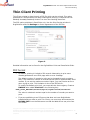
The PDF option publishes in Book Style only. Use the Print Preview window in
OrgPublisher and click Settings to control appearance of the PDF file.
Figure 2.
Detailed information can be found in the OrgPublisher Print and PowerPoint Guide.
PDF Format
By default, printing is limited to 500 records. Attempting to print more
records generates a new HTML page with an error message.
The default number of records to print can be changed through a registry
entry. The maximum number of records that can print is approximately 2000
records. If you set the maximum number higher, you may receive an error
when trying to print. This limitation is due to the PDF driver.
To modify the default print limit, you must edit the client registry. Create a
DWORD value called PrintLimit in the following key:
HKEY_LOCAL_MACHINE\Software\Aquire\OrgPublisherX\ThinServer
The value is a decimal number equal to the number of records you want to
print.
If you are publishing to an IIS server that does not have OrgPublisher
installed and you want to print Thin Client, you must copy and execute the
PDFDRV.EXE file on the Web server so that the Web server can print from
Thin Client.
Copyright 2015, PeopleFluent. All rights reserved. Proprietary and confidential.
PeopleFluent and the PeopleFluent and OrgPublisher logos are trademarks or registered trademarks of PeopleFluent. All
other brand and product names are trademarks or registered trademarks of their respective holders.
7/20/2015
9
OrgPublisher EChart Thin Client Implementation Guide
Thin Client Printing
A PDF “printer” must exist during the PDF publishing. If a PDF printer option
does not exist, one is created temporarily prior to publishing, then deleted
after publishing is completed. The process takes extra time.
If a PDF printer option already exists, the publishing to PDF occurs at normal
speed.
This printer can be created permanently by using the program file,
PDFDRV.EXE, which is installed during the OrgPublisher application
installation.
If you click the print button and nothing happens, make sure that you have
Read and execute permissions assigned to the folder where the
pdfui250.dll file is located.
Troubleshooting EChart Thin Client Log Files
ECharts log activity when published and accessed using EChart security.
The log file is found in the published charts folder and is the same name as the
published chart file. When the Web service is restarted, the next access to the
EChart creates a new log.
The previous log file is renamed to preserve past information. This can occur up to
nine times, after that, each log file is cycled through the nine backup files and the
tenth file is lost.
Copyright 2015, PeopleFluent. All rights reserved. Proprietary and confidential.
PeopleFluent and the PeopleFluent and OrgPublisher logos are trademarks or registered trademarks of PeopleFluent. All
other brand and product names are trademarks or registered trademarks of their respective holders.
7/20/2015
10
OrgPublisher EChart Thin Client Implementation Guide
Searching Thin Client Charts
Searching Thin Client Charts
The default search field in Thin Client charts is Last Name. This default can be
changed with a registry setting on the server. To modify the default search field,
create a DWORD value called DefaultSearchIndex in the following key:
HKEY_LOCAL_MACHINE\Software\Aquire|OrgPublisherX\ThinServer\
The value is a decimal number equal to the appropriate field.
The values to use are:
AllFields = 1001
AllStandardFields = 1002
AllCustomFields = 1003
PosTypeField = 1004
StatusField = 1005
RelationshipField = 1006
GroupField = 1007
PersonIdField = 1009
To make the default search field a custom field, the value for the registry key must
correlate to the field value (Any fields greater than field 19 equal 1000+ the field
number. For example, if the custom field sequence number you want is 22, the
registry key is 1022.).
Copyright 2015, PeopleFluent. All rights reserved. Proprietary and confidential.
PeopleFluent and the PeopleFluent and OrgPublisher logos are trademarks or registered trademarks of PeopleFluent. All
other brand and product names are trademarks or registered trademarks of their respective holders.
7/20/2015
11
OrgPublisher EChart Thin Client Implementation Guide
Customizing EChart Thin Client
Customizing EChart Thin Client
OrgPublisher Thin Client charts are dynamic HTML versions of org charts. You can
customize the HTML pages to more closely match the look and feel of your Web site,
as well as what information is displayed, by linking to your custom style sheet.
Publishing Options
You are given several options in the publishing definition:
JavaScript must be enabled if you want to give end users the ability to close
views or search numeric fields.
You can enable or disable end users’ ability to print charts as PDF.
There are two options for publishing charts as graphics, JPEG and GIF.
–
–
JPEG provides high text quality and very high photo, gradient, and
background image quality.
GIF provides very high text quality but lower photo, gradient, and
background image quality.
You can optimize the toolbar and button images by caching static images. If
enabled, the ChartImages folder (from the OrgPubX folder where you
installed it) must be copied to the destination Web folder.
Because there is no input type for tree control in HTML, the Tree View is not
available in Thin Client charts.
The search feature is not available in its entirety in Thin Client charts. End
users can access a modified Search View by clicking the List View
in the toolbar.
button
For additional help publishing Thin Client charts, see the OrgPublisher application
help file, or the online version of the User Manual and search for these topics:
Publishing in EChart Thin Client Format
Choosing EChart Thin Client Settings
Troubleshooting Tips for Published ECharts
Modifying the Look and Feel of the Published
Chart
Thin client technology uses a cascading style sheet called windows.css to control
the look and feel of the thin client chart. This file is located in the css subfolder in
the OrgPublisher installation folder.
HTML programming is accomplished with a file called thinserver.dat. This file is
located in the installation folder of OrgPublisher.
This section includes samples of thin client customizations. Other examples of
modifying these files can be found in the OrgPublisher SDK on the Web site.
Copyright 2015, PeopleFluent. All rights reserved. Proprietary and confidential.
PeopleFluent and the PeopleFluent and OrgPublisher logos are trademarks or registered trademarks of PeopleFluent. All
other brand and product names are trademarks or registered trademarks of their respective holders.
7/20/2015
12
OrgPublisher EChart Thin Client Implementation Guide
Customizing EChart Thin Client
Note: Support for this modification type falls outside the norm for Product
Support. Our Professional Service Group can work with you on a consulting
basis.
Customization Example 1
This example changes the thin client login window gray background color to white.
Change the BACKGROUND-COLOR parameter value from #E9E9D8 to #FFFFFF:
(highlighted below)
<STYLE TYPE=”text/css” MEDIA=screen>
<!—
BODY
{
MARGIN: 0px;
MARGIN-LEFY: 0px;
MARGIN-RIGHT: 0px;
FONT: 10px Arial, Helvetica, sans-serif;
COLOR: #000000;
BACKGROUND-COLOR: #FFFFFF;
}
Customization Example 2
This example hides the group names from the Styles bar. Remove the line of text
below from the thinserver.dat file.
<td class=”groupoff” nowrap valign=”middle”><a href=”JavaScript:
toggleGroups () ;” id=”groupname”
class=”groupff”> %GROUP_BUTTON_LABEL%%CURRENT_GROUP_NAME%&nb
sp;; </a></td>
To test any changes to thinserver.dat, you must:
1. Edit and save the thinserver.dat file.
2. Close and reopen OrgPublisher.
3. Publish your file and test.
4. Repeat steps 1-3, as needed.
Thin Client URL Parameters
The following parameters can be added to the URL to control a Thin Client chart.
OrgPublisher Thin Client charts are dynamic HTML versions of org charts. You can
customize the HTML pages to more closely match the look and feel of your Web site,
and determine what information is displayed, by linking to your custom style sheet.
Authentication – It is possible, although not secure, to pass a user name and
password in the URL in order to authenticate to a chart that has been published
using chart authentication.
USERNAME = the user name with which to authenticate
Copyright 2015, PeopleFluent. All rights reserved. Proprietary and confidential.
PeopleFluent and the PeopleFluent and OrgPublisher logos are trademarks or registered trademarks of PeopleFluent. All
other brand and product names are trademarks or registered trademarks of their respective holders.
7/20/2015
13
OrgPublisher EChart Thin Client Implementation Guide
Customizing EChart Thin Client
PASSWORD = the password for the user name
Example:
http://computername/ECharts/Orgchart.dll?Frame&USERNAME=lfranklin
&PASSWORD=password
Another possibility is to specify the same field as both the username and the
password fields. That way, you only have to control one field. This method is a
convenient way to jump into a Thin Client chart programmatically from a lookup
page, or, possibly, from another chart. This publishing definition parameter page is
shown below.
Figure 3.
This is a sample URL for using this method.
http://computername/ECharts/Orgchart.dll?Frame&USERNAME=lfranllin
&PASSWORD=lfranklin
Other parameters include:
STYLE = Style selected. Number 0 = the default style (the style it was published
with). Styles are numbered 1 and up, as they appear in the style list.
Example:
http://computername/ECharts/Management_Thin.dll?Frame&STYLE=1
DRILL = Turns drill buttons on or off. 1 = on, 0 = off, 2 = default
Example:
http://computername/ECharts/Management_Thin.dll?Frame&DRILL=1
BOX_SELECTED = selects the specified box ID. If the ID doesn’t exist, the box at
the top of the chart is shown.
Copyright 2015, PeopleFluent. All rights reserved. Proprietary and confidential.
PeopleFluent and the PeopleFluent and OrgPublisher logos are trademarks or registered trademarks of PeopleFluent. All
other brand and product names are trademarks or registered trademarks of their respective holders.
7/20/2015
14
OrgPublisher EChart Thin Client Implementation Guide
Customizing EChart Thin Client
Example:
http://computername/ECharts/Management_Thin.dll?Frame&BOX_SELECTE
D=5
Levels = Sets the number of levels to be displayed in the chart. Number 2 or
greater. O = default.
Example:
http://computername/ECharts/Management_Thin.dll?Frame&LEVELS=2
TOP = Box ID. Determines the top box of the chart – useful for unsecured charts.
Example:
http://computername/ECharts/Management_Thin.dll?Frame&TOP=3
EChart Rich Client/Thin Client Feature Comparison
The Thin Client option is a form of EChart, however, there are some differences
between the rich and thin mode in a published chart. See the OrgPublisher EChart
Rich and Thin Client Comparison.
Copyright 2015, PeopleFluent. All rights reserved. Proprietary and confidential.
PeopleFluent and the PeopleFluent and OrgPublisher logos are trademarks or registered trademarks of PeopleFluent. All
other brand and product names are trademarks or registered trademarks of their respective holders.
7/20/2015
15