1
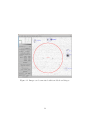
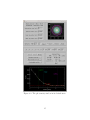
it to confirm you have selected the correct target and that the object’s magnitude seems
appropriate. When you are satisfied that the correct object has been selected, click Add
selected point to store the point for reporting. Up to five points can be stored for reporting.
After at least two points have been selected, clicking the Check Plots tab will display plots
of RA,Dec, and Magnitude vs time, as well as the computed velocity and position angle.
This information can be used to help determine whether a suspected detection is real.
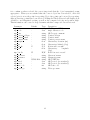
Parameter
Default
mpc ack
mpc code
mpc com
mpc contact address mpc contact email
mpc contact name
mpc height
mpc lat
N
mpc lat dir
mpc lon
mpc
mpc
mpc
mpc
mpc
mpc
mpc
mpc
lon dir
observers
measurer
net
note1
note2
site code
telescope
Type
string
char
string
string
string
string
float
float
N/S
float
W
E/W
string
string
USNO-B1.0 string
char
char
int
string
21
Description
MPC report ACK line
single character code
MPC report comment
Contact address
Contact email
Contact person’s name
Observatory elevation (m)
Observatory latitude (deg)
Is lat north or south?
Observatory
longitude
(deg)
Is the lon east or west?
Observers’ names
Measurer’s name
MPC NET line
MPC note 1 (see standard)
MPC note 2 (see standard)
MPC site code
Telescope name