1
IP Link® Device Interface
Ethernet Communication Sheet
extr_17_3346_1.pkn
Revision: 6/17/2009
This document provides additional assistance with wiring your Extron IP Link enabled product to your device.
Different components may require a different wiring scheme than those listed below.
For complete operating instructions, refer to the user’s manual for the specific Extron IP Link enabled product or
the controlled device manufacturer supplied documentation.
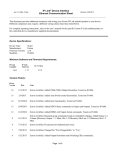
Device Specifications:
Device Type:
Manufacturer:
Firmware Version:
Model(s):
Scaler
Extron
1.27
DVS 304, DVS 304A, DVS 304D, DVS 304AD
Minimum Software and Firmware Requirements:
IP Link
Compiler
IP Link
Firmware
GC
Version
1.40
1.15
3.00
Version History:
Driver
Version
Date
1
06/17/2009
Notes
Initial Extron Certified version. Tested on DVS 304A.
Driver Notes:
Page 1 of 4
IP Link® Device Interface
Ethernet Communication Sheet
extr_17_3346_1.pkn
Revision: 6/17/2009
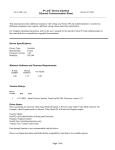
Control Commands & States:
Aspect Ratio
16:9
4:3
Audio Gain/Attenuation
(Step)
Up
Down
Audio Gain/Attenuation
(Discrete)
-15 to 9
Audio Mute
On
Auto Image
Execute
Executive Mode
On
Off
Freeze
On
Off
Input
1
2
3
Left
Up
Off
Input 1
Input 2
Input 3
Input 4
Off
4
Pan
Right
Down
Picture In Picture
Picture In Picture Swap
Execute
PIP Size
1/16
1/25
1/4
1/9
Side by Side - Full Screen
Side by Side - Normal
On
Off
Video Mute
Page 2 of 4
IP Link® Device Interface
Ethernet Communication Sheet
extr_17_3346_1.pkn
Revision: 6/17/2009
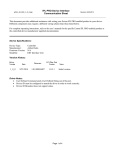
Status Available:
Aspect Ratio
16:9
4:3
Audio Mute
On
Off
Connection Status
Connected
Disconnected
Executive Mode
On
Off
Freeze
On
Off
Input
1
2
3
Off
Input 1
Input 2
Input 3
Input 4
1/16
1/25
1/4
1/9
Side by Side - Full Screen
Side by Side - Normal
On
Off
4
Picture In Picture
PIP Size
Video Mute
Page 3 of 4
IP Link® Device Interface
Ethernet Communication Sheet
extr_17_3346_1.pkn
Revision: 6/17/2009
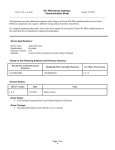
Network communication:
When configuring the Ethernet driver, be sure all device settings match that of the GC configuration. When
configuring for a password, Administrator login is required and the password can only have a minimum of 4 or a
maximum of 12 characters.
Port Type:
Ethernet
Default User Name:
Default Password:
Default Port:
23
Multi-Connection
Capabilities:
Port Changeability:
Yes
Logon Credentials
Supported:
Yes
Yes
Ethernet Driver Configuration Description:
Please refer to manual for setting and changes to Network Communication parameters such as: User Name,
Password, and Port Number. Please look to Chapter 4: Software Configuration and Control for modification.
Changes to parameters can also be made through device default web pages in the Configuration Tab under System
Settings.
Notes for the Device:
Page 4 of 4