1
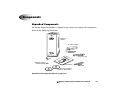
Infinity Expansion Module Front Components
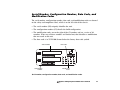
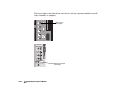
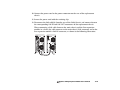
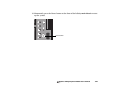
The following illustration is provided for reference as you perform the installation tasks
in this chapter. It shows the components at the front of the Infinity Expansion Module,
with the hard drives installed.
Hard drives
Use Only
CodonicsParts
Removing more than
one hard drive may cause
permanent data loss.
Contact technical
support before servicing.
Failure to comply may
void warranty.
Power button on Main
Chassis controls power
for all Expansion Modules.
Front door
1
1
2
3
4
Status lights
2
3
Expansion ON
Infinity Expansion Module front panel components
•
Opening the Front door provides access to the front panel components.
•
The Status lights indicate Expansion status.
•
The Hard drives are housed in the hard drive slots.
Codonics Infinity Expansion Module User’s Manual
2-5