1
39
12.2
Audio
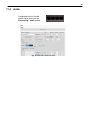
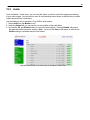
From the Monitor > Audio menu, you can verify the status, as well as control the stopping and starting,
of your audio outputs. You can use this menu to emit and adjust sound levels, as well as test your audio
outputs and verify their connections.
Use the following rules to operate the Trap 48 RA's audio alarms:
1. Select Audio from the Monitor menu.
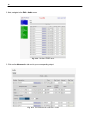
2. Under the Status field, you can see the current condition of the audio alarm.
3. Use the On, Off, and Disable buttons to control the audio outputs. Pressing Disable will prevent
that particular audio output from working. Note: You must click Save at the bottom in order for the
Disable setting to remember beyond a unit reboot.
Fig 12.2 View the state of the audio relays in the Monitor > Audio menu