1
isoPV
Installation Bulletin / Reference Guide
TM
Menu Structure Flow Chart
Front Panel Display
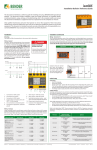
Figure 5 shows the structure of the menu built into the isoPV. The menu is used for viewing
alarms, viewing the status of the system, and making any necessary settings changes.
Use the supplied gray boxes to take note of applied settings for future reference. Note that
some settings do not have more than one selectable option - these are special options tuned
specifically for PV systems.
Menu or settings option
Settings option essential for proper operation
1
1. EXIT
2. HISTORY INFO
3. ISO SETUP
1. Exit
2.Alarm1
200 Ω... 100 kΩ
3. Alarm2
200 Ω... 100 kΩ
4. K1
N/O-T N/C-T
N/C N/O Flash
5. K2
N/O-T N/C-T
N/C N/O Flash
Memory
on
7. M+/M-
0-20 mA
4-20 mA
7. M+/M-: Ri
28kΩ
PV
3. Ce max
2000μF
4. Measure
AMP3
6
7
INFO / ESC key: Displays system information / goes back a step in menu
5.
LED “ALARM 1”: Illuminates when alarm
1 is active.
2.
TEST / UP key: Initiates self-test / moves
up in menu
6.
LED “ALARM 2”: Illuminates when alarm
2 is active.
3.
RESET / DOWN key: Resets device when
latching mode is active / moves down
in menu
7.
LED “ERROR”: Illuminates when a device
error has occured.
4.
MENU / ENTER key: Opens the main
menu / confirms changes in menu
•
Ensure that all menu options in red in the menu structure flow chart are set correctly.
Incorrect settings may lead to improper readings. For alarm trip values, use the factory
defaults when possible.
•
Use the following guidelines when setting the measuring principle under the ISO
ADVANCED > Measure menu option:
5. Autotest
24 no 01
6. Clock
00:00
7. Date
dd.mm.yy
•
AMP4
•
Use option “AMP3” for arrays with mono- or polycrystalline solar panels
•
Use option “AMP4” for arrays using thin-film solar panels
Options ISO SETUP > K1 and ISO SETUP > K2 refer to the energized state of the output
relays K1 and K2 during operation. Refer to the section “Wiring - Contacts” on the reverse side of this document for more information. The menu options stand for:
00:00 ... 23:00
•
N/C: Normally energized operation (failsafe mode)
•
N/O: Normally deenergized operation (nonfailsafe mode)
•
N/C-T: Normally energized operation, switches during self-test
•
N/O-T: Normally deenergized operation, switches during self-test
•
Flash: During alarm, contact switches app. every 2 seconds
2. Addr.
1 ... 30
Analog Outputs
3. ISONet
on off
4. ISO Monitor
1 ... 30
IsoPV models feature a 0 - 20 mA or 4 - 20 mA output, selectable in the main menu under ISO
SETUP > M+/M-. Under menu option ISO SETUP > M+/M-: Ri, the midpoint of the equation
may be set to 28 kΩ or 120 kΩ. When using an externally connected analog meter, ensure the
midpoint setting is the same as the external meter. For integrating into control systems, use
the midpoint value appropriate for the system’s requirements.
1. Exit
6. PASSWORD
2. Password
000 ... 999
3. Status
on off
0 - 20 mA output
1. Exit
7. LANGUAGE
English Deutsch
2. Text
RF
I
RI
Insulation resistance in kΩ
Current output in mA
Midpoint setting
RF
I
RI
Insulation resistance in kΩ
Current output in mA
Midpoint setting
4 - 20 mA output
8. SERVICE
Figure 5 - isoPV menu flow chart
Dimensions
Ordering Information
Dimensions in inches (mm).
2.9” (74)
3.2” (81)
Ø 0.18”
(4.5)
0.2”
(5)
4.4” (111)
2.4” (60)
4.1”
(104)
2.8” (71)
4.4” (112.5)
4.1”
(105)
5
1. Exit
5. COM SETUP
4.1”
(105)
4
1.
120kΩ
2.AGH
8. Test
3
Device Setup Tips
off
1. Exit
4. ISO ADVANCED
2
Ordering Information
Part No.
iso-PV-327
with AGH-PV
iso-PV-335
with AGH-PV
System Voltage
3(N)AC 0…793 V /
DC 0…1100 V
3(N)AC 0…793 V /
DC 0…1100 V
Supply Voltage
DC 19.2…72 V
Ordering No.
B 9106 5132W
AC 88…264 /
DC 77…286 V
B 9106 5133W
3.6” (91)
Screw mounting: Ø 0.22” (5.5)
Figure 3 - isoPV dimensions in inches (mm)
Figure 4 - AGH-PV dimensions in inches (mm)
Technical Data
Refer to isoPV series user manual (document TGH1454en) or isoPV series datasheet (document
NAE1012370) for detailed technical information.
Bender Inc. • USA: 800.356.4266 / 610.383.9200 / [email protected] • Canada: 800.243.2438 / 905.602.9990 / [email protected] • www.bender.org
Document NAE1018370 • 10.2012 • © Bender Inc. • Page 1/1 • Side 2/2