1
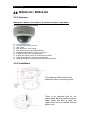
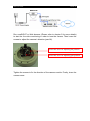
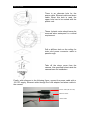
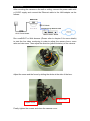
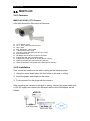
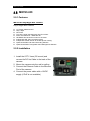
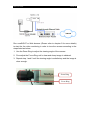
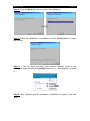
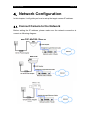
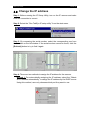
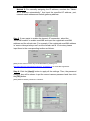
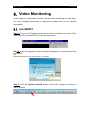
MX Series HD Network Camera MX810-HD / MX820-HD MX833-HD / MX873-HD / MX763-HD Installation Guide Notice: Signal Communications Limited reserves the right to make improvements to the product described in this manual at any time and without notice. This manual is copyrighted. All rights are reserved. This manual should not be copied, reproduced or translated in whole or part without prior consent from Signal Communications Limited. TeleEye is a trademark of Signal Communications Limited and is registered in China, European Communities, Hong Kong, US and other countries. All other trademarks are the property of their respective owners. Copyright (c) 2011 Signal Communications Limited (A member of TeleEye Group). All rights reserved. Version 0.12 Limits of Liability and Disclaimer of Warranty Signal Communications Limited has taken care in preparation of this manual, but makes no expressed or implied warranty of any kind and assumes no responsibility for errors or omissions. No liability is assumed for incidental or consequential damages in connection with or arising out of the use of the information or accessories contained herein. Features and specifications are subject to change without prior notice. Contents 1. 2. Package Contents ................................................................................................... 6 1.1. MX810-HD ............................................................................................ 6 1.2. MX820-HD / MX823-HD ..................................................................... 7 1.3. MX833-HD ............................................................................................ 8 1.4. MX873-HD ............................................................................................ 9 1.5. MX763-HD .......................................................................................... 10 Hardware Installation ........................................................................................... 11 2.1. MX810-HD .......................................................................................... 11 2.1.1. 2.1.2. 2.2. MX820-HD / MX823-HD ................................................................... 14 2.2.1. 2.2.2. 2.3. 4. 5. 6. Features ........................................................................................ 20 Installation.................................................................................... 20 MX763-HD .......................................................................................... 23 2.5.1. 2.5.2. 3. Features ........................................................................................ 17 Installation.................................................................................... 17 MX873-HD .......................................................................................... 20 2.4.1. 2.4.2. 2.5. Features ........................................................................................ 14 Installation.................................................................................... 14 MX833-HD .......................................................................................... 17 2.3.1. 2.3.2. 2.4. Features ........................................................................................ 11 Installation.................................................................................... 11 Features ........................................................................................ 23 Installation.................................................................................... 23 Software Installation ............................................................................................ 25 3.1. PC Requirements ................................................................................. 25 3.2. sureSIGHT Installation ........................................................................ 25 Network Configuration ........................................................................................ 28 4.1. Connect Camera to the Network .......................................................... 28 4.2. Change the IP address .......................................................................... 29 Video Monitoring ................................................................................................. 31 5.1. sureSIGHT ........................................................................................... 31 5.2. Web Browser ........................................................................................ 34 Appendix .............................................................................................................. 36 6.1. Functional Features .............................................................................. 36 6.2. Specifications ....................................................................................... 38 6.3. Dimension ............................................................................................ 40 6.3.1. 6.3.2. 6.3.3. 6.3.4. 6.3.5. 6.3.6. MX810-HD .................................................................................. 40 MX820-HD .................................................................................. 40 MX823-HD .................................................................................. 40 MX833-HD .................................................................................. 41 MX873-HD .................................................................................. 41 MX763-HD .................................................................................. 41 MX User Guide Introduction TeleEye MX Series is a complete portfolio of professional and practical HD network camera utilizing our proprietary HD SMAC-M compression technology. The MX series offers the balanced combination of high-quality video, mobility, scalability and cost effectiveness. By using TeleEye MX, users can build an integrated, scalable, wired or wireless IP & mobile video surveillance solution over existing network infrastructure. With the support of TeleEye versatile back-end applications, users can gain extra control over their TeleEye business management beyond security. Safety Cautions Do not install the camera in extreme temperature conditions. Use the camera under conditions where temperatures are within +0C ~ +40C: (32F ~ 104F) Do not install the camera under unstable lighting conditions. Severe lighting change or flicker can cause the camera to work improperly. Do not install or use the camera in an environment where humidity is high. This can result in poor-quality image. Do not disassemble the camera. There are no user serviceable parts inside it. Opening or removing the camera‟s cover may expose you to dangerous voltage or other hazards. Refer all servicing to qualified personnel only. Do not touch the imaging surface of sensor. Use a soft cloth with alcohol to clean the surface if it is touched accidentally. The camera may be damaged by electrical and physical shock. Use regulated 12V DC, 1.25A power supply. Do not throw or drop it onto the floor. The camera can be used outdoor. But if it is used outdoor, it is required to avoid direct light from the sun. Do not use it under water. PAGE 5 MX User Guide PAGE 6 1. Package Contents After removing the package, make sure you have the following items: 1.1. MX810-HD MX810-HD High Definition Fixed Dome Package Contents Description Package Contents Description MX810-HD network camera Warranty Card Registration Code Sheet Installation Guide Software CD RJ-45 Ethernet Adapter Label Wall Mount Screws and plastic wall plugs Hexagon Wrench Power Jack Converter MX User Guide PAGE 7 1.2. MX820-HD / MX823-HD MX820-HD Outdoor & Vandal Resistant Fixed Dome Package Contents Description Package Contents Description MX820-HD network camera Warranty Card Registration Code Sheet Installation Guide Software CD RJ-45 Ethernet Adapter Label Wall Mount Screws and plastic wall plugs Hexagon Wrench Power Jack Converter MX User Guide PAGE 8 1.3. MX833-HD MX833-HD IR Vandal Resistant HD CCTV Camera Package Contents Description Package Contents Description MX833-HD network camera Warranty Card Registration Code Sheet Installation Guide Software CD RJ-45 Ethernet Adapter Screw driver, wall mount screws and plastic wall plugs MX User Guide PAGE 9 1.4. MX873-HD MX873-HD IR Vari-focal HD CCTV Camera Package Contents Description Package Contents Description MX873-HD network camera Warranty Card Registration Code Sheet Installation Guide Software CD RJ-45 Ethernet Adapter Hexagon Wrench Wall hole label, Wall mount screws and plastic wall plugs Screw Driver MX User Guide PAGE 10 1.5. MX763-HD MX763-HD Day & Night HD CCTV Camera Package Contents Description Package Contents Description MX763-HD network camera CS mount CCTV Lens Power Converter Cable Warranty Card Registration Code Sheet Installation Guide Software CD (Optional) MX User Guide PAGE 11 2. Hardware Installation In this chapter, it will show you how to setup and adjust the MX series cameras. 2.1. MX810-HD 2.1.1.Features MX810-HD High Definition Fixed Dome Weather Proof and Vandal Resistance 1/3.2” CMOS sensor f=3.6mm or 6mm fixed iris lens 720p, 15fps Max. Resolution: 1600 x 900p IP66 weather proof and Vandal Resistant HD SMAC-M multi-stream coder for HD video Independent HD video recording stream Independent mobile stream for mobile phone viewing Optional sureREC HD Video Recording Solution Optional sureSIGHT Integrated Video Management Solution 2.1.2.Installation The positions marked with circles show the holes for mounting screw. MX User Guide PAGE 12 There is an alternate hole for the power cable, Ethernet cable and alarm cable. When this hole is used, the upper hole has to be sealed with the plastic cork. These 4 plastic corks should never be removed when waterproof is a critical requirement. Drill a ф25mm hole on the ceiling for video and power connector cable to pass through. Take off the dome cover from the camera. Use specified holes inside the camera base for installation. With reference to the following figure, connect the power cable with a 12V DC supply, Ethernet cable through the LAN adapter and alarm cable to the camera. Power cable (DC12V IN) Ethernet cable Alarm cable MX User Guide PAGE 13 After mounting the camera on the wall or the ceiling, connect the power cable with a 12VDC supply and connect the Ethernet cable to the LAN adapter as the follows: MX810-HD Run sureSIGHT or Web browser (Please refer to chapter 5 for more details) to start the live video monitoring in order to tune the camera. Then loose the screws to adjust the camera‟s direction (pan/tilt). Loose this screw for adjusting tilt position Loose this screw for adjusting pan position Tighten the screws to fix the direction of the camera module. Finally, close the camera cover. MX User Guide PAGE 14 2.2. MX820-HD / MX823-HD 2.2.1.Features MX820-HD / MX-823-HD Outdoor & Vandal Resistant Fixed Dome Outdoor and Vandal Resistant 1/3.2” CMOS sensor f=3.6mm or 6mm fixed iris lens 720p, 15fps Max. Resolution: 1600 x 900p IP66 weather proof and Vandal Resistant HD SMAC-M multi-stream coder for HD video Independent HD video recording stream Independent mobile stream for mobile phone viewing Optional sureREC HD Video Recording Solution Optional sureSIGHT Integrated Video Management Solution 2.2.2.Installation The positions marked with circles show the holes for mounting screw. There is an alternate hole for the power cable, Ethernet cable and alarm cable. When this hole is used, the upper hole has to be sealed with the plastic cork. MX User Guide PAGE 15 These 4 plastic corks should never be removed when waterproof is a critical requirement. Drill a ф25mm hole on the ceiling for video and power connector cable to pass through. Take off the dome cover from the camera. Use specified holes inside the camera base for installation. With reference to the following figure, connect the power cable with a 12V DC supply, Ethernet cable through the LAN adapter and alarm cable to the camera. Power cable (DC12V IN) Ethernet cable Alarm cable After mounting the camera on the wall or the ceiling, connect the power cable with a 12VDC supply and connect the Ethernet cable to the LAN adapter as the follows: MX User Guide PAGE 16 MX820-HD Run sureSIGHT or Web browser (Please refer to chapter 5 for more details) to start the live video monitoring in order to tune the camera. Then loose the screws to adjust the camera‟s direction (pan/tilt). Loose this screw for adjusting tilt position Loose this screw for adjusting pan position Tighten the screws to fix the direction of the camera module. Finally, close the camera cover. MX User Guide PAGE 17 2.3. MX833-HD 2.3.1.Features MX833-HD IR Vandal Resistant HD CCTV Camera HD CCTV Camera with Focus Assist Function 1/3.2” CMOS sensor f=2.7 - 9mm Vari-focal auto-iris IR lens 720p, 15fps Max. Resolution: 1600 x 900p ~15m IR illumination range True day & night operation with auto IR-cut filter IP66 Weather Proof and Vandal Resistant Power over Ethernet – IEEE 802.3af HD SMAC-M multi-stream coder for HD video Independent HD video recording stream Independent mobile stream for mobile phone viewing Optional sureREC HD Video Recording Solution Optional sureSIGHT Integrated Video Management Solution 2.3.2.Installation The positions marked with circles show the holes for mounting screw. MX User Guide PAGE 18 There is an alternate hole for the power cable, Ethernet cable and alarm cable. When this hole is used, the upper hole has to be sealed with the plastic cork. These 4 plastic corks should never be removed when waterproof is a critical requirement. Drill a ф25mm hole on the ceiling for video and power connector cable to pass through. Take off the dome cover from the camera. Use specified holes inside the camera base for installation. Finally, with reference to the following figure, connect the power cable with a 12V DC supply, Ethernet cable through the LAN adapter and alarm cable to the camera. Power cable (DC12V IN) Ethernet cable Alarm cable MX User Guide PAGE 19 After mounting the camera on the wall or ceiling, connect the power cable with a 12VDC supply and connect the Ethernet cable to the LAN adapter as the follows: MX833-HD Run sureSIGHT or Web browser (Please refer to chapter 5 for more details) to start the live video monitoring in order to adjust the camera focus, zoom ratio and view area. Then adjust the direction (pan/tilt/rotation) of the camera. 90° Adjust the zoom and the focus by sliding the sticks at the side of the lens. Adjust Focus Adjust Zoom Finally, tighten the screws and close the camera cover. MX User Guide PAGE 20 2.4. MX873-HD 2.4.1.Features MX873-HD IR HD CCTV Camera Ultra-high Resolution Recording in Darkness. 1/3.2” CMOS sensor f=2.7 - 9mm, Vari-focal auto-iris lens 720p, 15fps Max. Resolution: 1600 x 900p ~15m IR illumination range True day & night operation with auto IR-cut filter IP66 weather proof HD SMAC-M multi-stream coder for HD video Independent HD video recording stream Independent mobile stream for mobile phone viewing Optional sureREC HD Video Recording Solution Optional sureSIGHT Integrated Video Management Solution 2.4.2.Installation First, mount the camera on the wall or ceiling as the following steps: 1. Using the mount holes label, drill four holes on the wall or ceiling. 2. Insert the plastic wall plugs into the holes. 3. Fix the screws into the plugs with the camera. After mounting the camera on the wall or ceiling, connect the power cable with a 12V DC supply and connect the Ethernet cable to the LAN adapter as the follows: MX873-HD MX User Guide PAGE 21 Power cable (DC12V IN) Ethernet cable Alarm cable Finally, run sureSIGHT or Web browser (Please refer to chapter 5 for more details) to start the live video monitoring in order to adjust the camera focus, zoom ratio and view area. For adjusting the horizontal and view angle: 1. Loosen a bolt to adjust horizontal and vertical angle of the camera 2. Use the wrench to tighten a bolt after adjusting the camera Back Cover Vertical bolt Horizontal bolt MX User Guide PAGE 22 For adjusting the zoom ratio and focus: 1. Open the back cover. 2. Use the screwdriver to adjust the focus and the zoom ratio. 3. Close the back cover after adjusting the camera Adjust Zoom Adjust Focus MX User Guide 2.5. MX763-HD 2.5.1.Features MX763-HD Day/Night Box Camera Day & Night Box Camera 1/3” SONY CMOS sensor 720p, 25fps CS-mount True day & night operation with auto IR-cut filter Power over Ethernet – IEEE 802.3af HD SMAC-M multi-stream coder for HD video Independent HD video recording stream Independent mobile stream for mobile phone viewing Optional sureREC HD Video Recording Solution Optional sureSIGHT Integrated Video Management Solution 2.5.2.Installation 1. Install the CCTV Lens (CS mount) and connect its DC Iris Cable to the back of the camera. 2. Mount the camera onto the wall or ceiling. 3. Connect the Ethernet Cable to the Ethernet Port of the camera. 4. Connect the power cable with a 12VDC supply (if PoE is not available) PAGE 23 MX User Guide PAGE 24 Run sureSIGHT or Web browser (Please refer to chapter 5 for more details) to start the live video monitoring in order to tune the camera according to the steps listed as below: 1. Use the Zoom Ring to adjust the viewing angle of the camera 2. Fine adjust the Focus Ring until a clear and sharp image is obtained. 3. Repeat step 1 and 2 until the viewing angle is satisfactory and the image is clear enough. Zoom Ring Focus Ring MX User Guide PAGE 25 3. Software Installation In this chapter, it will guide you how to install the sureSIGHT software. 3.1. PC Requirements sureSIGHT Lite Processor: Memory: Hard Disk: Drive: Display: Sound: Ethernet Port: OS: Intel® Core™ 2 Duo Processor sureSIGHT Business sureSIGHT Pro Intel® Core™ 2 Quad Processor 2 GB or above 2 GB of free space or above CD-ROM or DVD-ROM 1280 x 800 resolution, Direct 3D supported Sound card is required 10/100 Mbps or above Serial Port Microsoft Windows XP SP3, Vista SP1 and Windows 7 (32-bit Edition) 3.2. sureSIGHT Installation sureSIGHT is an integrated video management platform for IP cameras and Video Recording Servers. Its modular design allows customers to scale up easily and add functional modules to suit specific requirements. For the sureSIGHT installation, please refer to the following steps: Step 1: Put the installation CD into a CD-ROM, the installer should be run automatically. If not, open the CD-ROM manually and run the "Installer.exe". Step 2: Click the [Install] button next to "sureSIGHT" in the installation menu. MX User Guide PAGE 26 Step 3: Click the [Next >] button in the welcome window. Step 4: After reading the license agreement, select "I Agree" to confirm, and then click the [Next >] button. Step 5: [Browse] the installation path for sureSIGHT, [Disk Cost…] is available for user to check the available space for installation, then click the [Next >] button. [Note] The default path “C:\Program Files\TeleEye\TeleEye sureSIGHT\” is recommended MX User Guide PAGE 27 Step 6: Click the [Next >] button to confirm the installation. Step 7: When the installation is completed, click the [Close] button to close the window. Step 8: If the PC does not have Java runtime installed, return to the installation menu and click the [Install] button next to “Java Runtime” to install it. Step 9: After completing all the installation, sureSIGHT is ready on the start menu. MX User Guide PAGE 28 4. Network Configuration In this chapter, it will guide you how to setup the target camera IP address. 4.1. Connect Camera to the Network Before setting the IP address, please make sure the network connection is correct as following diagram: MX810-HD / MX820-HD / MX833-HD MX873-HD MX User Guide PAGE 29 4.2. Change the IP address Step 1: Before running the IP Setup Utility, turn on the IP camera and make sure the connection is correct. Step 2: Select the “Run TeleEye IP setup utility” from the start menu. Step 3: By comparing the serial number, select the corresponding row from the list table on the left window. If the serial number cannot be found, click the [Refresh] button to try to find it again. Step 4: There are two methods to assign the IP address for the camera: Method 1: For automatically assigning the IP address, select the “Obtain an IP address automatically” to assign the IP address by the DHCP server. Using this method, user only chooses which port they want to use. MX User Guide PAGE 30 Method 2: For manually assigning the IP address, unselect the "Obtain an IP address automatically". And input the specified IP address, port, network mask address and default gateway address. Step 5. If user wants to enable the dynamic IP connection, select the "sureLINK enable" to enable sureLINK and input the registered sureLINK address and the refresh rate. For example, if the registered sureLINK address is “www.rx.teleeye.teleeye.net” and the refresh rate is 15 minutes, please input them to the corresponding textbox as follows: [Note] If user dose not know any sureLINK address, please go to http://www.teleeye.com/softreg/customer/s_domainreg.jsp for sureLINK registration. Step 6: Click the [Apply] button to apply all the settings. Then, the password dialogue box will be shown. Input the correct camera password and then click the [OK] button. [Note] Default camera password is "000000". MX User Guide PAGE 31 5. Video Monitoring In this chapter, it will guide you how to do the video monitoring in a few steps. For more detailed procedures or operations, please refer to the relevant documents. 5.1. sureSIGHT Step 1: Turn on the IP camera and make sure the connection is correct. Then select the "Run sureSIGHT Lite" from the start menu. Step 2: Input the password in the password dialogue box, and then click the button. [Note] Default password for administrator is "000000". Step 3: Click the [Quick connect] button on the main toolbar to connect to the IP camera. MX User Guide PAGE 32 Step 4: Select the target camera by its serial number or site name from the list table on the left. Step 5: After selecting the camera, choose the connection type from the list. [Notes] TCP/IP LAN is recommended. Step 6: There are two security modes for user to make a connection: Mode 1: For normal security mode, only password is required. Unselect the "Use advanced security mode". Then input the password in the "Password:(*)" field. [Note] Default password is "000000". MX User Guide PAGE 33 Mode 2: For advanced security mode, both password and user name are required. Select the "Use advanced security mode". Then input the user name and password in the corresponding textboxes. Step 7: Click the button to confirm all the site information. And then the sureSIGHT will connect to the target camera. [Reference] For more details of the operations, please refer to the sureSIGHT user manual. MX User Guide PAGE 34 5.2. Web Browser Step 1: Run a web browser such as Internet Explorer. Enter the IP address or the sureLINK address in the address bar. [Note] Java Runtime Environment (JRE) is required for the web browser to run the application. If the PC does not have JRE, please go to the http://www.java.com to download the latest version. Step 2: Select the connection type in the connection dialogue box. Then enter the password in the "Password:" field. [Note] Default password is "000000" for normal security mode. For normal security mode, only password is required, but for advanced security mode, both password and user name are required to be input. MX User Guide PAGE 35 Step 3: Click the [Connect] button to connect the video stream. And the video stream will be displayed on the browser as below: There are several buttons on the top of the video screen. The function of each button is described as follows: In normal display mode, enlarge the video resolution. In normal display mode, shrink the video resolution. Change the video resolution to the full screen size. Press „ESC‟ to return back to the normal display size. When an event is triggered, click on this button to mute the event alert sound. When an event is triggered, click on this button to clear the event. If an alarm is triggered, it will be turned on. Otherwise, it will be off. After clicking on this button, the following buttons will be shown. This button is for general setting. This button is for audio control. This button is for Pan-Tilt-Zoom control. This button is for checking the log files. This button is for advanced setting. (e.g. Video quality) This button is for controlling the switch. # MX series does not support this feature # MX User Guide PAGE 36 6. Appendix 6.1. Functional Features HD SMAC-M – Revolutionary multi-stream coder for HD video HD SMAC-M is the world‟s first multi-stream coder developed by TeleEye for HD video recording & transmission. It is specially designed for IP & mobile surveillance application. HD SMAC-M features an independent HD recording stream to facilitate undisturbed recording of HD video while viewing through Internet or mobile devices. Providing four independent video streams covering different bit rates Offering simultaneous video surveillance and high quality HD video recording functions Transmitting 80% faster than H.264 on ADSL Recording 29% longer than H.264 16:9 Aspect Ratio Providing Wider View TeleEye MX Series records the HD video with the aspect ratio of 16:9. There is a significant advantage over conventional camera, which provides the 4:3 aspect ratio of video. The wide screen format of TeleEye MX provides 33% more viewing area than conventional cameras with much better clarity. Hence, it gives user a wider view, and greatly reduces the blind spot of surveillance system. Superb Video Quality with Great Details TeleEye MX Series HD CCTV provides ultra-high resolution video quality. Its resolution is greatly increased to over 800 TVL which exceeds conventional cameras that usually provide maximum resolution with 540 TVL. MX User Guide PAGE 37 High Definition Progressive Scan Video TeleEye MX Series HD CCTV Cameras come with high definition Progressive Scanning Technology. Its image is scanned line by line, instead of using the interlaced scanning method to interlace two groups of lines. The images have less distortion and jaggedness especially for the fast image movement. IP-based Video Surveillance Solution TeleEye High Definition Video Surveillance system is an IP-based solution. With the features of IP-based transmission, i.e. packet switching, versatile media and digital transmission, the TeleEye HD CCTV system can utilize the network resources, immune to high noise and transmit video through different media, such as CAT5 cable, Wi-Fi or mobile network. Total Solution for HD Video Surveillance TeleEye MX is capable of HD live video recording and multi-site viewing by using TeleEye sureREC HD Video Recording Solution and sureSIGHT Integrated Video Management Solution. sureREC is specifically designed for recording the independent HD video stream of up to 64 MX cameras. sureSIGHT HD supports HD live video viewing from up to 64 TeleEye MX Series HD CCTV simultaneously. Its modular design allows customers to scale up easily and add functional modules to suit specific requirements. Video Surveillance Everywhere By using TeleEye M-monitoring Solution (M-303), users can view live video through mobile phone. The M-303 software supports HSPA, 3G, EDGE and GPRS network. Users can also receive the event alerts of remote sites through the mobile phone immediately. MX User Guide PAGE 38 6.2. Specifications MODEL MX810-HD MX820-HD / MX823-HD Outdoor & Vandal Resistant High Definition Fixed Dome Fixed Dome VIDEO IMAGE SENSOR MX833-HD IR Vandal Resistant Vari-focal Dome 1/3.2”, 2 megapixel CMOS Sensor RESOLUTION 1600x1200 pixels (UXGA) MINIMUM ILLUMINATION 0.5 Lux @ F1 0.0 Lux (~15m) f=3.6mm or 6mm fixed iris lens f=2.7-9mm Vari-focal auto-iris lens VIEW ANGLE (HORIZONTAL) 41° / 64° 25° - 77° MECHANICAL REMOVABLE IR-CUT FILTER No Yes LENS CONNECTIVITY NETWORK INTERFACE RJ-45, 10/100 Base-T Ethernet (Auto-Sensing) NETWORK PROTOCOL HTTP, uPnP, DHCP DYNAMIC IP LIVE RESOLUTION sureLink, DDNS 1600x900, 1280x720, 960x540, 640x360, 480x270, 320x180 LIVE FRAME RATE Up to 15 fps CONCURRENT USERS 6 (Independent) SECURITY Multiple user access levels with password protection WEB SERVER Built-in VIDEO COMPRESSION COMPRESSION VIDEO STREAMING HD SMAC-M multi-stream 4 simultaneous streams for recording, LAN, ADSL and mobile RECORDING SOFTWARE STREAM sureREC Independent recording stream, independent resolution, frame rate with live monitoring MODE Manual, Schedule Motion, Schedule Event RESOLUTION 1600x900, 1280x720, 960x540, 640x360, 320x180 FRAME RATE PLAYBACK Up to 15 fps Forward, Backward, Pause, Step Forward, Step Backward, x10 Fast Forward, x100 Fast Forward EVENT HANDLING EVENT External Alarm, Video Motion Detection ACTION E-mail, Dial Back, Alarm Image Recording EXTERNAL ALARM INPUT 1 x NC/NO POWER POWER IN MAXIMUM RATING DC 12V DC 12V DC 12V, PoE 7.4W 7.4W 12W OPERATING ENVIRONMENT AMBIENT TEMPERATURE 0°C - 40°C RELATIVE HUMIDITY <85% (no condensation) MECHANICAL DESIGN WEATHER PROFF VANDAL RESISTANT NET WEIGHT IP66 Yes Yes Yes 0.45g 1kg 1kg MX User Guide MODEL PAGE 39 MX873-HD MX763-HD IR Vari-Focal Day/Night Box Camera VIDEO IMAGE SENSOR RESOLUTION MINIMUM ILLUMINATION LENS VIEW ANGLE (HORIZONTAL) 1/3.2”, 2 megapixel CMOS Sensor 1/3”, 1.3 megapixel CMOS Sensor 1600x1200 pixels (UXGA) 1280x720 pixels 0.0 Lux (~15m) 0.1Lux f=2.7-9mm Vari-focal auto-iris lens Depends on Lens used (CS mount) 25° - 77° MECHANICAL REMOVABLE IR-CUT FILTER Yes CONNECTIVITY NETWORK INTERFACE RJ-45, 10/100 Base-T Ethernet (Auto-Sensing) NETWORK PROTOCOL HTTP, uPnP, DHCP DYNAMIC IP sureLink, DDNS LIVE RESOLUTION 1600x900, 1280x720, 960x540 640x360, 480x270, 320x180 1280x720, 640x360, 320x180 LIVE FRAME RATE Up to 15 fps Up to 25 fps CONCURRENT USERS SECURITY 6 (Independent) Multiple user access levels with password protection WEB SERVER Built-in VIDEO COMPRESSION COMPRESSION VIDEO STREAMING HD SMAC-M multi-stream 4 simultaneous streams for recording, LAN, ADSL and mobile RECORDING SOFTWARE STREAM MODE sureREC Independent recording stream, independent resolution, frame rate with live monitoring Manual, Schedule Motion, Schedule Event RESOLUTION 1600x900, 1280x720, 960x540 640x360, 320x180 1280x720, 640x360, 320x180 FRAME RATE Up to 15 fps Up to 25 fps PLAYBACK Forward, Backward, Pause Step Forward, Step Backward, x10 Fast Forward, x100 Fast Forward EVENT HANDLING EVENT ACTION External Alarm, Video Motion Detection E-mail, Dial Back, Alarm Image Recording EXTERNAL ALARM INPUT E-mail, Dial Back, Relay Switch 1 x NC/NO POWER POWER IN MAXIMUM RATING DC 12V DC 12V, PoE 12W 12W OPERATING ENVIRONMENT AMBIENT TEMPERATURE 0°C - 40°C RELATIVE HUMIDITY <85% (no condensation) MECHANICAL DESIGN WEATHER PROFF IP66 No VANDAL RESISTANT Yes No 1.2kg 0.6kg NET WEIGHT MX User Guide 6.3. Dimension 6.3.1.MX810-HD 6.3.2.MX820-HD 6.3.3. MX823-HD PAGE 40 MX User Guide 6.3.4.MX833-HD 6.3.5.MX873-HD 6.3.6.MX763-HD PAGE 41