1
4. EXPLORER
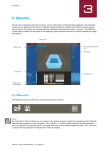
Small
This provides you with a minimalised view of all images, colours and materials without any further product
information. This view is ideal for looking at as many products as possible at once.
Medium
This view provides you with a larger presentation of the product as well as the product name and the possibility of receiving adetailed information display (for information about the details see chapter 4.2.2 “Colour details” and chapter 4.2.3 “Material details”). This view is particularly suitable for having a look at many
products at once and finding out first product information. Products are shown in the medium sample view
as standard.
Large
This view shows the images, colours and materials in a large view with the possibility of a detailed information display (for detailed information see chapter 4.2.2 “Colour details” and chapter 4.2.3 “Material
details”). It is especially suitable for viewing product details at the search stage.
Note: You can alternate between the there data views by clicking “View” in the menu bar.
09/2010 - Caparol SPECTRUM 4.0 - User Manual
18