1
!
!
!
!
!
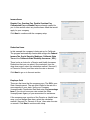
Income Items
Regular Pay, Overtime Pay, Double Overtime Pay,
Commission Pay and Bonus Pay are already created for
you. In this section select any income items listed that would
apply for your company.
Click Next to continue with the company setup
!
!
!
!
!
Deduction Items
In this example the company is being set up for California.
The program automatically creates and assigns the Federal
Income Tax, Social Security, Medicare, California State
Tax and the California State Disability Insurance ( SDI ).
There is also a choice for a Pension and Health Insurance
Deductions that you can select. Once selected, from the
drop down menu, select the calculation method ( Amount $,
or Percent of Gross ) and then enter the rate or amount.
Click Next to go on to the next section.
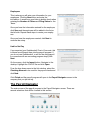
Employer Paid
These are the items that the company pays. The SUI is your
State Unemployment. The rate that is listed is the rate for a
new company in your state. Verify your Company
Unemployment Contribution Rate and enter it in percentage
form. If you do not know your rate contact the State
Unemployment Agency or your accountant for assistance.
If the company pays a portion of the Pension or Health Insurance, you can assign them here, select the calculation
method ( Amount $ or Percent of Gross ) then enter the rate
or amount. Click Next to continue with setup.
3