1
Placing Calls
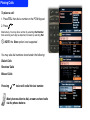
To place a call:
1. Press TEL, then dial a number on the PCM Keypad
2. Press
Alternatively, You may dial a number by selecting Dial Number,
then selecting each digit as depicted, followed by selecting Dial
! NOTE: the Store option is not supported.
You may also dial numbers stored under the following:
Dialed Calls
Received Calls
Missed Calls
Pressing
twice will redial the last number.
Most phones allow to dial, answer and end calls
via the phone buttons