1
rvs® portable
Version 3.05
Reference Manual
Reference Manual
The products listed in this manual are protected by copyright.
®
rvs portable
Version 3.05
Reference Manual
© 2005 by gedas
Pascalstraße 11
10587 Berlin
This manual is protected by copyright. All rights reserved. No part of this book may be used or
reproduced in any form or by any means including photocopies, microfilm or any other means or
stored in a database or retrieval system without obtaining prior permission from gedas. Rights are
also reserved as far as lectures, radio and television is concerned.
We reserve the right to make changes to the content of this manual without giving prior notice.
gedas is not liable for technical or printing errors or defects in this manual. Moreover, gedas shall
not be liable for damage which is directly or indirectly caused by delivery, performance and use of
this material.
2
Contents
Contents
Contents ................................................................................... 3
Change History......................................................................... 6
I. Introduction ........................................................................... 7
1 rvs® and its interfaces ....................................................... 8
1.1
II.
2
Representation means ...................................................................... 9
Technical Overview.......................................................... 10
Functional Elements ........................................................ 10
2.1
Monitor............................................................................................. 11
2.1.1
Monitor Basic Characteristics................................................... 11
2.1.2
Processing of a Send Order..................................................... 13
2.1.3
Handling Incoming Data........................................................... 13
2.2
MasterTransmitter ........................................................................... 14
2.3
Communication Modules ................................................................. 14
2.4
LogWriter ......................................................................................... 15
2.5
rvs® Service Provider (rvsSP) .......................................................... 16
2.6
ActivePanel...................................................................................... 17
2.7
Operator Console (rvscns) .............................................................. 17
2.8
Dialog Interface (rvsdia) .................................................................. 17
2.9
Batch (rvsbat) and Call (rvscal) Interface ........................................ 18
2.10
Database...................................................................................... 18
2.11
rvs® Data Center .......................................................................... 20
2.11.1 Introduction............................................................................... 20
2.11.2 System requirements ............................................................... 20
2.11.3 rvs® Data Center architecture .................................................. 21
2.11.4 rvs® Data Center user interface ............................................... 22
2.11.5 New rvs® Data Center system components ............................. 23
2.11.5.1 Fail safety .......................................................................... 23
2.11.5.2 Load balancing .................................................................. 24
2.11.5.3 Scalability........................................................................... 24
2.11.5.4 Log messages ................................................................... 24
2.11.5.5 Parameter changes at runtime .......................................... 25
2.12
Data Set Names........................................................................... 26
3
Protocol Layers in rvs® Communication........................ 28
3.1
3.2
3.3
3.4
4
LU 6.2 Basic Concepts .................................................... 32
4.1
4.2
4.3
4.4
4.5
4.6
5
Connection Establishment............................................................... 38
Effects of X.25 on rvs® Design ........................................................ 39
TCP/IP and rvs® ................................................................ 40
6.1
6.2
6.3
III.
Why LU 6.2 Communications?........................................................ 32
LU 6.2 Basic Functionality............................................................... 33
Mapped or Basic Conversation ....................................................... 33
Security............................................................................................ 34
Dependent and Independent Lus .................................................... 34
Effects of LU 6.2 on rvs® Design ..................................................... 35
X.25 Native Communication ............................................ 36
5.1
5.2
6
Network ........................................................................................... 29
Linedriver......................................................................................... 29
OFTP ............................................................................................... 29
Communication Program................................................................. 31
TCP/IP Application Interface ........................................................... 40
TCP/IP Addressing .......................................................................... 40
Establishing a Connection with rvs® ................................................ 41
Utilities .............................................................................. 42
Reference Manual rvs® / Rev. 23.08.2005
®
© gedas deutschland GmbH / FB rvs Systems
3
Reference Manual
7
List of all utilities .............................................................. 42
7.1
7.2
7.3
7.4
7.5
7.6
7.7
7.8
7.9
7.10
7.11
Write a station table to a backup file (rvswrdstat) ........................... 42
Convert U or T File to pseudo F or V Format (rvsut2fv) ............. 43
Active Panel (rvsap) ...................................................................... 44
Recover Isam Index (rvsrii) ........................................................ 46
rvs® Information Entry (rvsie) ....................................................... 47
Backup of the rvs® data (rvsbackup) ............................................ 48
Restore of the rvs® data (rvsrestore) ......................................... 50
rvs® End-to-End Response (rvseerp)........................................... 51
rvssce .............................................................................................. 53
rvscheckdb................................................................................... 56
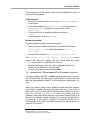
Send a Data Set (rvssend) only for UNIX ................................. 59
IV. rvs® Interfaces .................................................................. 60
8 How to work with rvs® Batch Interface and rvs® C-CAL
Interface................................................................................... 60
8.1
Start the rvs® Batch Interface (rvsbat)............................................. 60
8.2
How to use the C-CAL Interface (rvscal()) ...................................... 62
8.2.1
How to compile and link the C-CAL Interface for rvsNT .......... 62
8.2.2
Usage of the C-CAL Interface for UNIX and OS/400............... 64
8.2.3
Header File rvscal.h ............................................................ 64
9
Description of Commands ............................................... 70
9.1
9.2
9.3
9.4
9.5
9.6
9.7
9.8
9.9
9.10
9.11
9.12
10
Syntax of Command Strings............................................................ 70
Command START ........................................................................... 71
Command END ............................................................................... 71
Command SEND ............................................................................. 72
Command RESENTR....................................................................... 76
Command SENDJOB....................................................................... 80
Command USER ............................................................................. 82
Command ACTIVATE .................................................................... 83
Command MODST ........................................................................... 84
Command DELST ....................................................................... 85
Command LISTPARM................................................................. 85
Command SETPARM ................................................................... 86
How to Work with rvs® C-CAL Interface....................... 87
10.1
Sending and Receiving with C-CAL Interface ............................. 87
10.1.1 Type Definitions ....................................................................... 87
10.1.2 Get next send entry from Database ......................................... 88
10.1.3 Get a send entry from Database .............................................. 89
10.1.4 Set debug mode....................................................................... 90
10.1.5 Change status of SE................................................................. 90
10.1.6 Get next information entry........................................................ 91
10.1.7 Send a File ............................................................................... 91
10.1.8 Create a Send Entry................................................................. 92
10.2
Administration with C-CAL Interface............................................ 93
10.2.1 Functions to manage Station Table Entries ............................. 93
10.2.1.1 Type Definitions ................................................................. 93
10.2.1.2 Get next station entry from Database................................ 96
10.2.1.3 Update station entry from Database.................................. 96
10.2.1.4 Get station entries from Database..................................... 96
10.2.1.5 Delete station entry from Database ................................... 97
10.2.1.6 Free all suspended Commands......................................... 97
10.2.1.7 Return Codes..................................................................... 97
10.2.2 Functions to manage rvs® Parameters..................................... 97
10.2.2.1 Type Definition................................................................... 98
10.2.2.2 Get parameter value from Database ................................. 98
10.2.2.3 Get next parameter from Database ................................... 98
4
Contents
10.2.2.4 Writes parameter value into Database .............................. 99
10.2.2.5 Return Codes..................................................................... 99
10.2.3 Functions to manage rvs® Operator Commands...................... 99
10.2.3.1 Store operator command into Database ........................... 99
10.2.3.2 Wake the Monitor............................................................. 100
10.2.3.3 Return Codes................................................................... 100
10.2.4 Functions to manage Resident Receive Entries .................... 100
10.2.4.1 Type Definition and Macros............................................. 100
10.2.4.2 Get next command number of Resident Receive Entry from
Database 101
10.2.4.3 Get Resident Receive Entry from Database ................... 101
10.2.4.4 Configure Resident Receive Entries................................ 101
10.2.4.5 Return Codes................................................................... 102
10.2.5 Functions to manage Entries for Jobstart after Send Attempt102
10.2.5.1 Type Definition and Macros............................................. 102
10.2.5.2 Get next command number of Job Start Entry from
Database 103
10.2.5.3 Get Jobstart Entry from Database ................................... 103
10.2.5.4 Configure Entries for Jobstart after Send Attempt........... 103
10.2.5.5 Return Codes................................................................... 104
10.2.6 Functions to manage User Entries......................................... 104
10.2.6.1 Type Definition and Macros............................................. 104
10.2.6.2 Get next User from Database.......................................... 105
10.2.6.3 Get User Entry from Database ........................................ 105
10.2.6.4 Configure User Entries .................................................... 105
10.2.6.5 Return Codes................................................................... 106
10.2.7 rvs® Database Functions........................................................ 106
10.2.7.1 Type Definition and Macros............................................. 106
10.2.7.2 Dump Database............................................................... 107
10.2.7.3 Recover Database ........................................................... 107
10.2.7.4 Initialize Database ........................................................... 107
10.2.7.5 Delete Database .............................................................. 108
10.2.7.6 Dump User-, Receive, Js- and Station Entries................ 108
10.2.7.7 Return Codes................................................................... 109
10.2.7.8 Get the version of rvs® Database..................................... 109
10.2.7.9 Return Codes................................................................... 109
10.2.8 Other Functions...................................................................... 109
10.2.8.1 Get SID from ODETTE ID or vice versa .......................... 109
10.2.8.2 List status of rvs® Commands.......................................... 110
Glossary................................................................................ 112
Index...................................................................................... 116
Reference Manual rvs® / Rev. 23.08.2005
®
© gedas deutschland GmbH / FB rvs Systems
5
Reference Manual
Change History
The following changes of Reference Manual were made in the
previous releases (including the current release):
Version 3.05:
New: Chapter 2.5 "rvs® Service Provider", Chapter 7.10
"rvscheckdb" and Chapter 2.11 "rvs® Data Center".
6
Change History
I.
Introduction
The product rvsC is available on many different platforms. The
products rvsX, rvsNT, rvsXP and rvs400 form together the product
group rvs® portable.
For the normal usage of rvs® you should look into the user
manuals. They are provided in different platform-specific versions.
The things in common of all rvs® variants from the product group
rvs® portable are described in this manual. It contains more
technical details about the basic rvs® portable functionality, too.
This chapter presents a short description of the rvs® system, as
well as an explanation of the notations, which are used throughout
this manual.
Reference Manual rvs® / Rev. 23.08.2005
®
© gedas deutschland GmbH / FB rvs Systems
7
Reference Manual
1 rvs® and its interfaces
rvs® provides an efficient and reliable transport service for files of
any format or content.
rvs® can be integrated into applications for the automation of data
exchange. Typical areas of rvs® application are EDI (Electronic
Document Interchange), CAD (Computer Aided Design), financial
transaction systems, safe transmission of master data and data of
media companies.
For different degrees of automation are available suitable rvs®
interfaces:
Dialog
rvsdia
Interface Is an interactive tool for the creation of the
rvs® individual transfer tasks; inquiry
functions inform you about the task status.
Command
Interface
rvsbat
Line Reads commands from a file. The input file
is a simple text file, which can be prepared
with any editor or be produced as output file
of an application program.
C-CAL-Interface
rvscal
Enables application programs to generate
rvs® command entries by calling functions of
the programming language "C".
J-CAL-Interface
This interface was developed in connection
with the rvs® Client/Server, a networkable
extension of rvs® portable. It enables
application programs to generate rvs®
command entries by calling methods of the
programming language Java.
XML-Interface
makes possible export and import of rvs®
related data in the XML format.
8
rvs® and its interfaces
1.1
Representation means
This chapter contains the description of the indications which are
used in this manual and the explanation of the expressions which
are marked.
Indications
courier
commands, menu commands, file names,
path names, programs, examples, scripts,
qualifiers, data sets, fields, options,
modes, window names, dialog boxes and
statuses
BOLD and IN
CAPITAL LETTERS
parameters, environment variables,
variables
"quotation mark"
links to other manuals, sections and
chapters, literature
bold
important, names of operating systems,
proper names, buttons, function keys
Expressions
rvsX is the synonym of rvs® for UNIX systems.
rvsNT is the synonym of rvs® for Windows NT systems.
rvs400 is the synonym of rvs® for OS/400 systems.
Directories
As user directories are found on different locations for the
different operating systems we use the variable $RVSPATH in
this manual. Default values are:
•
•
•
•
/home/rvs/ for AIX, Solaris, IRIX, Linux and SCO
/users/rvs/ for HP-UX
/defpath/rvs/ for SINIX
c:\rvs for Windows NT and Windows XP
Substitute the variable with your correct path.
Generally, the file names on OS/400 systems are always
written in capital letters.
Reference Manual rvs® / Rev. 23.08.2005
®
© gedas deutschland GmbH / FB rvs Systems
9
Reference Manual
II.
Technical Overview
This part gives an overview of the functional elements of rvs® and
the protocol layers in the rvs® communication, as well as the basic
concepts of the LU 6.2, the X.25 native communication, and
TCP/IP in regard to rvs®.
2 Functional Elements
Elements of portable rvs®
rvs® consists of the following main elements:
•
•
•
•
•
•
•
•
•
•
Monitor
MasterTransmitter (rvsxmt)
Communication Modules
LogWriter
ActivePanel
Operator Console (rvscns)
Dialog Interface (rvsdia)
Batch Interface (rvsbat)
C-Cal Interface (rvscal), J-Cal Interface, XML Interface
Database
Information Flow
In a running rvs® environment, the central focal point is the rvs®
database which keeps all necessary static and dynamic
information. Static information is for example the table of rvs®
parameters and the table of stations that can be accessed from
the local node. Dynamic information is information about current
processes like send orders.
The work flow, i.e. the exchange of control information between all
related tasks is organized in a loosely coupled mode. The tasks do
not directly communicate with each other (exception: the console
task, which in some implementations of rvs® uses pipe
communications with the Monitor), they rather use the rvs®
database as communication medium.
10
Functional Elements
A close coupling in the sense of shared memory and subtasking as it is the case in rvsMVS - is not possible because of portability
and maintainability reasons. The aim was to use as much identical
code as possible across all supported platforms. Only few systems
support subtasking and shared memory, and if so, the code
cannot be kept portable. However, multiprocessing and external
data are common to all system, except for PCs under MS DOS or
PC-DOS.
In order to efficiently master the continuously growing flow of data
and to uncrease the performance level of rvsX and rvsNT, from
the version 2.05 and above it is possible to bind to an Oracle
database. The rvs® internal C-ISAM database is replaced with the
external high performance Oracle database. For rvsNT and rvsXP
from the version 2.11 there is besides Oracle also the possibility of
binding to a Microsoft SQL Server.
2.1
Monitor
This chapter describes the monitor basic characteristics, the
processing of a send order and the handling of incoming data.
2.1.1 Monitor Basic Characteristics
The Monitor is the agent who dispatches all work to be done and
who reacts on external events. The Monitor is the central
component of rvs®. Its main duties are to
•
•
•
•
•
•
•
•
•
•
•
dispatch work,
process operator commands,
scan the database for send orders to be processed,
submits a MasterTransmitter process, if not already active and
if something is ready to be transmitted,
reinitialize failed transmissions,
deliver incoming information to the final destination (user or
another node)
activate batch jobs if a matching resident receive entry is found
upon reception of a data set,
write statistics records,
create user notifications,
modify parameters and stationtable entries in the database
upon operator request,
recover the database.
The Monitor is controlled via an operator console task. Depending
on the local system, the console task is tightly coupled to the
Reference Manual rvs® / Rev. 23.08.2005
®
© gedas deutschland GmbH / FB rvs Systems
11
Reference Manual
Monitor via a thread or pipe (e.g. OS/2), or it is loosely coupled by
placing its orders into the database (OS/400 or UNIX).
The Monitor periodically scans the database for external events or
processable units of work. If nothing is found to be done, the
Monitor suspends itself for a user-defined period of time (rvs®
parameter SLEEP). External events like the submission of an
operator command or the creation of a new send order are
signalled to the monitor via a semaphore or similar, causing its
immediate `wakeup'. Whatever unit of work the Monitor has found
to do, it converts it to an rvs® command of the correct type to
which a unique command number is assigned. The further
processing of each rvs® command is controlled by correspondent
command status and priority information. Each kind of internal
command has assigned a certain priority that can be modified by
the rvs® operator.
The basic function of the Monitor is to deal with rvs® commands
and related statuses. The most important commands or events
are:
SE
SK
QS
QE
IE
IZ
OK
EC
send order entry (German: `SendeEintrag')
send command (`SendeKommando')
send command for receipt (`QuittungsSendung')
received receipt (`QuittungsEingang')
information entry (incoming information,
`InformationsEingang')
information delivery to recipient
(`InformationsZustellung')
operator command (`OperatorKommando')
command for `EndCommand' processing (cleanup)
The list of possible statuses is:
q
f
a
i
p
e
d
h
s
queued, awaiting processing by monitor
forwardable, awaiting processing by MasterTransmitter
active, processing by monitor underway
in transit, processing by transmitter underway
pending
ended
logically deleted from database
held by system or by operator
all traffic to destination has been suspended (SK, QS)
More or less all commands go through the following chain of
statuses: `queued' or `forwardable', `active' or `in transit',
(`pending'), `ended'.
12
Functional Elements
2.1.2 Processing of a Send Order
A user has created a send order entry SE in the database. Upon
next scan of the database it is found, interpreted and analyzed. A
processable unit of work, a send command SK is created.
The SE is now placed in status `forwardable'. The Monitor will
activate the MasterTransmitter process if this has not already been
done before. Execution of the SK results in submission of a
Sender task by MasterTransmitter.
The status of the SK is now `in transit', the corresponding SE is
placed in status `pending'. The completion of the Sender task,
successful or not, is notified to the Monitor via the database. Along
with a readable notification message, the Sender updates the
status and error fields of the SK.
The Monitor will display the notification message to the console
and will initiate a restart if the error field of the SK is indicating a
failure. If successful the SK will be placed in status `ended', the SE
is still in status `pending'. When eventually the receipt, QE, which
is the ODETTE end-to-end response for successful transfer, will
be received from the remote partner, the Monitor will mark the
originating SE as `ended'.
2.1.3 Handling Incoming Data
A Receiver task is initialized from the remote station if SNA LU 6.2
communications technics are used.
In other cases, i.e. X.25 native, a set of prestarted receiver tasks
is waiting for incomming calls. The completion of the receive
process is also indicated in the database by creating an incoming
information event entry IE.
The incoming data are stored in a temporary data set. Upon
detection of the IE event, the Monitor initiates the appropriate
action, i.e. the delivery of the data set to the destination recipient,
there might be more than one, by creating an IZ internal
command. Usually, the processing of the IZ consists of copying
the received data from the temporary data set and placing itself
and the related IE in status `ended'. If the IE contains information,
that has to be forwarded to another rvs® node, a SE is created for
the required transfer instead of an IZ.
Reference Manual rvs® / Rev. 23.08.2005
®
© gedas deutschland GmbH / FB rvs Systems
13
Reference Manual
2.2
MasterTransmitter
The MasterTransmitter has been introduced for better control of
parallel transmission processes. It's main functions are:
•
•
•
•
•
•
2.3
control of total maximum number of active transmitters
(outbound communication processes) in order not to overload
a local system
to queue outbound transmissions
to submit transmitters if maximum number of transmitters is not
exceeded
control of maximum number of active transmitters per remote
station. This future extension will allow to handle station
specific ressource limitations like the available number of SVCs
in a X.25 native connection.
a station dependent intelligent mechanism that allows to send
more than one data set, or even to receive data sets during
one transmission process.
control of prestarted receiver processes, e.g. for X.25 native
support.
Communication Modules
Sender and receiver processes are consolidated into a common
communication program, which acts as sender or receiver
depending on call parameters. The role as sender or receiver may
dynamically be changed. The communication program consits of
four hierarchical layers:
•
•
•
•
layer 1 (top): the communication module (main program),
layer 2: the sender and receiver modules,
layer 3: the ODETTE File Transfer Protocol (OFTP) module,
layer 4: the linedriver module.
The communication process is activated as a sender by
MasterTransmitter with the number of the respective send
command as input parameter. Using this number, the
communication module queries the database for the necessary
information, i.e. remote station ID, data set name, LU 6.2 or X.25
and ODETTE parameters, and starts the transmission. After
sending, it asks the partner to send his queued data sets.
After transmission, the sender looks for other data sets to send;
that means, if several data sets are queued for sending to the
same station, they all will go over only one established connection.
The communication process is activated as receiver upon an
incoming LU 6.2 APPC remote program-call, or it has been
prestarted, waiting for incoming X.25 or TCP/IP calls. The
14
Functional Elements
necessary information about the calling station is obtained from
the ODETTE protocol station ID and Password exchanged in the
first OFTP header records and will be counterchecked for
authorization. Information about the incoming data like data set
name, file size and record type, is derived from the initial header
records exchanged. If a Receiver has successfuly terminated, it
places an IE entry in the database, which the Monitor will find to
initiate the delivery of the data, IZ, to the final destination.
The communication process can be activated by an "ACTIVATE"
command. Then it acts like a sender and connects to the desired
station. If there are queued data sets on the local station or the
remote station, they will be transmitted. Otherwise, the connection
ends.
2.4
LogWriter
The Logwriter is the central module responsible for gathering
information about data transfers from the other rvs® processes.
The Information interchange between the LogWriter and the other
rvs® processes takes place via sockets. This functional detail
requires that the TCP/IP protocol stack must be activated (for
Windows NT, if necessary via a Loopback adapter).
The transfer information is divided in two types: status information
and event information. Status information is information about the
development of the currently active data transfer, e.g. how many
bytes are being transmitted at the moment, or whether a
transmission error is occurring, etc.
Event information specifies e. g. when a file has been transferred
or which files have been transferred. This type of information
refers to events which have taken place already.
The information is displayed differently depending on the type:
•
You can call and display status information about current data
transfers in the ActivePanel.
•
The information about events which have taken place between
the rvs® start and stop is written in a temporary message file.
You can call and display the event information via the Operator
Console.
•
Information about events which are independent from the rvs®
start or stop are saved in a specially defined message file. It
can be displayed by means of an ASCII editor.
Reference Manual rvs® / Rev. 23.08.2005
®
© gedas deutschland GmbH / FB rvs Systems
15
Reference Manual
The following picture exemplifies the functions of the LogWriter:
ENGDAT
ENGDAT
Dialog
Dialog
Batch
Batch
ActivePanel
ActivePanel
CAL
CAL
®
rvs
rvs®
Monitor
Monitorrvsmon
rvsmon
Mastertransmitter
Mastertransmitterrvsxmt
rvsxmt
LogWriter
LogWriterrvslgw
rvslgw
Communication
Communication
Communication
rvscom
Communication
Communication
rvscom
rvscom
Communication
rvscom
rvscom
rvscom
OFTP
OFTPNetwork
Network
2.5
rvs® Service Provider (rvsSP)
rvs® Service Provider is an internal rvs® application providing the
following services:
•
•
Compression and decompression
Encryption and decryption.
If necessary, files are compressed and/or encrypted prior to
transmission and decompressed and/or decrypted after reception.
rvsSP closely interacts with the rvs® Monitor. rvs® Monitor will
continue controlling send/receive jobs in rvs® and uses rvsSP for
pre- and post-processing of files (prior to transmission or after
reception).
rvs® Monitor writes all details necessary for a job to rvsSP into
one file per job – the job file. rvs® Monitor saves the job file in the
SPINDIR folder. Then rvsSP processes all jobs contained in
SPINDIR. Intermediate files created by rvsSP are saved in a
separate SPFILESDIR folder. rvsSP saves processed jobs in the
16
Functional Elements
SPOUTDIR folder. rvs® Monitor is informed via an IP socket
connection and then processes all jobs contained in SPOUTDIR.
Note: Set paths for the SPINDIR, SPFILESDIR and SPOUTDIR
variables in the $RVSPATH/rvsenv.dat file. See User Manual,
chapter 3.11 for an explanation of SPINDIR, SPFILESDIR and
SPOUTDIR.
2.6
ActivePanel
The ActivePanel is a display programme, which is used to display
information about currently active data transfers.
Start the ActivePanel:
•
•
2.7
using the rvsap programme for UNIX
using the main window rvs Administrator menu
View → Active lines for WindowsNT or Windows XP
Operator Console (rvscns)
The operator interface is used to control operations of rvs®. It
provides - via operator commands to the Monitor - an interface for
manipulations of the database. Some of the dynamic information,
for example send commands and send orders, can be displayed
and modified. Other commands allow the display and modification
of rvs® parameters and the stationtable. The modifications for the
stationtable are read from an input data set.
2.8
Dialog Interface (rvsdia)
The rvs® Dialog Interface is a `look similar' approach to the well
known menu system of rvsMVS. It allows entry, modification and
deletion of send orders and resident receive entries and the
display of statuses. The Dialog Interface communicates directly
with the rvs® Database.
The Dialog Interface consits of a finite state machine, which is
common to all portable rvs® implementations on the various
platforms.It has a set of display, entry and help panels or menus,
and the database interface. The panels are portable across all
systems supporting ANSI Terminals. Only on AS/400 the native
panel systems has been used.
Reference Manual rvs® / Rev. 23.08.2005
®
© gedas deutschland GmbH / FB rvs Systems
17
Reference Manual
2.9
Batch (rvsbat) and Call (rvscal) Interface
The Batch Interface allows to enter orders as a single command
line on the respective systems command language level. Such a
command can easily be included in command list procedures. It
can be used either interactively, or in a command list data set
which might be executed in batch mode.
The Call Interface can be linked directly into a user application
program. It allows to place orders into the rvs® Database out of a
user application program. A sample C Program and some batch
samples are included in the rvs® distribution.
2.10 Database
The rvs® Database is a relational database supporting the SQL
query language. All rvs® programs use "embedded SQL" calls.
The rvs® Database is organized in a set of tables which are listed
below:
AC
table for X.28/PAD or ASCII parameters
BB
table for user notifications (German:
"BenutzerBenachrichtigung")
BT
table of locally registered rvs® users ("BenutzerTabelle")
CT
table of valid console-ids
DB
table for actual rvs® and database version
EC
table of "EndCommand" type internal commands
ET
table of valid receivers ("EmpfaengerTabelle")
FK
table of command errors
FS
table of station errors
IE
table for information about received transmission
("InformationsEingang")
IZ
table for information about deliveries
("InformationsZustellung")
KT
table of commands being processed
("KommandoTabelle")
LC
table containing the last unique command number
("LastCommand")
LD
LastDate (last used ODETTE-time)
LM
table for Log Messages
LU
table for LU 6.2 parameters
18
Functional Elements
LT
table of Data Center Log Messages
LX
table for linedriver parameters X-tensions.
NK
table for neighboring nodes ("NachbarKnoten")
OK
table for Operator Commands
OP
table for ODETTE Parameters
PT
table for rvs® parameters ("ParameterTabelle")
QE
table for received receipts ("QuittungsEingang")
QS
table for receipts to be sent ("QuittungsSendeeintrag")
RE
table for Resident receive Entries
RI
table of rvs® information (rvs® Data Center)
RT
table for routing infomation ("RoutingTabelle")
SE
table for send order entries ("SendeEintrag")
SK
table for send commands ("SendeKommando")
SL
table for Serialization Lists
SS
table for Send Statistics
ST
table for stations ("StationsTabelle")
TC
table for TCP/IP parameters
VD
table for info about data set to send ("VersandDatei")
VM
table for send notifications ("VersandMeldung")
XP
table for X.25 native parameters
The primary key of a table usually is the station ID "SID". The
tables are organized in rows and colums. The rows contain one
command or station description or whatever, the columns contain
the various details of informatin like status, name of data set, date
and time of entry etc..
The physical database depends on the local system. rvs® currently
supports Oracle, MS SQL and ISAM databases. The physical
differences are hidden under a embedded-SQL interface which is
common throughout all portable rvs® versions. This is of major
importance for the portability and maintainability of portable rvs®
since the logic design can be kept completely independent of the
physical file or database system which can vary considerably from
system to system.
In order to efficiently master the continuously growing flow of data
and to increase the performance level of rvs®, rvs® 2.06 and above
on Windows NT, Windows XP, AIX, Linux and Sinix Systems gives
Reference Manual rvs® / Rev. 23.08.2005
®
© gedas deutschland GmbH / FB rvs Systems
19
Reference Manual
the possibility of binding to an ORACLE database and rvs 2.11
and above gives the possibility of binding to Microsoft SQL
database. The rvs® internal C-ISAM database is replaced with the
external high performance Oracle or MS SQL database.
The database entries can be printed with the rvs® Database dump
command rvsddb.
2.11 rvs® Data Center
The present chapter describes the technical basis of rvs® Data
Center; its operation is explained in the rvsX 3.05 User Manual.
2.11.1 Introduction
rvs® Data Center offers significantly higher fail safety and
transmission capacity than rvs®.
An rvs® Data Center comprises several rvs® servers aiming at
ensuring high system availability.
Jobs to be processed are evenly distributed among all rvs®
servers within the rvs® Data Center (load balancing).
Transmission capacity can be increased or decreased by adding
or removing rvs® servers at rvs® Data Center run time (scalability).
To ensure trouble-free rvs® Data Center operation another server
can assume the tasks of a failed server.
With regard to communication partners and operation (e.g. file
transfer), rvs® Data Center behaves like a single rvs®.
2.11.2 System requirements
As of rvs® version 3.05.00, rvs® Data Center is available for the
following platforms:
•
AIX 5.2.
Oracle version 8.1.7 is used as rvs® database.
To ensure access to the Oracle database, Oracle client software
must be installed on each rvs® server (node).
20
Functional Elements
The NFS (Network File System) protocol version 3 is required to
access the shared directories of the rvs® Data Center over the
network.
2.11.3 rvs® Data Center architecture
rvs® Data Center comprises the following components:
•
•
•
•
several rvs® nodes (rvs® servers with rvs® version 3.05 and
later as well as Oracle client software installed).
a central Oracle database (version 8.1.7) the rvs® servers can
reach via SQLNET using TCP/IP.
a central directory holding the most important directories used
by rvs® Data Center. This central directory must be accessible
by every rvs® server via NFS (Network File System). We
recommend that you set up this directory on a separate
computer. This directory could be located on the same
computer holding the central database but, in order not to
impair the entire system’s fail safety, not on one of the rvs®
nodes. The central directory must contain the following
subdirectories:
− temp: for temporary file storage while transmission and
reception is active.
− usrdat: for delivery of received files.
− init: for configuration files and license.
− keydir: for the file encryption and decryption keys.
− spindir: for the internal service provider job files
(compression and encryption) that are to be processed.
− spoutdir: for the internal service provider job processing
log files. You can use the log files for error analysis.
− spfilesdir: for the internal service provider job files used
during job processing.
− All files to be sent must also be located in the central
directory.
®
rvs Client/Server (which in turn comprises rvs® Middleware
and rvs® Client). rvs® Client/Server is used to configure and
maintain the rvs® Data Center. rvs® Middleware must run on
any node while rvs® Client can be executed on a computer
outside the rvs® Data Center. Communication between Client
and Middleware is implemented by an RMI connection (Java).
In case a firewall is installed between rvs® Client and rvs®
Middleware, seven freely configurable ports must be opened.
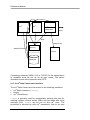
The following illustration shows the rvs® Data Center architecture:
Reference Manual rvs® / Rev. 23.08.2005
®
© gedas deutschland GmbH / FB rvs Systems
21
Reference Manual
rvs®
rvs®
rvs®
rvs®Middleware
OFTP
NFS
RMI(TCP/IP)
SQLNET(TCP/IP)
central
directory
rvsClient
central rvs®
database
Connecting networks (ISDN, X.25 or TCP/IP) for file transmission
or reception must be set up on all rvs® nodes. The above
illustration shows this component with OFTP.
2.11.4 rvs® Data Center user interface
The rvs® Data Center user has access to the following interfaces:
•
•
•
rvs® Batch interface (rvsbat)
scripts
rvs® Client/Server.
rvsbat is primarily used for automatically sending files and for
creating resident receive entries (REs) and job starts after send
attempts (JSs). rvsbat can be run on any rvs® node. The
procedure is identical as with rvs® standalone; files to be sent
22
Functional Elements
must be located in the central directory. Furthermore, rvsbat
must be able to access the central database. For more information
on rvsbat, in particular on the SEND, RESENTR und SENDJOB
commands please refer to chapters 9.4, 9.5 and 9.6.
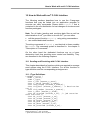
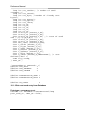
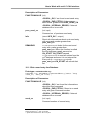
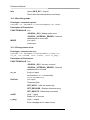
Note: The term rvs® standalone is used in contrast to rvs® Data
Center and identifies a single rvs® (e.g. rvsXP or rvsX).
You can use scripts to start post-processing (RE or JS) or start or
stop rvs® Data Center.
The graphical rvs® Client user interface allows for the following
actions:
•
•
•
•
rvs® Data Center configuration at runtime,
job, station and user administration,
display of log messages and statistics information with filter
options
snapshot display of rvs® Data Center configuration.
2.11.5 New rvs® Data Center system components
The following new components distinguish rvs® Data Center from
rvs® standalone.
2.11.5.1
Fail safety
All rvs® components (rvscom, rvsmon, rvsxmt, …) run on all
rvs® nodes. Every monitor (rvsmon) monitors all components
depending on him on the own node and the monitors on other rvs®
nodes. A database table in the central database logs the activities
of all nodes. Failure of a component on an rvs® node causes this
component to be restarted on the respective node and the aborted
job to be terminated. When a monitor fails (which a remote monitor
can detect by checking the activities in the database table), rvs®
will be restarted on this very node. The restart will be initiated by
the monitor that detected the activity failure in the database.
There is no monitoring of the central database and of the central
directories. rvs® Data Center cannot continue operation when one
or both items are unavailable. A configurable interval allows you to
define for how long every monitor attempts to reach the failed
component. The monitor executes an error script allowing the error
to be made public if the interval is exceeded.
Reference Manual rvs® / Rev. 23.08.2005
®
© gedas deutschland GmbH / FB rvs Systems
23
Reference Manual
Note: Time needs to be synchronized on all rvs® Data Center
nodes in order to ensure correct functioning of the monitors and
tracing of log messages. Time synchronization is a requirement to
the system where the rvs® Data Center is installed.
The following new global parameters are used to configure the
monitoring mechanism: MONTIMEOUT, COMTIMEOUT, CNTMA,
CNTGC and RECERREX.
There are also the following new parameters that must be
configured in the rvsenv.dat rvs® environment file:
RVSNODENAME, SPERRTO, LOGINDB, LOGFORMAT, DBDL and
DBTO.
Please refer to chapter 12 of the rvsX 3.05 User Manual on how to
configure the new rvs® Data Center parameters.
2.11.5.2
Load balancing
Each rvs® node can assume all tasks, which makes it possible to
evenly distribute the load among all nodes. A monitor on a node
with low load will start processing a new job earlier than a monitor
with a high load because it will access the database earlier to
check for new jobs to be processed (first come, first serve).
Note: The hardware upstream of the rvs® Data Center (e.g. Brick
for ISDN or switch for TCP/IP) is also responsible for load
balancing of incoming connections but does not form part of the
rvs® Data Center.
2.11.5.3
Scalability
You can use rvs® Data Center to add new rvs® nodes or to remove
old ones. This quantitative node scalability allows an rvs® Data
Center to process a significantly greater amount of data and jobs
than an rvs® standalone. Adding or removing nodes at runtime
allows the processing capacity to be dynamically adapted without
having to stop rvs® Data Center. The number of nodes that can be
feasibly used depends on the environment in use (computer,
network bandwidth, file system, database, etc.).
2.11.5.4
Log messages
Apart from the conventional option of writing log messages to the
log file (rlog.log, rlco.log), rvs® Data Center allows the log
messages of all rvs® nodes to be directly written to the database.
24
Functional Elements
The sequence of log messages is determined by a process type
and a process ID.
Example (log message):
O: 2004/12/15 15:23:28{node1}[C49944][S0000000856]<CONNECT_IND
Recipient: Connection with Station 'FRC10' with Credit=99,
Buffer=2048, OFTP Compression Established.
>
Odette
In this example the connection with station FRC10 was established
by rvs® node node1 on 12/15/2004 at 15:23:28. In [C49944], C is
the process type, and 49944 the process ID. C stands for the rvs®
communication process (rvscom).
Note: For a detailed syntax description of log messages please
refer to the rvs® “Messages and Return Codes” manual.
The log messages can be evaluated by rvs® Client/Server, which
can read the log messages from the database using filters (Admin
-> Log Messages window) or by external applications that read
the required data directly from the appropriate database tables. A
database script (export_lt.sh) allows log messages to be
exported from the database to a file.
2.11.5.5
Parameter changes at runtime
rvsbat or rvs® Client/Server allow the following parameters to be
edited during runtime using the setparm command: ODTRACLVL,
LITRACELVL, SIDTRACE, STATISTICS, CMDDELETE, DTCONN120, TCPIPRCV, MAXX25RCV, OCREVAL and OEXBUF.
To edit any other parameters the rvs® Data Center must be
stopped and restarted because it is vital that these are identical on
all nodes.
Reference Manual rvs® / Rev. 23.08.2005
®
© gedas deutschland GmbH / FB rvs Systems
25
Reference Manual
2.12 Data Set Names
In this manual, we use the terms file and data set as
synonyms.
The syntax for valid data set names is operating system specific.
"Equivalent" names may be specified as
/myid/invoice.dat
under UNIX
c:\myid\invoice.dat
under OS/2 on a PC and
under Windows NT and
Windows XP
MYID/DATA(INVOICE)
under OS/400
MYID.INVOICE.DATA
under MVS on an IBM host
. . .
These names are case sensitive on some systems (e.g. UNIX)
and may or may not be case sensitive on others. Security systems
(such as RACF under MVS) may impose additional constraints on
what is considered a legal data set name on a particular local
system.
These differences may cause problems or inconveniences as
described below when a file is sent to a different operation system.
Virtual Data Set Name
For transfer and delivery, a file is identified by its Virtual Data Set
Name (VDSN) 1. You can specify this VDSN in the NEW DSNAME
field when you interactively create a send request (see user
manual) or in the DSNNEW parameter of the SEND /CREATE
command (see section 9.4 "Command SEND"). When you do not
specify a VDSN, rvs® uses the name of the sending file to
generate one.
When a transmitted file is being delivered to its recipient, rvs® uses
the VDSN as one criterion to look for matching resident receive
entries. If none is found or the (best) matching entry does not
define a data set name, VDSN is also used to generate a local
data set name under which the file will be stored:
1
VDSNs are used in the ODETTE file transfer protocol to pass the file name to
the next node. Maximum length
(26 characters) and character set used when generating a default VDSN are
due to the ODETTE protocol.
26
Functional Elements
rvsMVS
uses VDSN as-is; so, when sending to an MVS host,
make sure to specify a VDSN that adheres to MVS
naming conventions and that starts with a high level
qualifier that RACF is happy with. Do not use quotes
(") or apostrophes (') to delimit your data set name.
portable rvs uses VDSN to generate a name for the individual
data set; the name of the path or library where this
file will be stored is taken from the local rvs®
environment (talk to your local rvs® administrator or
see "User Manual" for more information on rvs®
configuration).
VDSN is also one criterion to specify a job that should execute
after a send attempt (see chapter 9.6 "Command SENDJOB" for
more informations).
Time Stamping
When time stamping is requested, rvs® generates unique data set
names when it delivers the file by using a numeric qualifier or by
adding or replacing the last part of the name by a numerical value.
For data sets with otherwise identical names, this number
indicates the delivery sequence of the data sets (unless one or
more old ones have been deleted, rvs® uses the smallest available
number). The file systems currently supported by portable rvs® do
not allow addition of a real time stamping, i.e. date and time of
delivery, to the file name (with the exeption of UNIX systems and
Windows NT).
Time stamping may be requested in a resident receive entry. It is
done, when the data set is delivered.
Reference Manual rvs® / Rev. 23.08.2005
®
© gedas deutschland GmbH / FB rvs Systems
27
Reference Manual
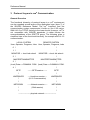
3 Protocol Layers in rvs® Communication
General Overview
The functional hierarchy of protocol layers in a rvs® environment
can be regarded as sub layers of the application layer (layer 7) of
the ISO/OSI Reference Model. The rvs® linedriver and the
communication system components it builts on, like X.25 native,
SNA LU6.2 or TCP/IP, belong to the lower levels. However, rvs® is
not compatible with ISO/OSI standards, it rather follows the
recommendations of the ODETTE group. The following gives a
simplified view of the functional hierarchy, for example with LU 6.2
communication:
LOCAL SYSTEM
REMOTE SYSTEM
User, Operator, Programs, Jobs User, Operator, Programs, Jobs
0 !
!
1 !
!
MONITOR → local Job submit
MONITOR → local Job submit
2 !
!
MASTERTRANSMITTER
MASTERTRANSMITTER
3 !
!
(local) Data ↔ COMMUN. PGM. (local) Data ↔ COMMUN. PGM.
4 !
!
OFTP
-------OFTPsession-------
!
OFTP
!
LINEDRIVER
-----linedriver session ---
LINEDRIVER
!
(LU 6.2 conversation)
!
!
!
NETWORK
------Network session ----
NETWORK
!
(SNA session)
!
!
!
--------------------physical network--------------------
28
Protocol Layers in rvs® Communication
3.1
Network
rvs® does not care much about the physical details of the network,
e.g. whether X.25, leased lines, or Token Rings are used. The
control and definitions of the physical network is external to
portable rvs®. For SNA networks, the availability of LU 6.2 services
and PU 2.1 support for both communication partners is mandatory.
3.2
Linedriver
The rvs® linedriver together with the related system components is
used to establish an end-to-end connection (X.25 connection, LU
6.2 conversation or TCP/IP connection) which allows to transport
data packages transparently and reliably from one rvs® node to
another. It talks to the remote rvs® linedriver on the basis of a
special linedriver protocol which depends on the network type, e.g.
X.25, LU 6.2 or TCP/IP. The rvs® linedriver receives network
connect or disconnect requests from the ODETTE File Transfer
Protocol (OFTP) layer. After successful connection, it receives
data packages from the remote linedriver and delivers them
transparently to the local OFTP layer and vice versa.
3.3
OFTP
It is the purpose of the ODETTE File Transfer Protocol (OFTP) to
ensure the reliable transfer of a data set. The OFTP enters a
protocol session with the OFTP on the remote rvs® station which
logically runs on top of the linedriver connection.
After the OFTP session has started, both sides exchange their
ODETTE IDs and passwords, negotiate some parameters, like
ODETTE exchange buffer size, ODETTE credit value (the number
of buffers the sending side can send without waiting for a
response), and exchange information about name, approximate
size and format of the data set to be transferred.
During transfer, a compression and decompression of data is
performed. After the data have been transferred, the byte count is
checked between both sides. After the data set has successfully
been stored, a receipt is sent to the sending station. If the transfer
has been disrupted, for example by a link failure, the OFTP
protocol provides a mechanism that allows to restart the transfer at
the point of rupture.
Reference Manual rvs® / Rev. 23.08.2005
®
© gedas deutschland GmbH / FB rvs Systems
29
Reference Manual
'Change direction' feature: When all Data sets are transmitted, the
sender asks the receiver to send its queued data sets.
For protocol details kindly refer to the publications of the ODETTE
and VDA groups: "ODETTE Specifications for File Transfer".
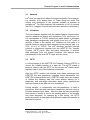
Shown below is the general but simplified message flow within an
ODETTE session. The sending side acts as initiator, the receiving
side as responder.
Initiator (Sender)
Connect
Responder (Receiver)
−−− network connect −→
←−−−−−− SSRM −−−−−−
"ODETTE FTP
READY"
ODETTE
id −−−−−−− SSID −−−−−−→
password
buffersize, credit
←−−−−−−− SSID −−−−−−
ODETTE-id
password etc.
Start File-id (name, −−−−−−− SFID −−−−−−→
size, format)
←−−−−−− SFPA −−−−−−
'n' data records
Start file pos.
answer
======= DATA ======>
======= DATA ======>
...
======= DATA ======>
←−−−−− CREDIT −−−−−
send 'n' records
send credit value
'n'
======= DATA ======>
.
.
.
end file identif.
(bytecount)
−−−−−−−− EFID −−−−−→
←−−−−−− EFPA −−−−−−
30
end file positive
answer (if store
successful and
Protocol Layers in rvs® Communication
bytecount correct)
change direction
−−−−−−−− CD −−−−−−→
←−−−−− EERP −−−−−−
end to end
response (receipt)
←−−−−−− ESID −−−−−−
end of session
identif.
network disconnect
3.4
network
disconnect
Communication Program
The rvs® communication program handles the system dependent
physical file I/O on top of OFTP. If necessary, the data are
translated from EBCDIC to ASCII code or vice versa. The
translation table is a separate data set, that can be modified by an
installation to meet some special requirements. The
Communication program, when acting in receive mode, stores the
incoming data into a temporary data set. Even data formats that
are not supported on the local system, like for example fixed or
variable record files under OS/2, can be stored and forewarded;
they will be converted to a supported format upon delivery.
Reference Manual rvs® / Rev. 23.08.2005
®
© gedas deutschland GmbH / FB rvs Systems
31
Reference Manual
4 LU 6.2 Basic Concepts
The purpose of this chapter is to provide a brief overview over the
basic functionality of LU 6.2 communication and to facilitate
understanding of the correspondent rvs® stationtable parameters.
Implementation details and limitations as they exist for certain
system platforms are mentioned in the respective installation
manuals. If you need details about LU 6.2, kindly refer to the
respective publications from IBM and/or the LU 6.2 documentation
of your system supplier. Some useful IBM publications are listed
below:
•
Systems Application Architecture, Communications Reference,
SC26-4399
• System Network Architecture, Concepts and Products, GC303072-4
• System Network Architecture, Sessions Between Logical Units,
GC20-1868-2
• System Network Architecture, Type 2.1 Node Reference,
SC30-3422-2
• Overview sections in system specific APPC manuals, like
− OS/2 (EE 1.3) APPC Programming Reference
− AS/400 APPC Programmer's Guide
− RS/6000 APPC Programmer's Guide
4.1
Why LU 6.2 Communications?
The most important reasons for choosing the LU 6.2 (SNA Logical
Unit type 6.2) communications technique as one future main path
for all rvs® versions are:
•
•
•
•
32
An Advanced Program to Program Communication (APPC)
application interface for LU 6.2 is available on almost every
state of the art computer system.
The APPC programming interface is standardized, at least on a
functional level. Thus, application programs using APPC can
be adapted to other systems without major redesign.
The application interface is independent of the physical
properties of the network. The application just picks up an
available SNA session for use.
The control of network resources out of the application
program is normally not necessary and often not even possible
with APPC. This has to be done externally using the respective
systems network operator tools.
LU 6.2 Basic Concepts
The alternative within the SNA world would be to use the outdated
LU 0 interface. LU 0 is not supported on many computer systems;
and if available, the programming interface is system dependent to
a large extent. In addition, it requires some effort for network
control.
4.2
LU 6.2 Basic Functionality
The SNA network and the APPC application interface must be
seen as almost independent issues. In the framework of the OSI
7-layer model, APPC belongs to layer 7, while the network itself
covers the layers 0 to 6 (roughly speaking).
The SNA network must provide a physical and logical path
between the communication endpoints, the type 6.2 LUs, which
usually are real computer systems that act as equivalent peers in
the network. This path is an SNA session established with a
special SNA logmode. Details of the physical network, e.g. wether
Token-Ring, X.25, SDLC links are used, must be dealt with on the
level of definitions in the respective basic communication
resources like VTAM, NCP, etc..
The LU 6.2 application, in our case rvs®, just uses an available
SNA-session in order to setup a logical communication path
between the partners. This logical path is called an LU 6.2
conversation. A conversation can only exist between a pair of
application programs. One basic feature of LU 6.2 is, that when
the local program initiates a conversation, it starts up a partner
program on the remote site. The local application must only know
the LU-Name of the partner system, the name of the (Log)Mode to
select an unused session with the right characteristics, and the
name of the remote partner transaction program (TP-name).
In our case the TP name is that of the rvs® communication
process: rvscom. After the conversation has been built, both
partners communicate by means of APPC verbs which are more
or less standardized function calls like for example "Send" or
"ReceiveAndWait". LU 6.2 conversations have half-duplex flip-flop
characteristics_therefore, only one side at a time has control.
4.3
Mapped or Basic Conversation
Depending on initialization parameters, a conversation can be of
type "mapped" or "basic" with synchronization levels of "confirm"
or "none".
Reference Manual rvs® / Rev. 23.08.2005
®
© gedas deutschland GmbH / FB rvs Systems
33
Reference Manual
The main difference between basic and mapped conversation is,
that in basic mode, the length information about the block of user
data to be transferred is part of the data. The application has to
insert the length information into the data when sending and
retrieve it from the data when receiving. Presently, rvs® supports
only mapped conversations, where the system accepts and
returns the length by means of a parameter of the send or receive
function calls.
Synchronization level "confirm" means, that for synchronization
purposes one partner can request the other to send a confirmation
signal and the conversation will not proceed until the confirmation
is sent. rvs® supports either mode. Using synclevel "confirm" is
more secure but produces more overhead.
4.4
Security
Most systems provide the possibility to transmit security
information along with the "allocate" request, which is used to
initialize a conversation. This security information consists of a
user ID and a password valid for the remote system; they are
necessary to start the remote transaction program. Some systems
support default users and do not check security when such a
default user has been defined. rvs® provides correspondent
stationtable parameters for security information.
4.5
Dependent and Independent Lus
There are two types of LU 6.2 logical units: independent LUs (real
peers) and dependent LUs. The latter are LUs that are controlled
from a system services control point, SSCP (e.g. VTAM on an
SNA host). Dependent LUs are treated as local resources (like a
terminal) belonging to a physical unit of type 2.0, (PU 2.0).
Independent or peer LUs require support of physical units of type
2.1, (PU 2.1). On non-mainframe systems, the independent LU
and the PU 2.1 is the system itself. Independent LUs and the
related PUs of type 2.1 are always considered as "active" and
never accept SSCP commands such as "actpu" or "actlu" from
outside. Consequently, they also cannot be deactivated from
outside. Before a SNA session is established, i.e. a bind image is
exchanged, both sides exchange their XIDs. This is done even
when the connection is based on leased lines, because the XIDexchange is used to negotiate the station roles (primary or
secondary) of either partner.
34
LU 6.2 Basic Concepts
rvs® is designed to be used with independent LUs and PU 2.1.
One basic advantage of a PU 2.1 is, that parallel sessions are
supported. This means, that all partner LUs can freely access the
local LU or freely be accessed by the local LU at the same time.
With independent LUs, rvs® can open many conversations
simultaneously and transfer data in parallel on the same physical
link.
The use of dependent LUs has not yet been tested with rvs® and
therefore is declared as "not yet supported". For dependent LUs,
the session initialisation is controlled by an SNA-host, and only a
single session per LU is possible. On such a connection, rvs®
could transfer only one data set at a time.
While most non-mainframe systems support PU 2.1 as easy-touse standard, some effort and knowledge is required in order to
provide PU 2.1 support on SNA-hosts.
4.6
Effects of LU 6.2 on rvs® Design
Because of the basic LU 6.2 characteristics, rvs® had to
designed in a somewhat special way, which is different from
rvsMVS implementation. On non-mainframe systems, the
always is the system itself and the TP the rvs® Receiver in
case is started as an independent main process.
be
the
LU
our
Some LU 6.2 implementations (for example the one under SINIX)
even require that every APPC application must run as
independent main task. For symmetry and portability reasons,
both, Sender and Receiver have been consolidated into a unique
Communications program that can assume either role. The
Communications program was designed as independent job or
process.
The rvs® MasterTransmitter has the role to submit or initiate an
independent Communications processes whenever a data set has
to be transferred.
MasterTransmitter and Communications
processes communicate via system dependent semaphores and
via the rvs® database.
This is different from the implementation of rvsMVS where all LU
6.2 tasks run as subtasks of the Monitor. In rvsMVS the LU is the
rvs® subtask for LU 6.2 control and the TP is a subtask of that
subtask.
Reference Manual rvs® / Rev. 23.08.2005
®
© gedas deutschland GmbH / FB rvs Systems
35
Reference Manual
5 X.25 Native Communication
General X.25 Characteristics
The pupose of this chapter is to provide a general overview over
X.25 communications technics per se and their usage with rvs®.
The implementation differences and limitations for special system
platforms are dealt with in the respective installation manuals.
X.25 native communication is the basis for `open' communication
as defined in the standards of the ODETTE file transfer protocol.
The meaning of `open' is world wide connectivity between nodes
running an OFTP compatible communcation product like rvs® via
public packet switched data networks. X.25 networks are based
on ISO/OSI definitions and cover OSI-layers 1 thru 3. Any
installation that is attached to a public X.25 network can be
reached or addressed by a unique X.25 call address of up to 15
decimal digits. Thus an almost telefone-like connectivity is
achieved. However, not all national x.25 networks are functional
on the same level and limitations may occur.
In an X.25 network the physical routing and the transport of data,
which are grouped into data packets of 128 bytes, is performed by
the public network supplier. It is possible that data packets
belonging to the same block of user data travel different routes,
however the network will deliver them in sequence at the
destination. The network also provides an automatic speed
control, thus allowing communication between partners using
different transmission speeds. Special X.25 protocol elements
(RR, RNR) provide an end-to-end pacing control to prevent data
overruns.
The end-to-end connection in an X.25 network is called a virtual
circuit, VC. One physical link to the X.25 network can carry up to
255 VCs, depending on what you have ordered from your network
supplier. Because of this capabilities the link into the packet
switched network is often called a multi channel link.
36
X.25 Native Communication
There are two types of VCs:
1. SVCs, switched virtual circuits,
2. PVCs, permanent virtual circuits.
PVCs behave like a leased line and represent a distinct point-topoint relationship. SVCs have a point-to-point character too, but
the other end can be freely choosen in the initialisation phase. At
the end of a logical connection the SVC is disconnected. rvs® is
designed to operate on the basis of SVCs.
Customers attaching to an X.25 network will have to specify how
many PVCs and/or SVCs they want to have configured for their
"multi channel". The number of channels is an upper limit to
possible parallel connections. On the other hand, the number of
virtual circuits is a cost factor. The requirements of rvs®
concerning number of VCs depend on the expected data traffic,
precisely, on the number of data sets that must be transferred in
parallel at a time.
As a minimum requirement for very low traffic, 2 VCs should be
available. In normal cases any number around 10 VCs should be
sufficient.
X.25 networks, dependent on supplier, offer a variety of additional
features like
•
•
•
•
•
reverse charging
closed user groups
fast select
delivery confirmation
call user data
and many others. Most of them must be mutually agreed upon
between partners.
Most X.25 networks support a feature called Packet Assembler
Disassembler, PAD. A PAD is a hard- or software component,
which converts simple standard ASCII data streams into X.25
packets and vice versa. A PAD can only be called from the ASCII
side. On the X.25 side, it only can call out. A standard PAD
configuration is an ASCII-terminal or PC calling a public PAD via
telefone modem, then accesses a remote Host via public X.25
network.
Reference Manual rvs® / Rev. 23.08.2005
®
© gedas deutschland GmbH / FB rvs Systems
37
Reference Manual
The standard protocol for the ASCII side is X.28, the user
configurable PAD parameters are standardized as X.3 and the
end-to-end connection protocol in this context is standardized as
X.29. The ability to support PAD connections will be provided in
one of the next portable rvs® versions.
Instead of using an expensive public X.25 network, like DATEX-P,
it is possible to install an ISDN adapter between X.25 board and
an ISDN port. The adapter translates X.25 packets to ISDN and
vice versa. This protocol is standardized as X.31. Both
communication partners need an adapter. If you have questions,
please ask your distributor.
5.1
Connection Establishment
The addressing of a partner rvs® via X.25 requires basically the
X.25 call address and optional X.25 call user data.
The connection establishment on X.25 network level begins with
the send-out of a X.25 Call Packet consisting of the address to be
called, the calling (own) address followed by call user data. If the
remote side sends back the call data packet, the connection is
established and an SVC activated. If the remote station does not
expect the call or if any of the network parameters is odd, it will
answer the call with a Clear packet which also terminates the
SVC.
Successful connection establishment requires that a "listening"
rvs® task is active on the side receiving the call. On some systems
like IBM-Mainframes, rvs® activates a responder task upon receipt
of an X.25 call. On others, like most portable rvs® platforms, one
ore more active receiver task must be prestarted in order to catch
incoming calls.
Once an SVC is established, both sides can freely exchange data
buffers in full-duplex mode. The only security check so far is that
the called station examins the callers address. For better security,
the ODETTE FTP used by rvs®, requires the exchange of SSIDs
with station ID's and passwords. If both sides agree, the ODETTE
session is established and file transfer can start.
Under normal conditions, rvs® does not require any call user data.
However, if other applications share the same X.25 multichannel,
the call user data must be used to route an incoming call to the
correct application. The first byte of call user data is usually
interpreted as so-called protocol identifier, pid. Some characters
are reserved as pid: X'C3 and X'C4 for SNA, X'01 for PAD, X'C0
38
X.25 Native Communication
for ASYNC etc. By default rvs® expects no PID at all. PIDs of X'01
are encountered in calls originating from PADs and X'C0 in calls
originating from some less sophisticated AS/400 products. Those
PIDs can be of special importance for rvs®.
5.2
Effects of X.25 on rvs® Design
With X.25 native communication, the need for better control of the
number of simultaniously active transmitters became obvious,
since customers may use X.25 multi channels with only very few
virtual circuits because of cost reasons. As a result, the
MasterTransmitter was introduced into rvs®. In order to be able to
deal with X.28 communication partners dialing in via an X.25 PAD,
the formerly separated sender-only and receiver-only modules
were integrated into a unique Communications Program that can
handle both directions. This is necessary because PAD
Connections always have only one single "session" which in
addition can only be initiated from the X.28 side.
rvs® supports multiple X.25 lines. If more than one X.25 line is
used, rvs® needs a database entry ('XP') for every line (with
adress, link or alias name etc.).
Reference Manual rvs® / Rev. 23.08.2005
®
© gedas deutschland GmbH / FB rvs Systems
39
Reference Manual
6 TCP/IP and rvs®
This chapter describes the TCP/IP application interface, the
TCP/IP addressing as well as the establishing of the connection
with rvs®.
6.1
TCP/IP Application Interface
rvs® does not care how and which route within a TCP/IP network
data are transported. It rather uses an application interface on a
fairly high level, consisting of not much more than the basic
function calls "connect", "listen", "accept", "send", "receive" and
"close" of the commonly available C-socket library. The C-socket
library allows for reliable transmission of blocks of data.
Communication via TCP/IP requires that the partner who takes the
initiative to set up a connection acts as a "client" while the
counterpart must act as a "server". The client process, in our case
the rvs® Sender, issues a connect request to an address where it
knows that the partner, the rvs® Receiver, is `listening' as a server
process. The connection is established and ready for use when
the server process has issued an accept call which will succeed
when the connect request from the client arrives. From then on,
full duplex exchange of data is possible.
6.2
TCP/IP Addressing
Addressing in an TCP/IP network is fairly simple. A TCP/IP
address consists of two parts:
Internet address
This is a world-wide unique address which
defines a host system. It is a 32-bit integer
value, sometimes given in the form
"aaa.bbb.ccc.ddd", where `aaa' to `ddd' are 3digit decimal values each describing one of the
4 bytes of the Internet address from left (high
order) to right (low order).
Port number
Each host in the network can use a range of 64
K subaddresses called ports. Each port is
described by an 16 bit integer value. Port
numbers 0 to 1023 are reserved.
40
TCP/IP and rvs®
A TCP/IP connection is always established between exactly one
local and one remote internet.port combination, where one side
must act as client, the other as server. An internet.port
combination is bound to a so called socket, which the application
program internally uses as reference. While the client is free to
choose any free port, the server is not. The server must be
listening on one destinct port which must be known to the client;
otherwise, the client will not be able to find the server and may
even unadvertantly attach to the wrong application.
6.3
Establishing a Connection with rvs®
rvs® is designed to run parallel transmissions on parallel TCP/IP
connections.
One possibility is to provide a range of port numbers on each
system where rvs® receivers could be listening as servers. The
problem is than that this range must be coordinated and
communicated througout all other rvs® stations, which seemed not
to be very practicable.
Instead the following dynamic two-stage addressing concept was
developed.
Each rvs® on the TCP/IP network runs a permanently listening
master server task which is waiting on exactly one fixed
portnumber which has to be known by all other rvs® systems.
Whenever a sender task is started at an originator site, it first
connects to the master server port at the destination site. The
necessary address information is easily derived from the
stationtable. After the connection to the master server is
established, the master server communicates on this connection
the port address of a prestarted receiver task. The connection is
terminated and the sender task on the originator site reconnects to
the destination site with the new port number behind which the
rvs® receiver is waiting for the work connection.
The master server meanwhile prestarts another receiver on any
random port which he waits to communicate as work port to the
next client who calls in.
Reference Manual rvs® / Rev. 23.08.2005
®
© gedas deutschland GmbH / FB rvs Systems
41
Reference Manual
III.
Utilities
In this section all useful and important utilities of the rvs® system
are described.
7 List of all utilities
This list gives you an overview of all rvs® utilities and there
availability on different operating systems.
•
•
•
•
•
•
•
•
•
•
7.1
rvswrdstat (Windows NT, Windows XP and UNIX)
rvsut2fv (Windows NT, Windows XP and UNIX)
rvseerp (Windows NT, Windows XP and UNIX)
rvssce (Windows NT, Windows XP and UNIX)
rvsap (Windows NT, Windows XP, AIX, IRIX and Solaris)
rvsrii (Windows NT, Windows XP and UNIX)
rvsie (Windows NT, Windows XP and UNIX)
rvsbackup (only UNIX)
rvsrestore (only UNIX)
rvssend (only UNIX)
Write a station table to a backup file (rvswrdstat)
The tool rvswrdstat on Windows and UNIX systems gives you a
possibility to make a backup file of the station table. The station
table should be configurated by the graphical user interface on
Windows systems and in the file $RVSPATH/init/rdstat.dat
on Unix systems.
Usage:
rvswrdstat [-?o]
Optional parameters:
-?
help
-o <output file> Write to the specified output file; without this
option the station table will be written to the
standard output.
Example:
rvswrdstat –o /home/skk/rvs/arcdir/rdstat12.dat
42
List of all utilities
The backup file of the station table can be imported into the rvs
with the following steps:
UNIX systems:
•
•
•
Move the old station table $RVSPATH/init/rdstat.dat to
a safe place.
Copy the backup file (e.g. rdstat12.dat) to the directory
$RVSPATH/init/ and store it under the file name
rdstat.dat.
Then modify the rvs database with the command
modst
in the Operator Console (rvscns).
Windows systems:
Use the graphical interface to import stations.
•
Open the station table window with the rvsNT Administrator
(View ⇒ Stations) or rvsXP Administrator (rvs ⇒
Stations).
•
Execute the command Edit ⇒ Import Station Table.
Then Select file with station definitions dialog
window will open and display, the files which have the name
*.dat in the rvsNT or rvsXP system directory.
•
•
7.2
Search the directory with the station table backup file and
select the file which has to be imported.
Confirm your selection by pressing Open.
Convert U or T File to pseudo F or V Format (rvsut2fv)
On many platforms like PC or UNIX systems, there are no (native)
record format files, all data sets are either ASCII or binary files and
thus are transmitted as either T or U format files, respectively, by
rvs®.
When you want to send a file to another system that does support
fixed and/or variable record format data sets and if you want to
make sure that your data will be delivered with a particular record
size, you can use rvsut2fv to convert your stream file to a
(pseudo) record format file that you can transmit specifying F or V
format in the dialog or batch interface. For example, this procedure
is necessary if you need to transfer an unstructured file from a
UNIX system to an MVS host where they must be stored there in a
certain F or V format.
Reference Manual rvs® / Rev. 23.08.2005
®
© gedas deutschland GmbH / FB rvs Systems
43
Reference Manual
Remember, however, that automatic code conversion between
ASCII and EBCDIC takes only place for T format data sets, so that
you may have to specify input and output codes when sending text
data sets as record files.
Usage
rvsut2fv <output file> <F or V>
<record length> <input file> <U or T>
All parameters are required:
<output file>
(fully qualified) name of output file; (sub-)
directory must exist.
<F or V>
one-character format for output file (F or V)
<record
length>
record length for F format, maximum record
length for V format output file.
<input file>
name of input file.
<U or T>
one-character format specifying whether input
file should be interpreted as binary (U) or text
file (T).
For T format input files, each line is terminated by carriage return
and line feed; each line is converted into one output record.
Longer lines are truncated to <record length>; for F format output
files, shorter lines are padded with blanks.
For U format input files, each output record contains <record
length> bytes, except for the last one, which may be shorter for V
format output files; for F format output file, it may contain trailing
zeros.
For more information see the User Manual, the chapter about
code conversion and the chapter about the rvs® parameters,
parameter VFTYP.
7.3
Active Panel (rvsap)
This new feature of rvs® enables the rvs® administrator to get
more information about state and progress of transmission. It is
only available for Windows NT, AIX, IRIX and Solaris.
This program you can start executing
•
•
44
The command rvsap (for UNIX systems)
View → Active Lines menu command in the rvsNT
Administrator (for Windows NT)
List of all utilities
The following details are available on this panel:
SID
Station ID
State
state of the transmission at the level of the
ODETTE-Protocol
R(R)
I am receiving a file and I am the Initiator (active) of
the communication process.
S(S)
I am sending a file and I am the Initiator of the
communication process.
R(S)
I am receiving a file and I am the Responder (not
active) in the communication process.
S(R)
I am sending a file and I am the Responder in the
communication process.
Lyne Type
the type of communication
Process ID
Id for communication process at the operating
system level
DSN
Data set Name, the name of the file, which is just in
transmission
v(B/s)
Velocity (speed) of the transmission
rate
how much of the transmission has already been
done (percentage)
start
the start time of the transmission.
If you have too many busy lines at the same time and you are
interested only in some of them, you can define a filter which
results in showing you only the lines of interest. In order to define
a filter you can define the filter by indicating
•
•
a SID: restricts to lines going to this station, * means no
restriction by station
a communication TYPE: restricts to lines of this communication
type, * means no restriction by communication type.
<F3> function key or an <ESC> key exits this panel on UNIX
systems.
Reference Manual rvs® / Rev. 23.08.2005
®
© gedas deutschland GmbH / FB rvs Systems
45
Reference Manual
7.4
Recover Isam Index (rvsrii)
The rvs® database is isam (index sequential access method)
organized.
In the $RVSPATH/db/ directory there are two types of files:
*.db
*.idx
The *.db files are table files and the *.idx are index files.
Every access to a table file is running over ist .idx file. Index
files can grow very much. Therefore, they have to be recovered
regulary.
rvsrii ['/eenvdsn'] ['/lx']
All parameters are optional.
•
•
the optional parameter /e is used only, if the environment data
set is not defined in the RVSENV environment variable and not
located in the current directory, either.
the optional parameter /l defines the language (x) to be used
for prompts and messages, default is English.
Example:
rvsrii /ld
With this command you can call rvsrii with German language for
prompts and messages.
This utility may be started while rvs is running.
You should invoke this command from the file
$RVSPATH/init/rdmini.dat
by entering OPCMD operator command
OPCMD cmd='system cmd="nohup rvsrii > /dev/null
&"' time=02:00:00 repeat=24:00:00
46
List of all utilities
This command enables database index cleanup every day at 2
o’clock.
If you are forced to use the rvskill command, we strongly
recommend to call the rvsrii utility afterwards to avoid the possible
damaging of the database.
7.5
rvs® Information Entry (rvsie)
rvsie (the rvs® Information Entry recovery tool), can be very
helpful, if your database get damaged. rvsie make it possible for
you to recover all the information entries, which are not
successfully completed, because exactly such uncompleted rvs®
commands can be lost, if the database gets damaged.
What kind of information entries is it possible to recover with
rvsie?
•
•
•
All SEs of files, which are not completely transmitted
All IEs of files, which are completely received, but are
destinated for routing
All QSs, which are still to be sent
Usage
rvsie [-fvsdriomtqanl]
-f
local filename (DSNLOCAL)
-v
virtual filename (VDSN)
-s
SID of sender (SIDSENDER)
-d
SID of destination (SIDDEST)
-r
record format (RECFM)
-i
input character code (A=ASCII or E=EBCDIC)
-o
output character code (A=ASCII or E=EBCDIC)
-m
max. record length (MAXRECL)
-t
time (DTAVAIL)
-q
create End-to-End-Response (EERP)
-a
immediate call to partner (only EERP feature)
-n
optional neighbour SID (only EERP feature)
-l
print list of entries in rvs® database (input for rvsie)
-c
iDaysBefore: print input for rvsbat to cancel send entries
Reference Manual rvs® / Rev. 23.08.2005
®
© gedas deutschland GmbH / FB rvs Systems
47
Reference Manual
To recover your damaged database with rvsie, it is neccessary
to do the following steps:
•
•
•
•
•
With command
rvsie –l
you can list all information entries from the database, which are
not yet executed. For every information entry the
corresponding call of rvsie is generated.
The next step is to redirect this output into a command file
Example for Windows NT: rvsie -l > restore.bat
Example for UNIX:
rvsie -l > restore
Now you have to delete the damaged database with the
command:
rvsdbdel
And to create a new one, the command:
rvsidb lid
where lid is replaced by your local station ID.
After that you have to execute the generated command file
Example for Windows NT: restore.bat
Example for UNIX:
sh restore.
If there are any information entries in the output file which are no
longer important for you, you can first edit this file in order to
delete the unnecessary information entries before executing. By
execution of the output file the command rvsie is called so many
times, as you have unexecuted information entries. So, you do not
have to call it manually for every entry.
7.6
Backup of the rvs® data (rvsbackup)
It is very important to practise a regular backup of the rvs data in
order to beeing prepared for e.g. data loss after power failure. This
tool helps you to do this task automatically.
rvsbackup checks
•
•
that no other rvs process is running
that the selected archive directory is existing
rvsbackup creates
•
•
a dump of the rvs® database (rvsdbdump.log)
a file rvsenv.var which contains a value of $RVSENV
(Example: $RVSPATH/rvsenv.dat)
rvsbackup makes copies of
•
•
48
all db log files (rlog.log, rlstat.log, rldb.log)
all files from $RVSPATH/temp directory
List of all utilities
•
•
the configuration file ($RVSPATH/rvsenv.dat)
all files from $RVSPATH/init directory (rdkey.dat,
rdmini.dat, rdstat.dat)
Usage
rvsbackup [options]
-?
usage
-a
all backup steps in $ARCDIR
-e
save $RVSENV
-b
dump database
-x
delete dblog after successful dump
-s
check if rvs is stopped
-c
backup copy (rlog.log, rldb.log, rlstat.log,
init/*, rvsenv.dat, temp/*)
-r
call prervsbackupext
-o
call postrvsbackupext
-n
Create and use new subdirectory in $ARCDIR
-d dir
save in directory dir
Examples:
rvsbackup –a
This command performs all backup steps into archive directory
$ARCDIR.
rvsbackup –a –d /home/tmp/backup
This
command
performs
/home/tmp/backup directory.
all
backup
steps
into
There is the possibilty to extend the backup process by your own
installation-specific scripts. The script prervsbackupext, if
exists, will be called after the checks before any access to the
database.
The postrvsbackupext, if exists will be called after all the
backup steps are done. The both scripts are searched in the
system directory.
Reference Manual rvs® / Rev. 23.08.2005
®
© gedas deutschland GmbH / FB rvs Systems
49
Reference Manual
If you have made a backup with this tool, you can restore the
saved state of the rvs® system by the tool rvsrestore.
7.7
Restore of the rvs® data (rvsrestore)
This tool serves to restore a former state of the rvs® system from a
backup created by the tool rvsbackup.
rvsrestore checks
•
that no other rvs process is running
rvsrestore copies the backup
•
•
•
•
rvs® enviroment file ($RVSPATH/rvsenv.dat)
all files from the $RVSPATH/init directory (rdkey.dat,
rdstat.dat, rdmini.dat)
db log files (rlog.log, rlstat.log, rldb.log)
all files from the $RVSPATH/temp directory
rvsrestore delets the old database and creates a new one and
fills it with old data from the backup.
Usage
rvsrestore [options]
-?
usage
-a
all restore steps
-s
check if rvs® is stopped
-e
copy $RVSENV (rvsenv.dat)
-k
copy rdkey.dat
-r
copy rdstat.dat
-i
copy rdmini.dat
-l
copy rlog.log
-o
copy rlstat.log
-d
restore database from dump file
-m
copy files from temp directory
-b
restore database from rldb.log
-x
delete rldb.log after successful restore of
database
50
List of all utilities
(from) archive directory
-f dir
Example:
rvsrestore –a –f /home/skk/rvs/arcdir
This command performs all restore steps from archive directory
(/home/skk/rvs/arcdir).
7.8
rvs® End-to-End Response (rvseerp)
EERP (End-to-End Response) is an important service of the
ODETTE protocol. It should be send from the final destination to
the originator of a transfer file. A file is regarded as completely
sent, only if its EERP is delivered, too. So, you may have
unfinished commands in the rvs® database, if your partner doesn’t
send you EERP, or in the another direction, if you are not in
possibility to deliver the EERP to your partner.
This tool rvseerp enables you to list und handle
send jobs with not yet received EERP
receive jobs for which the EERP could not be send
In the first case the SK commands remain in status „pending“ and
in the second case the same holds about the QS. For more
information see 2.1.1 "Monitor Basic Characteristics".
Usage
rvseerp [-?lceqsnt]
This program has 3 basic features:
•
•
•
list pending SK/QS command entries (Option –l)
end pending SK command entries (Option –c)
end pending QS command entries (Option –e)
The output of the first feature (Option –l) contains detailed
information about command entry in status „pending“ and a
rvseerp command, that may be used to finish this command
entry. The rvseerp command is written as a comment (rem for
NT, # for UNIX).
Reference Manual rvs® / Rev. 23.08.2005
®
© gedas deutschland GmbH / FB rvs Systems
51
Reference Manual
The additional options for the -l option are:
•
•
•
-q
-s
-t
Example:
rvseerp –l –s –t 24
lists all pending SKs older than 24 hours.
You may redirekt the output of a rvseerp –l into a file and edit
it removing the comment markers in the commands, where
rvseerp is called with option –c or –e in order to cancel the
pending SKs and QSs , respectively (the second and the third
basic feature of rvseerp).
Example:
rvseerp –l
shows the detailed list of pending command entries with command
members.
rvseerp –l > output.bat (for NT)
rvseerp –l > output
(for UNIX)
redirects the output of the rvseerp –l command in an output
file.
Now, you can edit the output file, remove the comment markers for
commands which you would like to execute, and invoke the edited
file.
output.bat (for NT)
sh output
(for UNIX)
The second and the third basic feature can be called separately:
Examples:
rvseerp –c –n XXXXXX (for SKs)
52
List of all utilities
rvseerp –e –n XXXXXX (for QSs)
XXXXXX is the command number from a
generated with rvseerp –l.
rvs® database
You should use this tool very carefully and seldom because it
bypasses the standard communication protocol (ODETTE). The
better solution is to use the ODETTE Parameter EERP_IN or
EERP_OUT in your stationtable.
Note: You can also release or delete a EERP with rvseerp.
Please, read the User Manual, chapter 3.1.7 for more information.
7.9
rvssce
The tool rvssce offers starting from the version 2.05 of rvsX and
rvsNT an additional possibility of sending a file to the partner. All
send parameters, which are available in rvsX or rvsNT, rvsbat
and rvscal, are usable here with same characteristics. With
rvssce you can also query the status of a command from the
rvs® database and return this information into a XML file, in order
to process it.
Sending a file
Syntax:
rvssce -d <file name> -s <StationID>
[-uvtlIoODFTSVMYC]
Mandatory Parameters
-d
Name of the file to be sent
-s
SID of the target station
Optional Parameters
-u
ID of the local user
-v
virtual file name for the transmission, maximum length 26
characters
-V
Text files can also be sent in the format F (fixed) or V
(variable), without conversion by the utility rvsut2fv (see
7.1).
VFTYP=T means, that your file is to be sent without
conversion by rvsut2fv. In this case you have to use the
parameters MAXRECL and FORMAT to achieve the same
Reference Manual rvs® / Rev. 23.08.2005
®
© gedas deutschland GmbH / FB rvs Systems
53
Reference Manual
result as with rvsut2fv. See examples in chapter 9.4.
VFTYP=V means, that the file to be sent was already
converted by rvsut2fv. Now you have to use only the
parameter FORMAT without the parameter MAXRECL. See
examples in chapter 9.4.
-D
Indication whether the file is to remain or to be deleted after
successful sending:
•
K to keep data after sending (default).
•
D to delete data after sending.
-l
Label, Name of group of serialized send requests.
-F
Format of the file to be sent: T=text, U=unstructured
(binary), F=fixed, V=variable record length.
default: record format of local data set
(U for rvsNT, rvsX, F for rvs400).
-T
earliest time when send request may be performed; may be:
H=hold, N=now (default), or an explicit time in the format
YYYY/MM/DD HH:MM.
-S
Serialization; if set to Y (=yes), the send requests will sent in
the order you have created them (see also LABEL). The
next request will only be sent if the previous is completely
finished.
-I
code of local data set (A=ASCII, E=EBCDIC);
Default: local code.
-O
desired code of data set at receiver; output code (A=ASCII
or E=EBCDIC)
-t
Path of the own conversion table.
-M
Record length; same as the parameter MAXRECL (see
chapter 9.4.
-Y
Encryption;
-C
-o
54
•
if Y (Yes) the file should be compressed before sending
•
if N (No) the file should not be compressed before
sending.
Compression;
•
if Y (Yes) the file should be compressed before sending
•
if N (No) the file should not be compressed before
sending.
Output in XML file
List of all utilities
Example:
rvssce -d /home/skk/out/test2.txt -s D43
The file /home/skk/out/test2.txt should be sent to the
station D43.
There is also a possibility to write the rvssce command in the file
$RVSPATH/init/rdmini.dat, so it can be executed e.g.
periodically.
Example:
opcmd
CMD="system
CMD='rvssce
-d
D:\Testdaten\test42.txt -s DL3'" repeat=04:00:00
In this example a file test42.txt will be sent every 4 hours to
the partner station DL3.
Inquiry about the Status of a rvs® Command
Syntax:
rvssce -c <Command number> -o <XML file >
Example:
rvssce -c 89 -o /home/skk/out/ausgabe.xml
This command line writes the status of the command number 89
into the file /home/skk/out/ausgabe.xml. The status of the
command 89 is e.g. terminated (<ended>).
Note: However the monitor parameter SSCREATE (see the User
Manual, chapter "The rvs® Parametersʼ̓ Overview", parameter
SSCREATE) must be set to 1. Only in this case the information
about the successfully completed commands are maintained in the
statistics database table SS. This does not cause performance
problems with the rvs® database.
In case of success the return code of rvssce is 0. Follows some
of possible error return cases:
#define
#define
#define
#define
RC_INVALID_ARG
ERROR_LOAD_LIBRARY
ERROR_GETPROCESSADDRESS
ERROR_CANNNOT_OPEN_XMLOUT
Reference Manual rvs® / Rev. 23.08.2005
®
© gedas deutschland GmbH / FB rvs Systems
11
12
13
14
55
Reference Manual
#define ERROR_CANNOT_CREATE_SE
15
7.10 rvscheckdb
The rvscheckdb program analyzes the rvs® database tables for
potential inconsistencies and can correct these if necessary.
Inconsistencies can occur when file transmission/reception was
suddenly interrupted, e.g. in case of a faulty communication
connection.
Syntax:
rvscheckdb [-?| –o <file name>| -T <table name>
-C <command number> -d]
Options:
-?
Help
-o <file name>
Output file: You can pipe the output of
the rvscheckdb program to an
output file.
-T <table name>
Table of the rvs® database from
which the commands are to be
deleted.
-C <command number>
Number of the command to be
deleted.
-d
Specify the action to be performed
with a command: d (delete)
Usage:
Type the following command at the command prompt of the
respective operating system:
rvscheckdb -o <file name>
Example (Windows XP):
rvscheckdb –o C:\dboutput
The above example results in a summary of the database check
output to the command prompt of the operating system.
In addition, rvscheckdb generates two text files showing the
database check results in more detail:
56
List of all utilities
•
•
<file name>.ok: containing a list of all consistent database
entries,
<file name>.err: containing a list of all inconsistent
database entries,
and a delete script. Depending on the operating system used, this
script bears one of the following names:
•
•
<file name>.sh: for Unix operating systems, or
<file name>.bat: for Windows operating systems.
Example:
The rvscheckdb
following files:
–o
C:\dboutput command created the
dboutput.ok, dboutput.err and dboutput.bat.
The user can now adapt the delete script as desired with a text
editor. During “adapting” you will remove comment characters
preceding those delete commands that you wish to have executed
on the database.
In Unix operating systems you must delete the “#” comment
character preceding the delete commands to be executed.
In a Windows operating system you must delete the “REM echo”
comment preceding the delete commands to be executed.
The following example shows a faulty send job entry contained in
the delete script.
Example: dboutput.bat
REM echo Sendjob 1400764 inconsistent!
REM echo <UNKNOWN> was to be sent at 0 from
RVSFARM to LIN4 as
REM echo LOOP.TENNIS.U000.QPRQJQ.
REM echo DB entries for deleting:
REM echo SE 1400764 KT 1400764 ET 1400764
REM echo rvscheckdb -T SE -C 1400764 -d
The upper lines in the example are for explanation. You must NOT
delete the comment (REM echo) preceding these lines.
Reference Manual rvs® / Rev. 23.08.2005
®
© gedas deutschland GmbH / FB rvs Systems
57
Reference Manual
The second and third line give an overview of the send/receive job
using available job information in the following pattern:
<file name> was to be sent at <time> from <sender> to
<recipient> as <virtual file name>.
Where the database does not contain any information on the job,
the <UNKNOWN> or 0 (for the time) default is used.
The last three commented lines of the above example are the
actual delete commands the rvscheckdb program can interpret
and execute.
Note: Depending on the completeness the number of delete
commands for each entry can vary. Remove the comments for
only these lines if required!
After editing and saving the delete script the user can execute it
from the operating system’s command line.
58
Utilities
7.11 Send a Data Set (rvssend) only for UNIX
rvssend lets you send a text file to a rvs® station:
rvssend local_filename remote_filename sid
This command is a simple shell script in the system directory. It
can be used to test a connection. The following example sends the
system profile as "HELLO" to the station "ABC":
rvssend /etc/profile HELLO ABC
Reference Manual rvs® / Rev. 23.08.2005
®
© gedas deutschland GmbH / FB rvs Systems
59
Reference Manual
IV.
rvs® Interfaces
The rvs® interfaces rvsbat and rvscal are described in this
part.
8 How to work with rvs® Batch Interface and rvs® CCAL Interface
This chapter describes how to start the two interfaces and which
parameters you can use. Furthermore, a description of the
corresponding global commands is given. The syntax of the
commands is explained as well as the prototype of the function
rvscal().
Note: For all tasks (sending and receiving data files as well as
administration of rvs®) you have to do with rvs® you can either
•
•
•
write commands into a text file and execute them by the
command line interface (rvsbat)
execute commands by the function rvscal() of the C-CAL
interface
use several dedicated C- functions of the C-CAL interface
(each command has own function)
The string commands of rvscal() are identical to those useable
for rvsbat. You can read about them in chapter 9 "Description of
Commands".
On the other hand the dedicated functions are on a lower
abstraction level thus providing more control and flexibility. They
are described in chapter 10 "How to Work with rvs® C-CAL
Interface".
8.1
Start the rvs® Batch Interface (rvsbat)
The batch interface can be invoked as specified below:
rvsbat [/c] [/e<env.dsn>] [/i<cmd input file>]
[/l<language>] [/q] [/t]
Note: The invocation and parameter passing mechanism are
dependend on the target operating system.
60
How to work with rvs® Batch Interface and rvs® C-CAL Interface
The command line parameters have the following meaning:
•
/c: continue with rvsbat after an error occured during
execution of a utility command. By default, rvsbat will
terminate after an error.
• /e: use non-default environment data set
• /icmdfile: do not read commands from stdin but from
cmdfile. The command input file may contain the following
elements:
− Comment lines (starting with *)
− Commands (may extend over several lines by specifying + as
the last character in the line to be continued)
• /llanguage: use message language given by character
language
• /q execute user commands in quiet mode, i.e. do not echo
them to standard output; feedback about success or failure of
the operation will still be provided.
• /t: use test mode
The following picture shows an example for Windows NT:
Handling of Commands
Commands can be written into the <cmdfile> or can be entered
when calling rvsbat.
Reference Manual rvs® / Rev. 23.08.2005
®
© gedas deutschland GmbH / FB rvs Systems
61
Reference Manual
In both cases, the syntax of the command strings is identical. An
example is given in the picture above:
SEND /C DSN=c:\temp\readme.txt (SID=LOC
DSNNEW=new.txt)
For each command read from command input, a message is
written to stdout which gives information about success or failure
of processing the command.
If rvsbat is started without input of a command file, it can be
breaked by <STRG> C.
8.2
How to use the C-CAL Interface (rvscal())
The C-CAL interface is an Application Program Interface (API) for
rvs®. The following sections describe how to use the C-language
functions that may be linked into an application program to
execute rvs® utility commands.
8.2.1 How to compile and link the C-CAL Interface for rvsNT
This implementation of rvs® C-CAL Interface is tested and written
in Microsoft Visual C++. The prototype definitions are made in the
rvscal.h header file. That is what has to be included in the
application source file:
•
#include rvscal.h
There is another header file rixstd.h needed but not included.
Both are installed in the sample directory of rvs®.
It is recommended to use: Run-Time Linking to link the rvs® CCAL Interface. Therefore the application must issue the following
calls:
•
•
LOAD_RVSCAL_DLL(HANDLE &hlib). There is a macro to
load the correct version of dynamic load library
(RVSCALL.DLL) of rvs®. This macro calls the function
LoadLibrary() indirectly and loads the actual version of the
rvs® library. The parameter &hlib is the address of the handle
for the library. We recommend to use this macro to be
compatible to future versions of rvs®.library.
GetProcAddress() to specify rvs® C-CAL Interface on all
desired entry points to the dynamic link library (DLL) such as
rvsCreateSendEntry() etc.
62
How to work with rvs® Batch Interface and rvs® C-CAL Interface
•
FreeLibrary() issue the FreeLibrary() call when the
rvs® C-CAL Interface functions are no longer needed
Compiler and linker options:
•
•
Packing: Structures of rvs® C-CAL Interface are packed on 4
byte boundaries. Therefore the application has to use the
compiler option /Zp4.
char type: rvs® C-CAL Interface uses the compiler option /J to
change the default char type from signed char to unsigned
char.
Library Files
Two dynamic link libraries are delivered which are needed to exist
during run-time of the applikation using rvs® C-CAL Interface:
•
•
RVSCAL.DLL loaded by the application program
RVSCAL22.DLL loaded during run-time of RVSCAL.DLL, must
not be loaded by the application.
Example:
#include <windows.h>
#include <stdio.h>
#include "rvscal.h"
void main(void)
{
HANDLE hRvsLib;
char
str[128];
FARPROC
prvsGetDBVersion;
LOAD_RVSCAL_DLL(&hRvsLib);
if (!hRvsLib)
{
printf("Error in LoadLibrary, rc= %d\n",
GetLastError());
return;
}
prvsGetDBVersion = GetProcAddress( hRvsLib,
"rvsGetDBVersion");
if (!prvsGetDBVersion)
{
printf("Error in GetProcAddress
rvsGetDBVersion, rc= %d\n",
GetLastError() );
return;
}
prvsGetDBVersion(str);
printf("Version: %s\n", str);
}
Reference Manual rvs® / Rev. 23.08.2005
®
© gedas deutschland GmbH / FB rvs Systems
63
Reference Manual
8.2.2 Usage of the C-CAL Interface for UNIX and OS/400
To use the C-CAL Interface it is necessary to link the following
libraries
•
•
rpulib.a for UNIX systems (static link). You can find this
library in the directory $RVSPATH/system.
rvscal for OS/400 (service program). This service program is
in the library RVS_SYSTEM.
Then the user defined C program which uses this library has to
include the header file rvscal.h into the C source code.
UNIX:
In the directory $RVSPATH/samples are some examples how to
use the C-CAL Interface. The typical usage of the C-CAL Interface
is demonstrated in the program $RVSPATH/system/rvscd. The
C source code for this program you can find in the directory
$RVSPATH/samples/s_rvscd.c.
In this program you can see:
•
•
•
•
•
how to put entries of station table file
(&RVSPATH/rdstat.dat) to rvs® database (function
ModifyStationTable(char *stationfile)).
how to list values of the rvs® parameters
(function: ListParameter(char *parm)).
how to send a file
(function: Send(char *dsn, char *dsnnew, char
*sid)).
how to show station table entries (function:
ListStations()).
how to print help text (function help()).
In the directory $RVSPATH/samples is the make file s_make.cd
for building the demo program rvscd.
8.2.3 Header File rvscal.h
This chapter describes how to define a macro and explains a
prototype of rvscal.
Macro definitions
storage class definitions:
#if !defined _LITYPE_INCLUDED
64
How to work with rvs® Batch Interface and rvs® C-CAL Interface
typedef char
# if defined OS400
typedef int
# else
typedef short
# endif
#endif
STRING ;
SINT;
SINT;
#include "rixstd.h"
#ifdef NT
# define PROCDEF extern
# define PROCKEYW
__declspec(dllimport)
#elif _AFXDLL
# define PROCDEF extern "C"
# define PROCKEYW
#else
# define PROCDEF
# define PROCKEYW
#endif
return codes:
#define
#define
#define
#define
#define
#define
#define
#define
#define
#define
#define
#define
#define
#define
#define
#define
#define
#define
#define
#define
#define
#define
#define
#define
#define
#define
#define
#define
#define
#define
RVSCAL_OK
RVSCAL_END_FETCH RVSCAL_CLOSE_FAILED
RVSCAL_OPEN_FAILED
RVSCAL_ERROR_CREATESEND
RVSCAL_PARAMETER_CHECK
RVSCAL_DBERROR
RVSCAL_INVALID_NAME
RVSCAL_INVALID_SID
RVSCAL_RE_NOT_FOUND
RVSCAL_NEITHER_X_NOR_ISDN
RVSCAL_INVALID_DSN
RVSCAL_INVALID_JOB
RVSCAL_NOT_PRIVILEGED
RVSCAL_DUPLICATE_RE
RVSCAL_INVALID_UID
RVSCAL_INVALID_OWN_PRIV
RVSCAL_INVALID_USER
RVSCAL_DUPLICATE_USER
RVSCAL_NEIGHBOR_STATION
RVSCAL_RC_WAKE_FAILED
RVSCAL_WRITE_INTO_PIPE
RVSCAL_DSN_NOT_EXIST
RVSCAL_ENVIRONMENT_NOT_EXIST
RVSCAL_DUPLICATE_JS
RVSCAL_JS_NOT_FOUND
RVSCAL_ERROR_GETVERSION
RVSCAL_ERROR_MALLOC_INFOELEMENT
RVSCAL_ERROR_MALLOC_SIDELEMENT
RVSCAL_INTERNAL_ERROR
Reference Manual rvs® / Rev. 23.08.2005
®
© gedas deutschland GmbH / FB rvs Systems
0
1
-2
-3
-4
-5
-7
12
13
14
15
16
17
18
19
20
21
22
23
24
25
26
27
28
29
30
31
32
33
99
65
Reference Manual
#define RVSCAL_NOCMD RVSCAL_END_FETCH
others:
#define
#define
#define
#define
#define
#define
#define
#define
#define
#define
#define
#define
#define
#define
#define
#define
#define
#define
#define
#define
#define
#define
#define
#define
#define
#define
#define
#define
#define
#define
#define
#define
#define
#define
#define
#define
#define
#define
#define
#define
#define
#define
#define
#define
#define
#define
#define
#define
#define
RVSCAL_L_ACCT
RVSCAL_L_C1
RVSCAL_L_DBVERSION
RVSCAL_L_DSN
RVSCAL_L_DT
RVSCAL_L_JOBID
RVSCAL_L_KS
RVSCAL_L_ODETTEID
RVSCAL_L_LANG
RVSCAL_L_LU62_NETID
RVSCAL_L_LU62_LUNAME
RVSCAL_L_LU62_TPNAME
RVSCAL_L_LU62_UID
RVSCAL_L_LU62_PASSW
RVSCAL_L_LU62_PROF
RVSCAL_L_LU62_MODE
RVSCAL_L_LU62_PIP_DAT
RVSCAL_L_LX_NAME
RVSCAL_L_LX_VALUE
RVSCAL_L_LOGMSG
RVSCAL_L_NETID
RVSCAL_L_ERRMSG 512
RVSCAL_L_ODETTEID
RVSCAL_L_OFTP_EERP
RVSCAL_L_OFTP_USERD
RVSCAL_L_OPSW
RVSCAL_L_PARM_NAME
RVSCAL_L_PARM_VAL
RVSCAL_L_PHONE
RVSCAL_L_PIPEBUFFER
RVSCAL_L_PRIORITY
RVSCAL_L_RECMNT
RVSCAL_L_SEUSRLABEL
RVSCAL_L_STATID
RVSCAL_L_STATNAME
RVSCAL_L_TCPIP_ADDR
RVSCAL_L_TCPIP_SEC
RVSCAL_L_USID
RVSCAL_L_USERNAME
RVSCAL_L_VDSN
RVSCAL_L_X25_ADDR
RVSCAL_L_X25_ALIAS
RVSCAL_L_X25_CUG
RVSCAL_L_X25_FAC
RVSCAL_L_X25_LINK
RVSCAL_L_X25_SUBADDR
RVSCAL_L_X25_USDTA
RVSCAL_L_X25_ISDNNO
RVSCAL_L_X25_TIMEOUT
#define SID_START
RVSCAL_L_USID
L_C1
L_DBVERSION
255
L_DT
L_JOBID
L_KS
L_ODETTEID
L_LANG
L_LU62_NETID
L_LU62_LUNAME
L_LU62_TPNAME
L_LU62_UID
L_LU62_PASSW
L_LU62_PROF
L_LU62_MODE
L_LU62_PIP_DAT
L_LX_NAME
L_LX_VALUE
L_LOGMSG
RVSCAL_L_ODETTEID
L_ODETTEID
L_OFTP_EERP
L_OFTP_USERD
L_OPSW
L_PARM_NAME
L_PARM_VAL
L_PHONE
20000
L_PRIORITY
L_RECMNT
L_SEUSRLABEL
L_STATID
L_STATNAME
L_TCPIP_ADDR
L_TCPIP_SEC
L_USID
L_USERNAME
L_VDSN
L_X25_ADDR
L_X25_ALIAS
L_X25_CUG
L_X25_FAC
L_X25_LINK
L_X25_SUBADDR
L_X25_USDTA
L_X25_ISDNNO
L_X25_TIMEOUT
" "
66
How to work with rvs® Batch Interface and rvs® C-CAL Interface
Prototype of function rvscal
int rvscal(char s_cmd[],
int *p_l_cmd,
char *p_c_msglvl,
char s_msg[],
int *p_l_msg,
long *p_cmdid);
Note: parameter list has been designed in this way in order to be
callable by other programming languages, e.g. FORTRAN, as
well.
Description of Parameters
RETURNVALUE
(int)
=0, if rvscal succeeded (although the
message text may have been truncated),
different from 0, if any failure occured.
There are two types of error codes:
S_CMD
•
errors detected by the command parser
are due to an invalid command syntax.
The error codes are in the range between
1 and 7. A detailed description is given in
"Messages and Codes".
•
Any other error occured while rvs® tries to
execute the specified command. The
message string returned via S_MSG
contains a description of the error reason.
(char [], input)
pointer to character array with command
string; the array size must be at least
*P_L_CMD+1
P_L_CMD
(int *, input)
length of command string; S_CMD must be
zero-terminated, if *P_L_CMD is larger than
length of command string
P_C_MSGLVL
(char *, output)
returns the message level; may be I
(informal), W (warning), E (error), S (severe)
Reference Manual rvs® / Rev. 23.08.2005
®
© gedas deutschland GmbH / FB rvs Systems
67
Reference Manual
S_MSG
(char [], update)
pointer to a character string of length at least
*P_L_MSG+1 ; the character string receives
a message from rvscal which gives
information about the success of calling
rvscal
P_L_MSG
(int *, update)
on input, *P_L_MSG+1 is the size of the
buffer used to receive the message from
rvscal;
on output, *P_L_MSG gives the actual length
of the message text. This value does not
include the zero-terminator, but S_MSG is
zero-terminated.
P_CMDID
(long *, output)
the CMDID (command number) the command
which was processed (see table below).
The following commands (s_cmd) are supported:
start
start rvs® utility session
end
terminate session
send
create, modify (hold or release) or delete a send
request
print
print documentation about rvs®
receiver
delete a single receiver from send request
resentr
create, update or delete a resident receive entry
sendjob
create, update or delete a entry for starting jobs
after send attempts
user
create, modify or delete entry in rvs® user table
activate
activate a rvs® station
modst
modify station table (read a station table file)
delst
delete a station table entry
listparm
list a rvs® parameter
setparm
set a rvs® parameter
The CMDID returned by rvscal has the following meaning
depending on the command passed to rvscal:
68
How to work with rvs® Batch Interface and rvs® C-CAL Interface
Command
meaning of CMDID
SEND /CREATE
number of created send entry
SEND /DELETE
number of send entry being deleted 1
SEND /HOLD
number of send entry being held (see
footnote below)
SEND /RELEASE
number of send entry being released (see
footnote below)
RESENTR /CREATE
created resident receive entry
RESENTR /DELETE
deleted resident receive entry
RESENTR /UPDATE
number of new resident receive entry
SENDJOB /CREATE
created jobstart after send attempt entry
SENDJOB /DELETE
deleted jobstart after send attempt entry
SENDJOB /UPDATE
number of new jobstart after send attempt
entry
RECEIVER /DELETE
number of corresponding send entry
LISTPARM
not equal 0: invalid parameter
SETPARM
not equal 0: invalid parameter
MODST
not equal 0: error occured while loading
station table
any other command 0
1
If the send entry could not be identified uniquely by the specified parameters,
the number of the first matching command is returned.
Reference Manual rvs® / Rev. 23.08.2005
®
© gedas deutschland GmbH / FB rvs Systems
69
Reference Manual
9 Description of Commands
This section describes the syntax and the set of valid commands
used either by the rvs® C-CAL Interface (rvscal) or the rvs®
batch interface (rvsbat).
The examples given below, use two syntactical extensions only
available with the batch interface:
•
•
9.1
comment lines start with a * in column 1,
commands can be continued in the next line by specifying a +
as the last character of the line to be continued
Syntax of Command Strings
A utility command must follow the syntax rules specified below:
• It consists of
− a command verb,
− an optional command qualifier like /CREATE, /DELETE, etc.
The qualifier may start either with / or - and may be
abbreviated to a single letter
− values of non-repeatable parameters specified as <parameter
name>=<parameter value> . There must not be blanks around
the = sign.
− values of repeatable parameters (send command only); they
follow the same syntax rules as those for non-repeatable
parameters. A group of repeatable parameters is enclosed in
parentheses. There may be arbitrary many groups of
repeatable parameters.
• Command verb, qualifiers and parameter names may be
specified in uppercase, lowercase, or mixed case.
• Parameter values are converted to uppercase, if not protected
by single or double quotes.
If a parameter value is to contain the protecting character itself,
the protecting character must be specified twice. E.g. the
following parameter specifications are equivalent:
PARM=' "test string" ' or parm="""test
string"""
•
Non-protected parameter values may contain any
alphanumeric character. They may not contain a set of special
characters, e.g. blanks, single or double quotes, and
parentheses.
Different parameter specifications must be delimited by at least
one blank.
70
Description of Commands
9.2
Command START
Function:
• Start a session using rvs® utilities
• Open rvs® database,
• Check whether current user is allowed to use the rvs® utilities
• start /USER is issued implicitely by the C-CAL Interface, if
not issued explicitely. It is always performed implicitely when
the batch interface starts execution.
Qualifiers:
/USER (default) start session for rvs® user
Parameters:
RVSENV (optional) name of rvs® environment data set
Examples:
Use
environment
data
RVS_NEW/DAT(RVSENV)
set
in
(rvs400
library)
START /USER RVSENV="RVS_NEW/DAT(RVSENV)"
9.3
Command END
Function:
• Terminate session using rvs® utilities
• Close rvs® database
• END must be issued when the C-CAL Interface is used. It is
performed implicitely by the batch interface.
Qualifiers:
none
Parameters:
none
Examples:
END
Reference Manual rvs® / Rev. 23.08.2005
®
© gedas deutschland GmbH / FB rvs Systems
71
Reference Manual
9.4
Command SEND
Function:
• Create
• modify or
• delete
a send request to send a local data set to another rvs® node
Qualifiers:
/CREATE
(default) create a send request
/DELETE
delete a send request
/HOLD
set pending send request into `held'-state
/RELEASE
release send request, which has been put into
`held'-prior
SEND /CREATE parameters:
DSN
(required) name of local data set to be sent, the
complete path
CODEIN
(optional) code of local data set (A=ASCII,
E=EBCDIC);
default: local code
DISP
(optional) disposition for local data set after send
request has ended successfully: K=keep
(default), D=delete
FORMAT
(optional) format used for transfer via ODETTE:
T=text, U=unstructured (binary), F=fixed,
V=variable record length;
default: record format of local data set
(U for rvsNT, rvsX and rvs2, F for rvs400)
ACCOUNT
accounting number or code
INITTIME
(optional) earliest time when send request may be
performed; may be: H=hold, N=now (default), or
an explicit time in the format YYYY/MM/DD
HH:MM (Example: 2004/09/04 10:43)
LABEL
(optional) user label (up to 20 characters) used to
serialize on a preceeding send request (if
SERIAL=Y) or which can be used for serialization
by a subsequent send request
72
Description of Commands
SERIAL
(optional) if set to Y (=yes), the send requests will
sent in the order you have created them (see also
LABEL). The next request will only be sent if the
previous is completely finished.
VFTYP
(optional) Text files can also be sent in the format
F (fixed) or V (variable), without conversion by the
utility rvsut2fv (see 7.2).
VFTYP=T means, that a file should be sent
without conversion by rvsut2fv. Text file
means: only ASCII characters are allowed; the
record length is the length of a record without line
break (CR/LF for Windows systems and LF for
UNIX systems).
In this case (VFTYP=T) you have to use the
parameters MAXRECL and FORMAT to achieve
the same result as with rvsut2fv.
Example: If you want to send a file in format F
with a record length 80, you should create a file
containing only ASCII characters with a record
length 80 (without line break). The following
parameters should be used: VFTYP=T,
FORMAT=F, MAXRECL=80. For the files with
FORMAT=V (the record lengths are different), the
MAXRECL parameter indicates the record with
the maximal length.
VFTYP=V (variable) means, that the file to be
sent was already converted by rvsut2fv. Now
you have to use only the parameter FORMAT
without the parameter MAXRECL. See examples
at the end of this section.
MAXRECL
(optional) maximal record length for the files in
format F or V; this parameter should be used only
if the files are not converted before with the tool
rvsut2fv.
SIDORIG
Station ID of the virtual send station; the value of
this parameter will be added to SFID for the
transmission (see chapter 3.3 for SFID).
Repeatable Parameters:
Each group of repeatable parameters defines one receiver:
SID
(required) station ID of receiver
UID
(optional) user ID of receiver; if omitted or empty
string: system at remote station
Reference Manual rvs® / Rev. 23.08.2005
®
© gedas deutschland GmbH / FB rvs Systems
73
Reference Manual
COMPRESSION
(optional) if Y (Yes) the file should be compressed
before sending
Example:
SEND /CREATE DSN=<file name>
(SID=<stationID> COMPRESSION=Y)
ENCRYPTION
(optional) if Y (Yes) the file should be encrypted
before sending
Example:
SEND /CREATE DSN=<file name> (SID=stationID
ENCRYPTION=Y)
(optional) virtual data set name used for transfer;
DSNNEW
for transfer to MVS host, this must be a valid MVS
data set name (acceptable to RACF)
default: virtual data set name is constructed from
name of local data set
(optional) desired code of data set at receiver;
(A=ASCII, E=EBCDIC)
CODEOUT
Example:
SEND /CREATE DSN=<file name> FORMAT=U
CODEIN=a (SID=stationID CODEOUT=e)
CODETABLE
(optional) defines the code table, which is to be
used for the code conversion (see chapter about
the code conversion in the User Manual)
Example:
SEND /CREATE DSN=/home/send/test22 FORMAT=V
CODEIN=A (SID=RFF CODEOUT=E
CODETABLE=/home/skk/arcdir/rtcaeown.dat)
TSTAMP
(optional) determines, whether data set is to be
timestamped at receiver.
may be Y=yes or N=no.
Currently, this request cannot be passed to or via
an MVS host.
SEND /DELETE, /HOLD, /RELEASE parameters:
DSN
(optional) name of local data set to be sent
SID
(optional) station ID of receiver
UID
(optional) user ID of receiver; defaults to empty
string, i.e. the remote system
CMDID
(optional) unique command number of send request.
74
Description of Commands
The send entry to be processed can be identified either by
specifying DSN, SID, and UID, or by the unique command number
CMDID of the send request.
If no parameter has been given or if more than one send request
matches the specified parameters, rvscal does not modify any
send request and returns with an error.
The following examples demonstrate, how commands may be
specified in a data set that is used as input file to rvsbat,
including use of continuation lines (the previous line ends with +)
and comments (* in column 1).
Examples:
*
*----------------------------------*
SEND /C DSN=C:/RVS/LPDBI.C +
SERIAL=n LABEL=l1 inittime=NOW +
CODEIN=A FORMAT=T DISP=d +
+
(SID=st1 UID=user1 CODEOUT=e TSTAMP=n
DSNNEW=dsnnew1) +
(SID=st2 UID=user2 CODEOUT=a TSTAMP=y
DSNNEW=dsnnew2)
*
*------ use defaults and serialize on LABEL
*
SEND
DSN=LPDBI.C +
SERIAL=y LABEL=l1 inittime=HOLD +
CODEIN=E FORMAT=U DISP=k +
+
(SID=st1)
*
*------ serialize again on LABEL
*
SEND
DSN=rpu.c +
SERIAL=y LABEL=l1 inittime='1991/07/01 10:35' +
FORMAT=V +
+
(SID=st1)
*
*------ serialize on data set (without specifying
the full data set name)
*
SEND
DSN=lpdbi.c +
SERIAL=y +
FORMAT=f +
+
(SID=st1)
*
Reference Manual rvs® / Rev. 23.08.2005
®
© gedas deutschland GmbH / FB rvs Systems
75
Reference Manual
*------ serialize again on data set (and default
for FORMAT)
*
SEND
DSN=lpdbi.c +
SERIAL=y +
+
(SID=st1)
*
*------ delete SEND request (unique)
*
SEND /D DSN=rpu.c (SID=st1)
*
*------- send file without converting with
rvsut2fv
*
SEND /C DSN=test.txt CODEIN=A FORMAT=F VFTYP=T
MAXRECL=80
(SID=RTT CODEOUT=E DSNNEW=FIX0GBE.TEXT)
*
*-------- send file converted with rvsut2fv
*
SEND /C DSN=test22.txt CODEIN=A FORMAT=V
(SID=RTT CODEOUT=E DSNNEW=FIX0GBE.TEXT)
*
*--------- example with almost all parameters
*
SEND /C DSN=newtest.rcl CODEIN=a DISP=k FORMAT=F
INITTIME='2003/01/02 22:10' SERIAL=y
LABEL=rechnung VFTYP=T MAXRECL=80 (SID=Z24
COMPRESSION=y ENCRYPTION=y DSNNEW=Z24R32
CODEOUT=e TIMESTAMP=y)
*
9.5
Command RESENTR
Function:
Create, update, or delete a resident receive entry.
Qualifiers:
/CREATE
(default) create resident receive entry
/UPDATE
update resident receive entry
/DELETE
delete resident receive entry
Parameters:
DSN
(required) virtual name of incoming data set
SID
(required) station ID of sender
ACCOUNT
(optional) accounting number or code
COMMENT
(optional) comment describing action of resident
receive entry (up to 50 characters);
76
Description of Commands
default: empty string
DSNNEW
(optional) local name to be used for received data
set;
default: local data set name is constructed from
virtual data set name
JOB
(optional) name of data set containing a job to be
submitted after data has been received; if
specified, the data set must exist.
This batch file may contain substitution patterns.
rvs® substitutes them before submitting the job to
the operating system for execution:
•
?DSN?: name of local data set, where
received information has been stored
•
?VDSN?: virtual data set name under which
the data set was transmitted
•
?DTAVAIL?: date, when the data set was
available for sending
•
?FORMAT?: record format of received data
set:
− F fixed record length
− V variable record length
− T text file (only ASCII characters)
− U unstructured file (byte stream)
•
?MAXRECL?: The meaning of this field
depends upon the record format of the
received data set:
− F format: length of each record
− V format: maximum length a record
may have
− T and U format: always 0 (zero)
•
?BYTES?: number of transmitted bytes
•
?RECORDS?: number of transmitted records
for F and V format data sets; always zero for T
and U format data sets
•
?DTRCV?: date, when data set was delivered
to local user
•
?LUID?: recipient's (i.e. local) user ID
•
?UID?: sender's user ID
•
?SID?: sender's station ID
•
?SIDDEST?: Station ID of the virtual
Reference Manual rvs® / Rev. 23.08.2005
®
© gedas deutschland GmbH / FB rvs Systems
77
Reference Manual
recipient's station
•
?CNQS? command number of EERP (End-toEnd-Response) for received file
•
?DSNTEMP?: name of temp. data set (this
data set should be deleted at the end of the
job with the command:
− DELETE ?DSNTEMP? (NT)
− rm ?DSNTEMP? (UNIX)
− DLTF ?DSNTEMP? (OS/400)
default: no job will be submitted.
DISP
(optional) determines what should be done with
the incoming data set after processing has been
completed: D=delete; K=keep
default: K
REPLACE
(optional) determines action of rvs® when local
data set does already exist and DISP=K;
may be R (replace existing data set), N (create
new data set with unique name), or I (ignore
incoming data set)
default: N
TSTAMP
CODETRANS
(optional) may be Y=yes or N=no; tells rvs,
whether the data set name is to be timestamped
to make it unique, when the data set is received;
default: N
It indicates whether the received file is to be
converted to ASCII or EBCDIC, or an own code
table is to be used (see chapter about the code
conversion in the User Manual).
a code convertion to ASCII
e code conversion to EBCDIC
t code conversion with the own code table
Example:
resentr /c dsn=<received ASCII file>
codetrans=e sid=< Sender>
78
Description of Commands
CODETABLE
defines the code table, which is to be used for the
code conversion (see chapter about the code
conversion in the User Manual).
Example:
resentr /c dsn=<received EBCDIC
file> codetrans=t
codetable=/home/rvs/arcdir/rtcusrdat
sid=<Sender>
VFTYP
Optional; you can specify here, if the received file
is to be stored as a text file with a line feed after
every record. This applies to files that are
received in Fixed or Variable format only.
VFTYP=T the received file is to be stored as a
text file with a line feed.
VFTYP=V the received file is to be stored in the
rvs® intern format (without converting to text file).
VFTYP=S the received file is to be stored in the
SINIX format.
Examples:
*
*---------- use all parameters
*
RESENTR /C DSN=incoming1
SID=st2 +
DSNNEW=local.dsn REPLACE=n DISP=k +
JOB=/home/rvs/bin/rcv.sh COMMENT='This is a
test RE'
*
*---------- use defaults
*
RESENTR /C DSN=?DSN?
SID=st2 +
REPLACE=i
DISP=d
*
*---------- no UID, DISP
*
RESENTR /C DSN=incoming3
SID=st2 +
REPLACE=r
*
*---------- delete RESENTR
*
RESENTR /D DSN=incoming3
SID=st2
*
*---------- update RESENTR
*
RESENTR /U DSN=incoming2
SID=st2 +
REPLACE=n
JOB=/home/rvs/bin/rcv.sh
Reference Manual rvs® / Rev. 23.08.2005
®
© gedas deutschland GmbH / FB rvs Systems
79
Reference Manual
9.6
Command SENDJOB
Function:
Create, update, or delete a jobstart after send attempt entry
Qualifiers:
/CREATE
(default) create jobstart after send attempt entry
/UPDATE
update jobstart after send attempt entry
/DELETE
delete jobstart after send attempt entry
Parameters:
VDSN
(required) virtual name of data set that is sent
SID
(required) station ID of receiver
ATTEMPTS
(optional) number of send attempts; determines in
which case the job should start: value 0: the job
starts if data set has been transmitted successfully;
value greater than 0: determines the number of
attempts to send the data set in vain after that the
specified job should start
default: 0
JOB
(optional) name of data set containing a job to be
submitted after data has been transmitted
successfully or sending of data has been
attempted in vain; if specified, the data set must
exist
This batch file may contain substitution patterns.
rvs® substitutes them before submitting the job to
the operating system for execution:
•
?DSN?: name of local data set, that has been
sent; In case of an EERP we don't have a local
data set name. The value of ?DSN? has the
appearance QS ( SIDORIG - SIDDEST) with
meaning:
SIDORIG sender's station ID
SIDDEST receiver's station ID
•
?VDSN?: virtual data set name under which the
data set was transmitted
•
?DTAVAIL?: date, when the data set was
available for sending
•
?FORMAT?: Record format of the file sent
− F fixed
− V variable
80
Description of Commands
− T text
− U unstructured
•
?BYTES?: Number of bytes transmitted
•
?RECORDS?: Number of records transmitted
with F or V format
•
?DTRCV?: date, when data set was delivered
to local user
•
?LABEL?: string if the send command
contained a LABEL parameter. Can be used to
identify the send command.
•
?SECN?: command number of send command
(CN of SE). Can be used to identify the send
command
•
?SKCN?: Number of the send command
•
?UID?: sender's user ID; In case of EERP the
value is always “!-QS-!”
•
?SID?: receiver's station ID
•
?SIDORIG?: StationID of the virtual send
station
•
?SENDATT?: number of unsuccessful
attempts after which the program is to be start
•
?DSNTEMP?: name of temp. data set; this data
set should be deleted at the end of the job with
the command:
− DELETE ?DSNTEMP? (NT)
− rm ?DSNTEMP? (UNIX)
− DLTF ?DSNTEMP? (OS/400)
COMMENT
(optional) comment describing action of resident
receive entry (up to 50 characters);
default: empty string
Reference Manual rvs® / Rev. 23.08.2005
®
© gedas deutschland GmbH / FB rvs Systems
81
Reference Manual
Examples:
*
*---------- use all parameters
*
SENDJOB /C VDSN=sending1
SID=st2
ATTEMPTS=1
+
JOB=/home/rvs/bin/send-fail1.sh COMMENT='This
is a test JS'
*
*---------- use defaults
*
SENDJOB /C VDSN=sending2
SID=st2
JOB=/home/rvs/bin/snd.sh
*
*---------- Job should start after data have been
transmitted successfully
*
SENDJOB /C VDSN=sending3
SID=st2
JOB=/home/rvs/bin/snd.sh
*
*---------- delete SENDJOB
*
SENDJOB /D VDSN=sending3
SID=st2
*
*---------- update SENDJOB
*
SENDJOB /U DSN=?DSN?
SID=st2
JOB=/home/rvs/bin/sendok.sh
9.7
Command USER
Function:
• modify rvs® user table
• set user name
• set dialog language for user
• set privileges for user
Qualifiers:
/CREATE
create entry in rvs® user table
/DELETE
delete entry in rvs® user table
/UPDATE
update entry in rvs® user table
If no qualifier has been specified, the entry is either created or
updated depending on whether it already exists or not.
Parameters:
UID
(optional) user ID which identifies the entry to be
modified; a value different from the user ID of the
current user may be specified only by a privileged
user;
82
Description of Commands
default: current user
NAME
(optional) new name of user
LANGUAGE
(optional) new language setting (e.g. E=English,
D=Deutsch)
PRIV
(optional) new privilege for user; (U=user,
O=operator, A=administrator)
Examples:
*---------- create new user (default=own UID)
*
USER /C
*
*---------- create new user
*
USER /C UID=newuser LANGUAGE=d NAME=x PRIV=O
USER /C UID=extrauser
*
*---------- update existing user
*
USER /U UID=newuser LANGUAGE=e NAME=y PRIV=U
*
*---------- delete user
*
USER /D UID=newuser
9.8
Command ACTIVATE
Function:
• Activate a partner station:
• rvs® will start a sender process, which establishes the
connection to the partner station. All queued files will be
transmitted. After that, the connection is closed.
Parameters:
SID
(required) station ID of partner
Examples:
*
*---------- activate station ABC
*
(connect and send or receive queued
data sets)
*
ACTIVATE SID=ABC
Reference Manual rvs® / Rev. 23.08.2005
®
© gedas deutschland GmbH / FB rvs Systems
83
Reference Manual
9.9
Command MODST
Function:
Modify station table.
Attention: This command overwrites old database entries;
other existing entries will not be deleted (only DELST will delete
an entry)
Parameters:
DSN
(required) name of data set which contains a
station table. the file name can be a single input file
or a directory which contains several input files.
Examples:
*
*---------- modify station table:
*
(open the file (here: UNIX file
name),
*
read contents and put it into
database):
*
MODST DSN="/home/rvs/init/new_rdstat.dat"
84
Description of Commands
9.10 Command DELST
Function:
Delete entry station table.
Parameters:
SID
Station ID of station to be deleted
Examples:
*
*---------- delete entry ABC in database:
*
DELST SID=ABC
9.11 Command LISTPARM
Function:
• List the value of a rvs® parameter.
• In batch mode, the message "I: value" appears.
• In C programs, the value is given as a string in the rvscal()
output parameter S_MSG.
Parameters:
parameter
name of rvs® parameter
Examples:
*
*---------- show the value of the parameter SLEEP
*
LISTPARM SLEEP
Reference Manual rvs® / Rev. 23.08.2005
®
© gedas deutschland GmbH / FB rvs Systems
85
Reference Manual
9.12 Command SETPARM
Function:
Set the value of a rvs® parameter:
Parameters:
parameter
name of rvs® parameter
Examples:
*
*---------- set the value of the parameter SLEEP
*
SETPARM SLEEP=2
86
How to Work with rvs® C-CAL Interface
10 How to Work with rvs® C-CAL Interface
The following sections describes how to use the C-language
functions that may be linked into an application program to
execute rvs® utility commands. Please check rvscal.h that is
contained in the rvs® distribution for last changes of structures and
function prototypes.
Note: For all tasks (sending and receiving data files as well as
administration of rvs®) you have to do with rvs® you can either
•
•
call the general function rvscal() using string commands or
use several dedicated functions
The string commands of rvscal() are identical to those useable
for rvsbat. The command syntax is described in the chapter 9
"Description of Commands".
On the other hand the dedicated functions are on a lower
abstraction level thus providing more control and flexibility. They
are described in the following chapters.
10.1 Sending and Receiving with C-CAL Interface
This chapter describes the functions which are required to manage
send entries using the C-CAL Interface. For all this functions a
type definition and the corresponding prototypes are.
10.1.1 Type Definitions
typedef struct {
SINT i_error;
SINT i_type;
char s_uid [RVSCAL_L_USID];
char s_jobid [RVSCAL_L_JOBID];
char sid_neighb [RVSCAL_L_STATID];
char sid_dest [RVSCAL_L_STATID]; /* destination
SID */
char sid_sender [RVSCAL_L_STATID];
char s_vdsn [RVSCAL_L_VDSN];
char dt_created [RVSCAL_L_DT]; /* job creation
date and time */
char dt_avail [RVSCAL_L_DT];
char dt_sched [RVSCAL_L_DT];
char dt_begin [RVSCAL_L_DT];
char dt_end [RVSCAL_L_DT];
char dt_done [RVSCAL_L_DT];
char dt_received [RVSCAL_L_DT];
Reference Manual rvs® / Rev. 23.08.2005
®
© gedas deutschland GmbH / FB rvs Systems
87
Reference Manual
long int cnt_sendatt; /* number of send
attempts */
long int cnt_record;
long int cnt_byte; /*number of already sent
bytes*/
long int cnt_maxrecl;
long int cnt_apsize;
long int cnt_lenvm;
long int cn_se;
long int cn_sk;
long int cn_ie;
long int cn_iz;
long int cn_re;
char status_et [RVSCAL_L_KS];
char status_se [RVSCAL_L_KS];
char status_sk [RVSCAL_L_KS] ;/* state of send
cmd (-|a|i|f|p|e|d|s) */
char status_ie [RVSCAL_L_KS];
char status_iz [RVSCAL_L_KS];
char dsn_local [RVSCAL_L_DSN];
char s_recfm [RVSCAL_L_C1];
char s_ftype [RVSCAL_L_C1];
char s_code [RVSCAL_L_C1];
char s_codein [RVSCAL_L_C1];
char s_codeout [RVSCAL_L_C1];
char s_disp [RVSCAL_L_C1];
char s_label [RVSCAL_L_SEUSRLABEL]; /* user
defined label */
SINT flg_tstamp;
} INFO_SK ;
/*SetSendEntry Commands: */
#define SET_HOLD
1
#define SET_RELEASE
2
#define SET_DELETE
3
#define TRANSMISSION_SEND 1
#define TRANSMISSION_RECV 2
#define CN_START
0
10.1.2 Get next send entry from Database
Prototype rvsGetNextSend:
PROCDEF int PROCKEYW rvsGetNextSend(long
prev_send_cn, INFO_SK *info);
88
How to Work with rvs® C-CAL Interface
Description of Parameters
FUNCTIONVALUE (int)
=RVSCAL_OK, if we found a next send entry
=RVSCAL_END_FETCH, if there are no
send entries greater than PREV_SEND_CN
=RVSCAL_INTERNAL_ERROR, if internal
database error is occured
prev_send_cn
(int, input)
Command no. of previous send entry
info
(struct INFO_SK *, output)
Struct with informations about next send entry
with command number greater than
prev_send_cn
REMARKS
rvsGetNextSend looks for the next send
entry with a value greater than
prev_send_cn. When the function is called
the first time prev_send_cn must be
CN_START. CN_START caused
rvsGetNextSend to read all entries from the
rvs® database and save it to an internal list.
Every call of rvsGetNextSend with
prev_send_cn=CN_START will refresh that
list.
10.1.3 Get a send entry from Database
Prototype rvsGetSendEntry:
PROCDEF int PROCKEYW rvsGetSendEntry(const long
send_cn, INFO_SK *info);
Description of Parameters
FUNCTIONVALUE (int)
=RVSCAL_OK, if we found the informations
about this send command
=RVSCAL_END_FETCH, if there is no send
entry with given command number
=RVSCAL_INTERNAL_ERROR, if internal
database error occured
send_cn
(int, input)
Command number of a send entry
Reference Manual rvs® / Rev. 23.08.2005
®
© gedas deutschland GmbH / FB rvs Systems
89
Reference Manual
info
(struct INFO_SK *, output)
Struct with informations about send entry
10.1.4 Set debug mode
Prototype rvsSetDebugMode:
PROCDEF int PROCKEYW rvsSetDebugMode(int mode);
Description of Parameters
FUNCTIONVALUE (int)
=RVSCAL_OK, if debug mode is set
=RVSCAL_INTERNAL_ERROR, if internal
database error is occured
MODE
(int, input)
mode type
10.1.5 Change status of SE
Prototype rvsSetSendEntry:
PROCDEF int PROCKEYW rvsSetSendEntry(long int
cn_se, int SetCmd, char *szSID, char *s_msg);
Description of Parameters
FUNCTIONVALUE (int)
=RVSCAL_OK, if no error occured
=RVSCAL_INTERNAL_ERROR, if internal
database error occured
cn_se
(long int, input)
command no. of SE (returned by
CreateSendEntry)
SetCmd
(int, input)
Command type
SET_HOLD : Hold this send entry
SET_RELEASE : Release this send entry
SET_DELETE : Delete this send entry
szSID
(char *, input)
Station ID of receiver
s_msg
(char *, output)
Error message text in case of error
90
How to Work with rvs® C-CAL Interface
10.1.6 Get next information entry
Prototype rvsGetNextIE:
PROCDEF int PROCKEYW rvsGetNextIE(long int
prev_ie_cn, INFO_SK *p_info);
Description of Parameters
FUNCTIONVALUE (int)
=RVSCAL_OK, if no error occured.
=RVSCAL_INTERNAL_ERROR, if internal
database error is occured
prev_ie_cn
(long int, input)
command no. of previous info entry
p_info
(struct INFO_SK *, output)
data struct containing info about entry
10.1.7 Send a File
Prototype rvsCreateSendEntry:
PROCDEF int PROCKEYW rvsCreateSendEntry(
char *dsn,
char *disp,
char *format,
char *codein,
char *inittime,
char *serial,
char *label,
char *tstamp,
char *sid,
char *dsnnew,
char *codeout,
char *s_msg);
Description of Parameters
FUNCTIONVALUE (int)
=RVSCAL_OK, if it was successfull
=RVSCAL_INTERNAL_ERROR, if error
occured
dsn
(char *, input)
filename of local file (details: see rvs® User
Manual)
disp
(char *, input)
disposition (K=keep, D=delete after
transmission)
Reference Manual rvs® / Rev. 23.08.2005
®
© gedas deutschland GmbH / FB rvs Systems
91
Reference Manual
format
(char *, input)
file format (T/F/V/U)
codein
(char *, input)
code of input file (A=ASCII, E=EBCDIC)
inittime
(char *, input)
time of earliest send attempt (YY/MM/DD
HH:MM:SS)
serial
(char *, input)
serialization flag (Y or N)
label
(char *, input)
label of file (for serialization)
tstamp
(char *, input)
timestamp
sid
(char *, input)
station ID of receiver
dsnnew
(char *, input)
virtual file name (OFTP)
codeout
(char *, input)
output code (A=ASCII, E=EBCDIC)
s_msg
(char *, output)
error message in case of error
10.1.8 Create a Send Entry
Prototype rvsCreateSendEntryCmd:
PROCDEF int PROCKEYW rvsCreateSendEntryCmd(
char *dsn,
char *disp,
char *format,
char *codein,
char *inittime,
char *serial,
char *label,
char *tstamp,
char *sid,
char *dsnnew,
char *codeout,
char *s_msg);
Description of Parameters
FUNCTIONVALUE (int)
92
How to Work with rvs® C-CAL Interface
=command number of send entry, if it was
successfull
=RVSCAL_ERROR_CREATESEND, if error
occured
PARAMETERS
see chapter "Send a File"
10.2 Administration with C-CAL Interface
This chapter describes the functions to manage
•
•
•
•
•
•
•
Station Table Entries
rvs® Parameters
rvs® Operator Commands
Resident Receive Entries
Entries for Jobstart after Send Attempt
User Entries
Database Functions
For all this functions a type definition is given as well as the
corresponding prototypes and return codes.
10.2.1 Functions to manage Station Table Entries
This chapter describes the functions which are required to manage
the Station Table entries.
10.2.1.1
Type Definitions
typedef struct {
char
netid[RVSCAL_L_NETID];
char
statname[RVSCAL_L_STATNAME];
char
phone[RVSCAL_L_PHONE];
} INFO_ST;
typedef struct {
char
char
char
SINT
SINT
} INFO_NK;
ftp[RVSCAL_L_C1];
protocol[RVSCAL_L_C1];
autodial[RVSCAL_L_C1];
pr_nk;
flg_suspnd;
typedef struct {
char
SINT
} INFO_RT;
sidneighb[RVSCAL_L_STATID];
pr_rt;
Reference Manual rvs® / Rev. 23.08.2005
®
© gedas deutschland GmbH / FB rvs Systems
93
Reference Manual
typedef struct {
char
char
char
long
long
long
long
char
char
char
char
char
char
char
} INFO_OP;
odetteid[RVSCAL_L_ODETTEID];
pswfrom[RVSCAL_L_OPSW];
pswto[RVSCAL_L_OPSW];
i_sendblocks;
i_recvblocks;
i_ocreval;
i_oexbuf;
codein[RVSCAL_L_C1];
codeout[RVSCAL_L_C1];
userfield[RVSCAL_L_OFTP_USERD];
eerp_in[RVSCAL_L_OFTP_EERP];
eerp_out[RVSCAL_L_OFTP_EERP];
vdsnchar[RVSCAL_L_OFTP_EERP];
retry[RVSCAL_L_DT];
typedef struct {
char
char
char
char
char
char
char
SINT
SINT
SINT
} INFO_LU;
netid_lu[RVSCAL_L_LU62_NETID];
luname[RVSCAL_L_LU62_LUNAME];
tpname[RVSCAL_L_LU62_TPNAME];
userid[RVSCAL_L_LU62_UID];
password[RVSCAL_L_LU62_PASSW];
profile[RVSCAL_L_LU62_PROF];
mode[RVSCAL_L_LU62_MODE];
i_security;
flg_sync;
flg_conv;
typedef struct {
char
char
long
char
char
char
char
char
char
SINT
char
SINT
SINT
SINT
char
char
long
} INFO_XP;
alias[RVSCAL_L_X25_ALIAS];
recv_alias[RVSCAL_L_X25_ALIAS];
cntn;
xaddr[RVSCAL_L_X25_ADDR];
subaddr[RVSCAL_L_X25_SUBADDR];
timeout[RVSCAL_L_X25_TIMEOUT];
isdnno[RVSCAL_L_X25_ISDNNO];
link[RVSCAL_L_X25_LINK];
fac[RVSCAL_L_X25_FAC];
flgdbit;
cug[RVSCAL_L_X25_CUG];
flgreqrev;
flgaccrev;
flgfastsel;
usrdata[RVSCAL_L_X25_USDTA];
vc[RVSCAL_L_C1];
cntsessions;
typedef struct {
char
long
protocol[RVSCAL_L_C1];
cntn;
94
How to Work with rvs® C-CAL Interface
char
SINT
SINT
SINT
char
} INFO_TC;
inaddr[RVSCAL_L_TCPIP_ADDR];
i_port;
i_max_in;
i_max_out;
security[RVSCAL_L_TCPIP_SEC];
typedef struct {
char
long
char
} INFO_LX;
lx_name[RVSCAL_L_LX_NAME];
lx_len;
lx_val[RVSCAL_L_LX_VALUE];
typedef struct {
char
int
int
int
int
int
int
int
int
INFO_ST
INFO_NK
INFO_RT
INFO_OP
INFO_LU
INFO_XP
INFO_TC
INFO_LX
} INFO_STATION;
sid[RVSCAL_L_STATID];
flg_st;
flg_nk;
flg_rt;
flg_op;
flg_lu;
flg_xp;
flg_tc;
flg_lx;
st;
nk;
rt;
op;
lu;
xp;
tc;
lx;
Reference Manual rvs® / Rev. 23.08.2005
®
© gedas deutschland GmbH / FB rvs Systems
95
Reference Manual
10.2.1.2
Get next station entry from Database
Prototype rvsGetNextStation:
PROCDEF int PROCKEYW rvsGetNextStation(char
*SIDpre, char * SID);
Description of Parameters
SIDPRE
(char *, input)
SID of previous station
SID
(char *, output)
SID of next station found in ST Table
10.2.1.3
Update station entry from Database
Prototype rvsUpdateStation:
PROCDEF int PROCKEYW rvsUpdateStation(
INFO_STATION *info);
Description of Parameters
info
(INFO_STATION *, input)
Struct with informations about station entry
10.2.1.4
Get station entries from Database
Prototype rvsGetStation:
PROCDEF int PROCKEYW rvsGetStation( char
*psz_SID, INFO_STATION *info);
Description of Parameters
psz_SID
( char *, input)
SID of station
info
(INFO_STATION *, output)
Struct with informations about station entry
96
How to Work with rvs® C-CAL Interface
10.2.1.5
Delete station entry from Database
Prototype rvsDeleteStation:
PROCDEF int PROCKEYW rvsDeleteStation( char
*psz_SID);
Description of Parameters
psz_SID
(char *, input)
SID of station
10.2.1.6
Free all suspended Commands
Prototype rvsFreeSuspendedCommands:
PROCDEF int PROCKEYW rvsFreeSuspendedCommands(
void);
Description of Parameters
there is no parameter
10.2.1.7
Return Codes
FUNCTIONVALUE (int)
=RVSCAL_OK, if function succeeds.
=RVSCAL_END_FETCH, if there are no
stations with this SID or no entries greater
than SIDPRE
=RVSCAL_DBERROR, if database could not
be opened
=RVSCAL_NEITHER_X_NOR_ISDN, if
neither X25 address nor ISDN address is
specified
=RVSCAL_NEIGHBOR_STATION, if there
are routing links to this station in case of
delete
=RVSCAL_PARAMETER_CHECK, if at least
one parameter is incorrect
=RVSCAL_INTERNAL_ERROR, if internal
database error is occured
10.2.2 Functions to manage rvs® Parameters
This chapter describes the functions which are required to manage
rvs® parameters.
Reference Manual rvs® / Rev. 23.08.2005
®
© gedas deutschland GmbH / FB rvs Systems
97
Reference Manual
10.2.2.1
Type Definition
typedef struct{
char
s_parm[RVSCAL_L_PARM_NAME];
SINT
i_type ;
long
len ;
char
s_val[RVSCAL_L_PARM_VAL] ;
} PARM_STRUCT ;
10.2.2.2
Get parameter value from Database
Prototype rvsGetParm:
PROCDEF int PROCKEYW rvsGetParm( char *parm,
PARM_STRUCT *stparm);
Description of Parameters
parm
(char *, input)
parameter name
stparm
(PARM_STRUCT *, output)
Struct with informations about parameter entry
10.2.2.3
Get next parameter from Database
Prototype rvsGetNextParm:
PROCDEF int PROCKEYW rvsGetNextParm( char *parm,
PARM_STRUCT *stparm);
Description of Parameters
parm
(char *, input)
previous parameter
stparm
(PARM_STRUCT *, output)
Struct with informations about the next parameter
entry
98
How to Work with rvs® C-CAL Interface
10.2.2.4
Writes parameter value into Database
Prototype rvsWriteParm:
PROCDEF int PROCKEYW rvsWriteParm( char *parm,
PARM_STRUCT *stparm);
Description of Parameters
parm
(char *, input)
parameter name
stparm
(PARM_STRUCT *, input)
Struct with informations about parameter entry
10.2.2.5
Return Codes
FUNCTIONVALUE (int)
=RVSCAL_OK, if function succeeds
=RVSCAL_PARAMETER_CHECK, if at least
one parameter is incorrect
=RVSCAL_INVALID_NAME, if parameter
name doesn't exists
=RVSCAL_INTERNAL_ERROR, if internal
database error is occured
10.2.3 Functions to manage rvs® Operator Commands
This chapter describes the functions which are required to manage
rvs® Operator commands.
10.2.3.1
Store operator command into Database
Prototype rvsStoreOK:
PROCDEF int PROCKEYW
rvsStoreOK( char *command);
Description of Parameters
command
(char *, input)
command string
Reference Manual rvs® / Rev. 23.08.2005
®
© gedas deutschland GmbH / FB rvs Systems
99
Reference Manual
10.2.3.2
Wake the Monitor
Prototype rvsWakeMonitor:
PROCDEF int PROCKEYW rvsWakeMonitor( void);
Description of Parameters
there are no parameter
10.2.3.3
Return Codes
FUNCTIONVALUE (int)
=RVSCAL_OK, if function succeeds
=RVSCAL_PARAMETER_CHECK, if at least
one parameter is incorrect
=RVSCAL_INVALID_NAME, if parameter
name doesn't exists
=RVSCAL_RC_WAKE_FAILED, if wake
command failes
=RVSCAL_INTERNAL_ERROR, if internal
database error is occured
10.2.4 Functions to manage Resident Receive Entries
This chapter describes the functions which are required to manage
Resident Receive Entries.
10.2.4.1
Type Definition and Macros
typedef struct{
char
uid_local[RVSCAL_L_USID];
char
vdsn[RVSCAL_L_VDSN];
char
uid_sender[RVSCAL_L_USID];
char
sid_sender[RVSCAL_L_STATID];
char
dsn_local[RVSCAL_L_DSN];
char
s_replace[RVSCAL_L_C1];
char
s_disp[RVSCAL_L_C1];
SINT
flg_stamp;
char
s_printdef[RVSCAL_L_C1];
char
dsn_batchjob[RVSCAL_L_DSN];
char
uid_creator[RVSCAL_L_USID];
char
accnt_rcv[RVSCAL_L_ACCT];
char
comment[RVSCAL_L_RECMNT];
char
dt_lastused[RVSCAL_L_DT];
} INFO_RE ;
100
How to Work with rvs® C-CAL Interface
#define RE_UPDATE
#define RE_DELETE
#define RE_CREATE
1
2
3
10.2.4.2
Get next command number of Resident Receive
Entry from Database
Prototype rvsGetNextRE:
PROCDEF int PROCKEYW rvsGetNextRE( const long
cn_pre, long *lpcn_re);
Description of Parameters
cn_pre
(const long, input)
command number of previous resident receive
entry
lpcn_re
(long *, output)
command number of next resident receive entry
found in RE table
10.2.4.3
Get Resident Receive Entry from Database
Prototype rvsGetRE:
PROCDEF int PROCKEYW
INFO_RE *reinfo);
rvsGetRE( const long cn_re,
Description of Parameters
cn_re
(const long, input)
command number of resident receive entry
reinfo
(INFO_RE *, output)
struct with informations about resident receive
entry
10.2.4.4
Configure Resident Receive Entries
Prototype rvsResidentResceiveEntry:
PROCDEF int PROCKEYW rvsResidentReceiveEntry(
const int icmd, INFO_RE *reinfo);
Description of Parameters
icmd
(const int, input)
command to specify what should be done
RE_UPDATE - updates a resident receive
entry RE_DELETE - deletes a resident
receive entry RE_CREATE - creates a
resident receive entry
Reference Manual rvs® / Rev. 23.08.2005
®
© gedas deutschland GmbH / FB rvs Systems
101
Reference Manual
reinfo
(INFO_RE *, input)
struct with informations about resident receive
entry
10.2.4.5
Return Codes
FUNCTIONVALUE (int)
=RVSCAL_OK, if function succeeds
=RVSCAL_END_FETCH, if there is no
matching resident receive entry
=RVSCAL_PARAMETER_CHECK, if at least
one parameter is incorrect
=RVSCAL_INVALID_DSN, if invalid
DSNNEW was spezified
=RVSCAL_INVALID_JOB, if invalid JOB was
spezified
=RVSCAL_INVALID_NAME, if parameter
name doesn't exists
=RVSCAL_INVALID_SID, if SID_SENDER
isn't known
=RVSCAL_NOT_PRIVILEGED, if user is not
privileged in to configure resident receive
entries
=RVSCAL_DBERROR, if database could not
be opened or closed
=RVSCAL_RE_NOT_FOUND, if resident
receive entry could not be found
=RVSCAL_DUPLICATE_RE, if duplicate
resident receive entry has found in case of
icmd=RE_CREATE
=RVSCAL_INTERNAL_ERROR, if internal
database error is occured
10.2.5 Functions to manage Entries for Jobstart after Send
Attempt
This chapter describes the functions which are required to manage
Entries for Jobstart after Send Attempt.
10.2.5.1
Type Definition and Macros
typedef struct{
char
vdsn[RVSCAL_L_VDSN];
char
uid_sender[RVSCAL_L_USID];
102
How to Work with rvs® C-CAL Interface
char
sid_receiver[RVSCAL_L_STATID];
long
cnt_sendatt;
char
dsn_batchjob[RVSCAL_L_DSN];
char
uid_creator[RVSCAL_L_USID];
char
comment[RVSCAL_L_RECMNT];
char
dt_lastused[RVSCAL_L_DT];
} INFO_JS ;
#define JS_UPDATE
1
#define JS_DELETE
2
#define JS_CREATE
3
10.2.5.2
Get next command number of Job Start Entry
from Database
Prototype rvsGetNextJS:
PROCDEF int PROCKEYW rvsGetNextJS( const long
cn_pre, long *lpcn_js);
Description of Parameters
cn_pre
(const long, input)
command number of previous entry
lpcn_js
(long *, output)
command number of next entry for jobstart
after a send request found in JS table
10.2.5.3
Get Jobstart Entry from Database
Prototype rvsGetJS:
PROCDEF int PROCKEYW
INFO_JS *jsinfo);
rvsGetJS( const long cn_js,
Description of Parameters
cn_js
(const long, input)
command number of jobstart entry
jsinfo
(INFO_JS *, output)
struct with informations about jobstart entry
10.2.5.4
Configure Entries for Jobstart after Send Attempt
Prototype rvsJobStartEntry:
PROCDEF int PROCKEYW rvsJobStartEntry( const int
icmd, INFO_JS *jsinfo);
Description of Parameters
icmd
(const int, input)
command to specify what should be done
Reference Manual rvs® / Rev. 23.08.2005
®
© gedas deutschland GmbH / FB rvs Systems
103
Reference Manual
JS_UPDATE - updates a jobstart entry
JS_DELETE - deletes a jobstart entry
JS_CREATE - creates a jobstart entry
jsinfo
(INFO_JS *, input)
struct with informations about job start entry
10.2.5.5
Return Codes
FUNCTIONVALUE (int)
=RVSCAL_OK, if function succeeds
=RVSCAL_END_FETCH, if there is no
matching jobstart entry
=RVSCAL_PARAMETER_CHECK, if at least
one parameter is incorrect
=RVSCAL_INVALID_DSN, if invalid
DSNNEW was spezified
=RVSCAL_INVALID_JOB, if invalid JOB
was spezified
=RVSCAL_INVALID_NAME, if parameter
name doesn't exists
=RVSCAL_INVALID_SID, if SID_RECEIVER
isn't known
=RVSCAL_NOT_PRIVILEGED, if user is not
privileged in to configure entries for Jobstart
after Send Attempt
=RVSCAL_DBERROR, if database could not
be opened or closed
=RVSCAL_JS_NOT_FOUND, if job start
entry could not be found
=RVSCAL_DUPLICATE_JS, if duplicate
jobstart entry was found in case of icmd =
JS_CREATE
=RVSCAL_INTERNAL_ERROR, if internal
database error is occured
10.2.6 Functions to manage User Entries
This chapter describes the functions which are required to manage
User Entries.
10.2.6.1
Type Definition and Macros
typedef struct{
char
uid[RVSCAL_L_USID];
104
How to Work with rvs® C-CAL Interface
char
s_priv[RVSCAL_L_C1];
char
s_prof[RVSCAL_L_C1];
char
s_lang[RVSCAL_L_LANG];
char
s_name[RVSCAL_L_USERNAME];
} INFO_USER ;
#define USER_UPDATE
#define USER_DELETE
#define USER_CREATE
10.2.6.2
1
2
3
Get next User from Database
Prototype rvsGetNextUser:
PROCDEF int PROCKEYW rvsGetNextUser( char
*userpre, char *user);
Description of Parameters
userpre
(char *, input)
previous user name
user
(char *, output)
next user name found in BT table
10.2.6.3
Get User Entry from Database
Prototype rvsGetUser:
PROCDEF int PROCKEYW
INFO_USER *usinfo);
rvsGetUser( char *user,
Description of Parameters
user
(char *, input)
user name
usinfo
(INFO_USER *, output)
struct with informations about user entry
10.2.6.4
Configure User Entries
Prototype rvsUser:
PROCDEF int PROCKEYW
INFO_USER *usinfo);
rvsUser( int icmd,
Description of Parameters
icmd
(const int, input)
command to specify what should be done
USER_UPDATE - updates a user USER_DELETE
- deletes a user USER_CREATE - creates a user
Reference Manual rvs® / Rev. 23.08.2005
®
© gedas deutschland GmbH / FB rvs Systems
105
Reference Manual
usinfo
(INFO_USER *, output)
struct with informations about user entry
10.2.6.5
Return Codes
FUNCTIONVALUE (int)
=RVSCAL_OK, if function succeeds
=RVSCAL_END_FETCH, if there is no
matching user entry
=RVSCAL_PARAMETER_CHECK, if at least
one parameter is incorrect
=RVSCAL_INVALID_OWN_PRIV, if user
wants to decrease his own privileges
=RVSCAL_INVALID_UID, if parameter UID
is empty
=RVSCAL_INVALID_USER, if user does'nt
exist or wants to delete himself
=RVSCAL_NOT_PRIVILEGED, if user is not
privileged in to configure user entries
=RVSCAL_DBERROR, if database could not
be opened or closed
=RVSCAL_USER_NOT_FOUND, if user
entry could not be found
=RVSCAL_DUPLICATE_USER, if duplicate
user entry has found in case of icmd =
USER_CREATE
=RVSCAL_INTERNAL_ERROR, if internal
database error is occured
10.2.7 rvs® Database Functions
This chapter describes the functions which are required to manage
rvs® Database functions.
10.2.7.1
#define
#define
#define
#define
#define
#define
#define
#define
#define
Type Definition and Macros
RVSCAL_PIPE_NAME "\\\\.\\pipe\\rvsdb"
RVSCAL_OLEVENT_NAME "rvsdb_olevent"
RVSCAL_PIPE_TIMEOUT
90000
RVSCAL_L_OLEVENT
14
RVSCAL_L_PIPENAME
15
DEL_DB
0x01
DEL_LOG
0x02
DEL_TMP
0x04
DEL_REMDB
0x08
106
How to Work with rvs® C-CAL Interface
#define DUMP_RES
0x01
#define DUMP_USER
0x02
#define DUMP_JS
0x04
#define DUMP_STATION
0x08
#define DUMP_RU_ALL
DUMP_RES |
DUMP_USER | DUMP_JS | DUMP_STATION
10.2.7.2
Dump Database
Prototype rvsDumpDB:
PROCDEF int PROCKEYW rvsDumpDB(
*environment, char *dsn);
char
Description of Parameters
environment
( char *, input)
name of the environment data set, If
environment is NULL or an empty zero
terminated string rvs® will look for the default
environment
( char *, input)
dsn
data set name of dump file
10.2.7.3
Recover Database
Prototype rvsWriteDB:
PROCDEF int PROCKEYW rvsWriteDB( char
*environment, char *dsn);
Description of Parameters
environment
( char *, input)
name of the environment data set, If
environment is NULL or an empty zero
terminated string rvs® will look for the default
environment
( char *, input)
dsn
data set name of dump file
10.2.7.4
Initialize Database
Prototype rvsInitDB:
PROCDEF int PROCKEYW rvsInitDB( char
*environment, char *sid_loc);
Description of Parameters
environment
( char *, input)
name of the environment data set, If
Reference Manual rvs® / Rev. 23.08.2005
®
© gedas deutschland GmbH / FB rvs Systems
107
Reference Manual
environment is NULL or an empty zero
terminated string rvs® will look for the default
environment
sid_loc
( char *, input)
local station ID
10.2.7.5
Delete Database
Prototype rvsDeleteDB:
PROCDEF int PROCKEYW rvsDeleteDB( char
*environment, const int delattrib);
Description of Parameters
environ- ( char *, input)
ment
name of the environment data set, If environment is
NULL or an empty zero terminated string rvs® will look
for the default environment
delattrib ( const int, input)
attribute indicates which files should be deleted,
possible values are
DEL_DB (default) - remove all database files,
DEL_LOG - remove *.logfiles,
DEL_TMP - remove all files out of the temporary
directory of rvs®
10.2.7.6
Dump User-, Receive, Js- and Station Entries
Prototype rvsDumpRU:
PROCDEF int PROCKEYW rvsDumpRU( char
*environment, char *dsn, const int dumpattrib);
Description of Parameters
environ- ( char *, input)
ment
name of the environment data set, If environment is
NULL or an empty zero terminated string rvs® will look
for the default environment
dsn
( char *, input)
data set name of dump file. The data set contents will
get the input format useable with the rvs® batch
interface.
dumpattrib
( const int, input)
attribute indicates which files should be dumped,
possible values are
108
How to Work with rvs® C-CAL Interface
DUMP_USER (default) - dump all user entries,
DUMP_RES - dump all entries for Jobstart after Send
request DUMP_JS - DUMP_STATION
10.2.7.7
Return Codes
FUNCTIONVALUE (int)
=RVSCAL_OK, if function succeeds
=RVSCAL_PARAMETER_CHECK, if at least
one parameter is incorrect
=RVSCAL_DSN_NOT_EXIST, if given data
set does not exist
=RVSCAL_INTERNAL_ERROR, if internal
database error is occured
10.2.7.8
Get the version of rvs® Database
Prototype rvsGetVersion:
PROCDEF int PROCKEYW rvsGetDBVersion( char
*pszDBVersion);
Description of Parameters
pszDBVersion
( char *, output)
version of rvs® database
10.2.7.9
Return Codes
FUNCTIONVALUE (int)
=RVSCAL_OK, if function succeeds
=RVSCAL_PARAMETER_CHECK, if at least
one parameter is incorrect
=RVSCAL_ENVIRONMENT_NOT_EXIST, if
environment data set does not exist
=RVSCAL_ERROR_GETVERSION, if
version couldn’t be determined
10.2.8 Other Functions
This chapter describes how to get SID from ODETTE and vice
versa as well as how to get the list status of rvs® commands.
10.2.8.1
Get SID from ODETTE ID or vice versa
Prototype rvsgetsid:
Reference Manual rvs® / Rev. 23.08.2005
®
© gedas deutschland GmbH / FB rvs Systems
109
Reference Manual
char *rvsgetsid(char *s_odette_id);
Description of Parameters
FUNCTIONVALUE (char *)
=NULL, if no SID found or DB error.
=pointer to string containing rvs® SID
(char *, input)
s_odette_id
pointer to string containing ODETTE ID (max
26 bytes)
Prototype rvsgetodid:
char *rvsgetodid(char *s_sid);
Description of Parameters
FUNCTIONVALUE (char *)
=NULL, if no ODETTE ID found or DB error
=pointer to max. 26 byte string
(char *, input)
s_sid
pointer to string containing rvs® SID
10.2.8.2
List status of rvs® Commands
Prototype rvslistcmd:
typedef struct {
char status;
short errorcode;
} RVSCMD;
int rvslistcmd(long l_cmdid, RVSCMD *p_info);
Description of Parameters
FUNCTIONVALUE
(int)
=RVSCAL_OK, if rvslistcmd
succeeded
l_cmdid
(long, input)
the CMDID (command number) of the
command which was processed (return
value of rvscal)
p_info
(struct RVSCMD *, output)
pointer to a struct which contains
information about the command
CMDID
RVSCMD.status
(char, output)
110
How to Work with rvs® C-CAL Interface
character which contains the status of
the command: a/d/e/h/p/q/s/f/...)
RVSCMD.errorcode
(short, output)
short integer which contains an error
code, if it is different from 0
Reference Manual rvs® / Rev. 23.08.2005
®
© gedas deutschland GmbH / FB rvs Systems
111
Reference Manual
Glossary
A
Access Method
The access method describes the way
by which two stations are connected.
ASCII
American National Standard Code for
Information Interchange
B
Batch Interface
(rvsbat)
The batch interface of rvs® offers user
functionality for automatic background
use.
C
Communication Module The communication module of the rvs®
(rvscom)
system connects to another station and
sends or receives files.
D
Dialogue Interface
(rvsdia)
The dialogue interface of rvs® provides
interactiv user functionality.
E
EBCDIC
Extended Binary Coded Decimal
Interchange Code
EDI
Electronic Data Interchange
EDIFACT
Electronic Data Interchange for
Administration Commerce and Transport
EERP
End-to-End-Response; ODETTE
expression
ET
(`EmpfängerTabelle'; table of recipients)
internal rvs® table describing one
recipient
ETSI
European Telecommunications
Standards Institute
F
112
Glossary
G
H
HPFS
High Performance File System (OS/2)
I
IE
(`InformationsEingang'; information
reception) internal rvs® command
controlling delivery and routing of
received files
IZ
(`InformationsZustellung'; information
delivery) internal rvs® command
delivering received files to one local
recipient
J
K
L
M
MasterTransmitter
(rvsxmt)
The MasterTransmitter of the rvs®
system coordinates send and receive
processes to ensure the optimal use of
the net capacity.
Monitor (rvsmon)
The monitor is the main task of a rvs®
system. It controls all other processes
and initiates automatic follow up jobs if
necessary.
N
O
ODETTE
Organization for Data Exchange by Tele
Transmission in Europe
Reference Manual rvs® / Rev. 23.08.2005
®
© gedas deutschland GmbH / FB rvs Systems
113
Reference Manual
OFTP
ODETTE File Transfer Protocol
The ODETTE File Transfer Protocol is
the definition of a file transfer protocol by
the ODETTE Group IV for OSI Layers 4
to 7.
International Protocol used in many
business fields (Industry, Commerce,
Finance, ..).
Operator Console
(rvscns)
The operator console provides the
administrator with rvs® functions to
control the rvs® system.
OSI
Open System Interconnection
P
PDF
Portable Document Format
Protocol
To connect two different computers they
have to follow the same protocol. This
protocol defines actions and reactions as
well as the ”language” spoken.
Q
R
RE
(`Residenter Empfangseintrag'; resident
receive entry) rvs® table describing
actions to take, when a particular data
set is delivered to a local recipient
rvsmon
See Monitor
S
SE
(`SendeEintrag'; send entry) internal rvs®
command controlling sending of files
Send Entry
Order to rvs® which file has to be sent to
which station. This entry is saved in the
database.
SID
Station identification, rvs® internal name
of an OFTP partner station
114
Glossary
SK
(`SendeKommando'; send command)
internal rvs® command controlling
transfer of one file to one neighboring
node
Station
A station is a node that can be
addressed within a rvs® network. Each
station is identified by a unique station ID
(SID).
T
Transfer Component
Control program and line driver for a
special access method
U
V
VDA
Verband der Deutschen
Automobilhersteller
Adress:
Verband der Automobilindustrie e.V.
(VDA)
Abt. Logistik
Postfach 17 05 63
60079 Frankfurt
Tel.: 069-7570-0
VDSN
Virtual Data Set Name
name under which file is known during
transfer and for delivery
W
X
Y
Z
Reference Manual rvs® / Rev. 23.08.2005
®
© gedas deutschland GmbH / FB rvs Systems
115
Reference Manual
Index
basic characteristics of the
Monitor .............................. 11
basic functionality of LU 6.2
.......................................... 32
Batch and Call Interface .... 18
C-Cal-Interface ....................8
CMDDELETE .................... 25
CNTGC.............................. 24
CNTMA.............................. 24
Command Line-Interface .....8
communication program ... 14,
31
Interface
C-Cal- ........................................ 8
Command Line .......................... 8
Dialog- ....................................... 8
J-Cal-......................................... 8
XML ........................................... 8
Internet address................. 40
J-Cal-Interface ..................... 8
linedriver.......... 14, 19, 28, 29
LITRACELVL ..................... 25
Log messages ................... 24
LOGFORMAT.................... 24
LOGINDB .......................... 24
COMTIMEOUT .................. 24
LU 6.2 Communications .... 32
Configuration
Macro definitions ............... 64
connection establishment .. 38
MasterTransmitter 12, 13, 14,
113
DBDL ................................. 24
MAXX25RCV..................... 25
DBTO ................................ 24
Monitor .............................. 23
Dialog-Interface ...................8
Monitor commands10, 11, 12,
13, 15, 17, 35, 51, 114
KOGS.......................................37
DTCONN1-20 .................... 25
EDI .................................. 112
Elements of portable rvs® .. 10
Environment file................. 24
Firewall .............................. 21
FTP........................ 29, 30, 38
Function rvscal
prototype ..................................67
General X.25 Characteristics
.......................................... 36
Handling Incoming Data .... 13
Handling of Commands ..... 61
MONTIMEOUT .................. 24
NFS ................................... 21
OCREVAL ......................... 25
ODTRACLVL ..................... 25
OEXBUF............................ 25
operator commands..... 11, 17
operator interface .............. 17
Oracle................................ 20
Parameters ........................ 25
Password..................... 30, 34
rvs ..........................................112
physical network ... 28, 29, 30,
31, 32, 33, 36, 37, 38, 40, 41,
115
Information Flow ................ 10
Port number....................... 40
Information about
116
Index
Process type ..................... 25
rvs® Data Center ...20, 21, 22,
23, 24, 25
Processing of a Send Order
.......................................... 13
rvs® database..10, 17, 18, 20,
35
protocol layers............. 10, 28
rvs® environment..........10, 28
Prototype
rvs® Monitor ...................... 16
Process ID ........................ 25
rvsCreateSendEntry.................91
rvsCreateSendEntryCmd .........92
rvsDeleteDB ...........................108
rvsDeleteStation.......................97
rvsDumpDB............................107
rvsDumpRU............................108
rvsFreeSuspendedCommands 97
rvsGetJS ................................103
rvsGetNextIE............................91
rvsGetNextJS .........................103
rvsGetNextParm ......................98
rvsGetNextRE ........................101
rvsGetNextSend.......................88
rvsGetNextStation....................96
rvsGetNextUser .....................105
rvsgetodid...............................110
rvsGetParm ..............................98
rvsGetRE................................101
rvsGetSendEntry......................89
rvsgetsid.................................109
rvsGetStation ...........................96
rvsGetUser .............................105
rvsGetVersion ........................109
rvsInitDB.................................107
rvsJobStartEntry ....................103
rvslistcmd ...............................110
rvsResidentResceiveEntry.....101
rvsSetDebugMode ...................90
rvsSetSendEntry ......................90
rvsStoreOK...............................99
rvsUpdateStation .....................96
rvsUser...................................105
rvsWakeMonitor .....................100
rvsWriteDB .............................107
rvsWriteParm ...........................99
rvs® node .......................... 23
rvs® server ........................ 20
rvs® Service Provider ........ 16
rvs® stationtable ................ 32
rvsbackup Syntax.............. 56
rvscom .............................. 25
RVSNODENAME.............. 24
rvsSP ................................ 16
Send 102, 103, 104, 108, 114
SEND ................................ 23
Sender and receiver
processes.......................... 14
SENDJOB ......................... 23
SID.......................19, 45, 115
SIDTRACE........................ 25
SNA LU 6.2 ....................... 13
SPERRTO......................... 24
SPFILESDIR ..................... 16
SPINDIR ........................... 16
SPOUTDIR ....................... 17
stationtable.......11, 17, 34, 41
PVC................................... 37
STATISTICS ..................... 25
Receive ........................... 100
SVC .......................14, 37, 38
RECERREX ...................... 24
Syntax
RESENTR......................... 23
Resident Receive Entries 100
rlog.log .............................. 24
rvs® Client/Server.............. 21
Reference Manual rvs® / Rev. 23.08.2005
®
© gedas deutschland GmbH / FB rvs Systems
rvsbackup ................................ 56
TCP/IP address................. 40
TCP/IP application interface
.......................................... 40
TCPIPRCV........................ 25
117
Reference Manual
Time stamping ................... 27
X.25 communications ........ 36
TYPE ................................. 45
Usage .. 42, 44, 47, 49, 50, 51
X.25 native communication
.............................. 10, 36, 39
user interface..................... 17
XML-Interface ...................... 8
User Manual ...................... 17
118