1
2.3 Input / Output Signals
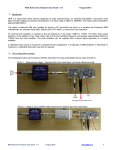
Figure 2.3 shows the input and output signals to the 2009-138.
GND
J1 - RF IN
13.75 to 14.5 GHz input .
This must be a “clean” input with
no image or other frequency
present. The max. input level is
-35dBm. This is a 50Ω, Type N,
female connector.
+15
J3 - DC POWER
The +15 VDC unregulated DC voltage from the
wall power supply. (Option -P models ONLY.)
CROSS TECHNOLOGIES, INC.
RF IN
DC
POWER
J1
FIGURE 2.3
J3
RF OUT
J2 - IF OUT
The 950 to 1700 MHz
output at -10dBm max
level with -35dBm in.
This is a 75Ω, Type F,
female connector. May
also contain +15 to +18
VDC, 250ma from LNB.
J2
Model 2009-138 Rear Panel Inputs and Outputs
2.4 Accessing the PC Card
There are NO USER JUMPERS or other on-card controls. ALTHOUGH IT IS NOT RECOMMENDED AND
MAY VOID THE WARRANTY the following shows how to remove the printed circuit board (PCB) from the
extrusion:
1. Always remove power when installing or removing the PCB from the extrusion
2. Remove four (4) rear panel screws (see Figure 2.1).
3. Gently pull the rear panel and PCB assembly completely out of the extrusion.
4. To install the PCB, gently push the rear panel and PCB assembly completely into the extrusion
(make sure the shield goes in the lower channel and the PCB in the next channel above that) and
that the front panel indicators line up with the front panel holes.
5. Install four (4) rear panel screws.
2.5 Installation / Operation
2.5.1 Installing and Operating the 2009-138
1. For -P models, connect one end of the Wall Power Supply to the 2009-138 DC Power In, J3,
and the other end to 115 VAC, 60 Hz (Figure 2.3).
2. Connect a -35 dBm, maximum signal to RF IN, J1 (Figure 2.3).
3. Connect the IF OUT, J2, to the receiver under test (For models powered from the LNB be sure
that the LNB voltage is +15 to +18 VDC, 250 mA max.) (Figure 2.3).
4. Be sure DS1 (green, DC Power) is on and DS2 (red, Alarm) is off (Figure 2.2).
2009-138 Manual, Rev. D
Page 6
09/22/15