1
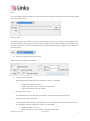
7. Enter the action type for the step
The options available for each action will vary depending on the action type selected.
Appointment
Either the appointments scheduler in the POS module or facility can be used for retention
step appointments. The benefits vary depending on the outcome required. The
appointments scheduler is simple and basic to use, but has no billing options. The facility
bookings module requires more setup but can have multiple facilities (or trainers) viewed at
any one time and charges can be applied if required.
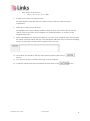
At each step level, you can choose which ‘appointment’ is selected. This will enable the
users when actioning a customer’s step access the correct appointment/facility type
automatically.
Note - For the appointment type to show up the in the drop menu you must have selected
Sales Reporting in the appointment type setup.
Email
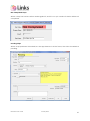
An email template can be applied to the step, by the same manner that it is applied to a
non attendance reminder. See the system settings section of this user guide for further
information.
Retention User Guide
January 2013
5