1
Installation, user and maintenance manual
Ethernet module
Step 4a (mandatory):
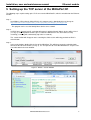
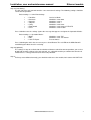
The left side of the web console contains a tree menu for all settings. The following settings should be
set for correct operation:
Basic Settings >> Serial Port Settings:
•
•
•
•
•
•
•
… Port Alias.
… Baud rate.
… Data bits.
… Stop bits.
… Parity.
… Flow control
… FIFO:
Can be left blank
Should be set to 9600
Should be set to 8
Should be set to 1
Should be set to None
Should be set to None or RTS/CTS
Should be set to Enable.
Press Submit to save the settings. Ignore the message that appears and go to the Operation Modes:
Basic Settings >> Operation Modes:
• … Mode.
• … Role.
• … Local TCP port.
Should be set to TCP
Should be set to TCP Server
Free to choose
Press Submit again and in the next screen press Save/Restart. The red LED on the MiiNePort will
start blinking to indicate that it is restarting.
Step 4b (optional):
The settings in step 4a are limited to the absolute minimum needed for correct operation, you are free
to look into the other settings in the web console. It is advisable to add a password to the console via
maintenance >> Change Password, for increased protection.
Step 5:
If all steps were followed correctly, you should be able to use the module, for instance with UNITOOL.
DDNN004MHGB/09-2015/Rev.1
7