1
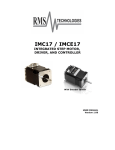
Silverpak 17C/CE
INTEGRATED STEP MOTOR,
DRIVER, AND CONTROLLER
With Encoder Option
USER MANUAL
Version 1.09
Thank you for purchasing the Silverpak 17C or 17CE integrated motor and controller
with microstepping driver. This product is warranted to be free of manufacturing
defects for one year from the date of purchase.
PLEASE READ BEFORE USING
Before you begin, ensure there is a suitable DC Power Supply. Do not disconnect
the DB-9 cable while power is still being applied to the controller. This will
damage the board. Under any circumstances, do not exceed +40 VDC.
DISCLAIMER
The information provided in this document is believed to be reliable. However, no
responsibility is assumed for any possible inaccuracies or omissions. Specifications
are subject to change without notice.
Lin Engineering reserves the right to make changes without further notice to any
products herein to improve reliability, function, or design. Lin Engineering does not
assume any liability arising out of the application or use of any product or circuit
described herein; neither does it convey any license under its patent rights, nor the
rights of others.
Special Symbols
Indicates a WARNING and that this information could prevent
injury, loss of property, or even death (in extreme cases).
RMS Technologies
Silverpak 17C-CE User Manual
Page 2
10/29/2009
Rev 1.09
Silverpak 17C/CE User Manual
Product:
Version:
Date:
Silverpak 17C and 17CE
1.09
10/29/2009
Version History
Version
Date
Description of Changes
1.00
04/10/2006
New User Manual
1.01
08/07/2006
Updated specs
1.02
08/18/2006
Updated specs
1.03
02/01/2007
1.04
11/02/2007
1.05
12/14/2007
1.06
4/3/2009
1.07
9/16/2009
1.08
10/7/2009
Standardization of all
user manuals
Updated description of
RMS vs Amp Peak
current, and explanation
of I/O’s
Updated designer kits,
connections &
HyperTerminal
instructions
Added new RoHS
RS485-232 card info
Updated image for LED
connection.
Updated RS485 info.
1.09
10/29/2009
RMS Technologies
Silverpak 17C-CE User Manual
Page 3
Added full stepping as a
resolution option.
10/29/2009
Rev 1.09
TABLE OF CONTENTS
1. FEATURES 5
Designer’s Kit with RS232 communication 5
Designer’s Kit with USB communication 5
Default Settings 6
2. ELECTRICAL SPECIFICATIONS 6
Digital I/O Specifications 6
Motor Specifications 6
3. OPERATING SPECIFICATIONS 6
Communication Specifications 6
4. MECHANICAL SPECIFICATIONS 7
Dimensions 7
Silverpak 17CE Encoder Pinouts 7
5. PIN ASSIGNMENTS 8
Connecting to the RS232 card 8
Connecting to the USB card 9
6. CONNECTION SPECIFICATIONS 9
Quick Start 9
RS232-485 converter card 9
USB-485 converter card 10
Mating Connectors 10
7. CONFIGURING AND CONTROLLING THE SILVERPAK 17C 11
HyperTerminal Setup 11
Setting the Current 12
Connecting Multiple Silverpak17C’s 14
Changing the Address of the Controller 15
Connecting Accessories 15
Push Button 15
LED or other output 16
Optical Sensor 17
9. Appendix 21
Connecting to the old non-RoHS RS232 card 21
Peak current versus Amps/Phase 22
RMS Technologies
Silverpak 17C-CE User Manual
Page 4
10/29/2009
Rev 1.09
1. FEATURES
•
•
•
•
•
•
•
•
•
•
•
•
•
•
•
NEMA 17, 1.8° step motor integrated with R256 controller/driver
Operates from +12V to 40V
Single 2 wire bus linking up to 16 stepper motors via RS485
2.0 Amp Chopper (PWM) Driver
Full step, 1/2, 1/4, 1/8, 1/16, 1/32, 1/64, 1/128, 1/256 step resolution
Stand alone operation with no connection to a PC
Execution Halt pending switch push button
Internally Pre-wired for Opto Switch inputs
Homes to an Opto or Switch closure with a single command
Fully programmable ramps and speeds
Two digital I/O and two fixed input channels
Switch selectable address
Software selectable "Move" and "Hold" currents
Hold Current automatically selected upon move completion
Simple DB9 connection
Designer’s Kit with RS232 communication
Here is the list of components if you
have purchased the optional
Designer’s Kit:
• RS485 to RS232 converter card
• A switch push button
• Opto Sensor
Lin part number: RS232KIT
Designer’s Kit with USB communication
Here is the list of components if you
have purchased the optional
Designer’s Kit:
• USB to RS232 converter card
• A switch push button
• Opto Sensor
• A USB 6 foot long cable
Lin part number: USBKIT
RMS Technologies
Silverpak 17C-CE User Manual
Page 5
10/29/2009
Rev 1.09
Default Settings
Function (command)
Running Current (m)
Holding Current (h)
Step Resolution (j)
Top Velocity (V)
Acceleration (L)
Microstep smoothness (o)
Outputs (J)
Baud Rate
Table 1:
Description
30% of 2.0 Amps
10% of max current of 2 Amps
256x
305175 pps (microsteps/sec)
L=1000, 6103500 µsteps/sec2
1500
Both are turned off, J0
9600 bps
Default Settings
2. ELECTRICAL SPECIFICATIONS
Supply Voltage:
Peak Current:
+12 to +40 VDC
0.1 to 2.0 Amps
Digital I/O Specifications
Number of I/O
2
Number of Inputs
2
Input Voltage
+0 VDC to +5 VDC (0 to 24V tolerant, but 5V recommended)
Input Current
700 mA
Pull-up Resistors
10k Ω
Protection
Static Protection to the microprocessor
LED output
(Pin 9) max of 20mAmps, with 200 ohm internal resistor
Motor Specifications
Any 4118 series step motor that is rated at 2.0 Amps/Phase or less can be combined
into a Silverpak 17C or CE product. General torque specifications are listed below:
Holding Torque (max of 1.0 Amp Holding Current, winding specific)
CO-4118S
20 to 45 oz-in
CO-4118M
30 to 63 oz-in
CO-4118L
40 to 80 oz-in
Steps per Revolution: 200,400, 800, 1600, 3200, 6400, 12800, 25600, 51200
3. OPERATING SPECIFICATIONS
Maximum Step Frequency
Operating Temperature Range
Storage Temperature Range
2^24 (pps) or 16.7MHz
0° to 50° C
-20° to 70° C
Communication Specifications
Interface Type
RS485 (RS232 or USB with a converter card)
Baud Rate
9600, 19200, or 38400 bps
# Bits per character
8 Data
Parity
None
Stop Bit
1
Flow Control
None
RMS Technologies
Silverpak 17C-CE User Manual
Page 6
10/29/2009
Rev 1.09
4. MECHANICAL SPECIFICATIONS
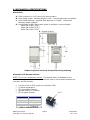
Dimensions
A. DB-9 connector for I/O, Power and Communication
B. Motor Shaft Length: standard length is 0.94”. Customized length is available.
C. Motor Shaft Diameter: standard shaft diameter is 0.1968”. Customized
diameter length available.
D. Overall Body Length: Motor body length is available in various lengths
Model CO-4118S (2.69”)
Model CO-4118M (2.92”)
Model CO-4118L (3.24”)
E. Encoder Pinouts
*Index is optional and must be specified during ordering
Silverpak 17CE Encoder Pinouts
NOTE: This is not a closed loop system. The encoder does not feedback to the
controller. A separate PLC or controller must be used to communicate between this
controller and this encoder.
•
•
•
•
•
A choice of 32 to 1250 cycles per revolution (CPR)
2 Channel Quadrature
TTL Squarewave Outputs
Optional index (3rd Channel)
E2 US Digital Encoder
Pin 5
Pin Number
Function
1
Ground
2
Index
3
Channel A
4
+ 5 VDC
5
Channel B
Table 2: Encoder Pinouts
RMS Technologies
Silverpak 17C-CE User Manual
Page 7
10/29/2009
Rev 1.09
5. PIN ASSIGNMENTS
A DB-9 female connector cable receives power and provides the control connections
for the Silverpak17C.
The DB-9 cable has a 3 pin connector provided for the
converter card in order for the controller to communicate with the PC via an RS232
converter card or USB card. Other wires allow the user to solder and program the
switch push button and the Opto Sensor, enabling several options. The I/O’s will
allow for options such as solenoids, relays, opto isolators, LED’s and many other
input and output connections. See Table3 below for details.
Pin #
1
2
3
4
5
6
7
8
9
Color
Red
Black
Brown
Black/White
Orange
Green
White
Blue
Yellow
Function
+V (Main Power In)
I/O
RS485B (+)
RS485A (-)
Switch Closure to GND (IN)
GND (-V of main power in)
Opto Sensor Phototransistor (IN)
I/O
Opto Sensor LED (Power Out)
Input*
1
4
3
2
Table 3: Pin Assignments
*Inputs are labeled 1, 2, 3 and 4 for programming the ‘Halt’ and ‘Skip’ Commands.
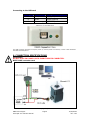
Figure 1: DB-9 Female Cable Connector (Rear View)
Connecting to the RS232 card
SP17C pin#
4
SP17C color
Black/white
6
Green
3
Brown
*USB pin#
1 (RS485A)
2 (GND connect to Power
Supply Ground)
3 (RS485B)
Table 4
Pin 1
Figure 2
The RS232 card requires power (7-40VDC)
RMS Technologies
Silverpak 17C-CE User Manual
Page 8
10/29/2009
Rev 1.09
Connecting to the USB card
SP17C pin#
4
SP17C color
Black/white
6
Green
3
Brown
*USB pin#
1 (RS485A)
2 (GND connect to Power
Supply Ground)
3 (RS485B)
Table 5
*Where Pin #1 is located here:
Figure 3
The USB converter card does not require power (it receives power from the PC). Power is still needed for
the R256 controller/driver.
6. CONNECTION SPECIFICATIONS
Quick Start
DO NOT PLUG IN POWER UNTIL EVERYTHING IS CONNECTED.
RS232-485 converter card
(Figure 4)
RMS Technologies
Silverpak 17C-CE User Manual
Page 9
10/29/2009
Rev 1.09
1. The RS232 converter card connects to the Silverpak using the DB-9 cable that
is provided to you. Opposite the DB-9 cable is a 3-Pin connector which is
placed onto the converter card.
2. Your power supply will be connected to the RS232 card where the green
header is located. + is for +12-40VDC, - is for the Power Supply
Ground. The Silverpak must also be powered via Pin 1 (red wire for
Power) and Pin 6 (Green for Ground).
3. Connect the RS232 card to your PC with a male to female DB-9 cable.
4. Turn your power supply on and follow instructions for using HyperTerminal.
USB-485 converter card
(Figure 5)
1. The USB converter card connects to the Silverpak using the DB-9 cable that is
provided to you. The 3-Pin connector is placed onto the converter card.
2. Your power supply will be connected to the Silverpak directly. The USB card
is powered via the PC. Silverpak’s pin1, Red wire is +12-40VDC, pin 6,
Green wire is Ground.
3. Connect the USB card to your PC using the USB cable provided to you. You
will need to download driver files (2 of them). You can find them at:
http://www.linengineering.com/line/contents/stepmotors/USB485.aspx
4. Turn your power supply on and follow instructions for using HyperTerminal.
Mating Connectors
ADB-9 cable is provided
with every motor. The
opposite end has flying
leads and a 3-pin
connector for RS485
communication.
RMS Technologies
Silverpak 17C-CE User Manual
Lin Part # 90-044
Page 10
10/29/2009
Rev 1.09
7. CONFIGURING AND CONTROLLING THE SILVERPAK 17C
HyperTerminal Setup
Please follow these steps in order to properly set up HyperTerminal:
1. Open a terminal from your PC by following these steps: Start Menu Æ Programs Æ
Accessories Æ Communications Æ HyperTerminal
2. Assign a name for your New
Connection
3. Determine the correct COM port # by
right clicking on “My Computer” and
selecting “Properties”. Select the
“Hardware Tab” and click on “Device
Manager”.
Note: if you are using the USB485
converter card, first download driver files
(found online: www.linengineering.com).
You should then see the RMS USB 485
converter card in the “Ports (COM & LPT)”
area.
If you are connecting via RS232, most
likely it is COM1, “Communications Port”.
4. Under ‘Connect using’, select the COM
connection that corresponds to your PC serial
port (i.e. COM 1, COM 2, etc.) then click ‘OK’
5. Set your Port Settings to default (i.e. 9600
baud, 8 data, no parity, 1 stop bit, no flow
control)
RMS Technologies
Silverpak 17C-CE User Manual
Page 11
10/29/2009
Rev 1.09
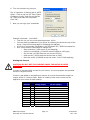
6. Turn on local echo by going to:
File Æ Properties Æ Settings tab Æ ASCII
Setup: Click on the box for “Echo Typed
Characters Locally” and click on the box
for “Send Line ends with line feeds”.
Click “OK”.
7.
Now you can type your commands
Example command: /1A10000R
• This will run unit #1 to the Absolute position 10000
• You can check the address of your driver by checking the dial at the top of the
driver. (See the following page for Changing the Address)
• A full list of commands is available in the Silverpak 23C / R356 Command List
• Hint: Most common commands to change are:
o Step resolution (/1j2R sets it to half stepping)
o Velocity in pulses/sec (/1V1000R sets the speed to 1000 pps)
o Run current (/1m50R sets the run current to 50%)
o Hold current (/1h20R sets the hold current to 20%)
o Move the motor (/1P800R moves the motor 2 revs if half stepping)
Setting the Current
CAUTION! DO NOT SET THE CURRENT ABOVE THE MOTOR’S RATED
CURRENT.
In order to set the correct current for your motor, you must program the specified
amount in HyperTerminal
Current is set based on the Maximum amount of current the controller board can
output, which is 2.0 Amps Peak. Below is a table of how much current will be
applied to your motor for each setting.
Percent
10%
20%
30%
40%
50%
60%
70%
80%
90%
100%
=
=
=
=
=
=
=
=
=
=
Motor’s Current
Rating (Amps)
0.14
0.28
0.42
0.57
0.70
0.85
0.99
1.13
1.27
1.41
Driver’s Equivalent
Current (Amps)
0.20
0.40
0.60
0.80
1.00
1.20
1.40
1.60
1.80
2.00
Table 6: Desired Current
RMS Technologies
Silverpak 17C-CE User Manual
Page 12
10/29/2009
Rev 1.09
To achieve the equivalent Driver Current (Amps), multiply your motor’s
rated current by 1.4. Follow these examples:
Example One:
You have a motor that is rated at 0.85 Amps, 0.85 Amps x 1.4 = ~1.2 Amps. Using
Table 3 we would see that 1.2 Amps is 60% of the driver’s maximum output current.
Assuming the Silverpak is addressed to Number 1, this is what you’d program:
/1m60R
Example Two:
You have a motor that is rated at 1.0 Amps, and your Controller is addressed to
Number 1, this is what you’d program: /1m70R
This will set the controller to 1.4 Amps Peak. How did we get 1.4 Amps? Æ 1.0
Amps x 1.4 = 1.4 A
WARNING!: Setting the Current to a value greater than the Motor’s rated
current will damage your motor, and may overheat the controller.
RMS Technologies
Silverpak 17C-CE User Manual
Page 13
10/29/2009
Rev 1.09
Connecting Multiple Silverpak17C’s
If using the RS232-to-RS485 converter card, daisy chain all four wires: power,
ground, RS485+ and RS485- prior to plugging into the converter card.
Figure 6: Connection using RS232 Converter Card
If using the USB485 converter card, connect all the power and ground lines on the
units to the main power supply. Then daisy chain the RS485+ and RS485- lines
prior to plugging into the USB485 card. Be sure to also ground the USB485 card
with Pin 2, ground.
Figure 7: Connection using USB485Converter Card
RMS Technologies
Silverpak 17C-CE User Manual
Page 14
10/29/2009
Rev 1.09
Changing the Address of the Controller
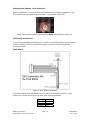
Use a screwdriver to turn the dial so the arrow points to the desired Address. Use
this number when programming commands. For example, /1P1000R
Figure 8: Address Dial
Note: New RoHS compliant boards have a Black dial instead of a Red one.
Connecting Accessories
If you have purchased the Designer’s Kit, there is a Red Push Button and an Optical
Sensor included. Follow the schematics below in order to properly assemble
accessory pieces.
Push Button
Figure 9: Push Button Schematic
It is best to solder the Push Button to Pin 5 which corresponds to Input 4, then
solder Pin 6 (Power Ground) to the other side of the push button.
Input
Input
Input
Input
RMS Technologies
Silverpak 17C-CE User Manual
1 Pin
2 Pin
3 Pin
4 Pin
Table 7
Page 15
2
8
7
5
10/29/2009
Rev 1.09
Any of the four inputs can be connected to a push button. In our example above,
pin 5 corresponds to input #4, therefore, if you want to program the motor to wait
until this button is pressed in order to begin movement, your program would look
something like this:
/1H04P50000R
H04 means to Halt until it sees a low, or 0, on input #4
P5000 move the motor in the positive direction by 5000 steps
R is to run this string of commands
The motor should send the command P5000 once the button has been pressed,
otherwise, it will continue to wait at “H04”
LED or other output
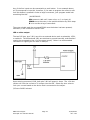
The two I/O lines, pins 2 & 8, can drive an external device such as solenoids, LED’s,
or switches. The bidirectional I/O’s are switches to ground internally, and therefore
need to be connected to the +V of the power supply. Below is a recommended
connection for lighting an LED with 20 mAmps:
Upon entering command /1J0R, both pins 2 & 8 will output 1 Amps. The 1.2k ohm
resistor will limit the current to 20 mAmps into the LED. Select any ohm value to
limit your current based on the device that is connected to the output.
I/O’s are 24VDC tolerant.
RMS Technologies
Silverpak 17C-CE User Manual
Page 16
10/29/2009
Rev 1.09
Optical Sensor
Figure 10: Opto Sensor Connection Schematic
The Opto Sensor uses Pins 6, 7, and 9. Use the following table to solder the
corresponding wires.
Optical Sensor
DB9 Cable
Green Æ
Green
Black Æ
Green
Red Æ
Yellow
White Æ
White
Table 8
Use the Z command and state the max number of steps you want it to search for
home. The unit will either stop at the opto sensor or when it finishes moving your
designated number of steps. For example:
/1Z500000R
Motor will take 500,000 steps and stop OR Motor will stop once the optical sensor
has been interrupted. Only input #3 can work with the optical sensor. The LED
output on pin 9 can output a max of 20mAmps (200 ohms internal resistor and 5VDC
output)
RMS Technologies
Silverpak 17C-CE User Manual
Page 17
10/29/2009
Rev 1.09
Encoder Usage
The Silverpak 17CE is not a closed loop system. The encoder does not connect to
the controller/driver. A separate PLC or controller system that can talk to the R256
board and understand the E2 encoder can create a closed loop system.
The Silverpak 17CE can also be used as reference to home by connecting to an US
Digital E2 Encoder. The pinouts are as follows:
Pin Number Function
1
Ground
2
Index
3
Channel A
4
+ 5 VDC
5
Channel B
Table 9
The E2 encoder requires a separate +5 Volt power supply, as the Silverpak17CE
cannot provide a strong enough source of power.
In order to use the Indexer as a reference to home, connect Pin 2 from the encoder
to one of the inputs on the controller. From the controller’s side, for best results use
Pin 5, the switch closure to ground.
In addition, use a pull-down resistor (10k Ω) to ensure that the controller will
recognize the difference between high and low (4.85V and 0.5V).
Figure 11: Encoder Pin Connection Schematic
After successfully connecting the encoder to the controller, now you can program the
controller to run continuously. The motor will stop movement when the indexer goes
high. This will send the high signal to Pin 5 on the controller.
If using channel 1, use this command to start the homing routine:
/1P0R
RMS Technologies
Silverpak 17C-CE User Manual
Page 18
10/29/2009
Rev 1.09
8. Troubleshooting & FAQ
Cannot Type anything in HyperTerminal:
Is the correct COM Port selected? Are you using Windows 95? Windows 95 has had
problems with its HyperTerminal. Use an operating system of Windows 98 or higher.
Are you working on a Laptop? Sometimes there is a shift in Ground on Laptop Serial
Ports. Pin 5 on the Serial Port is Ground. Make sure that this is connected to a true
ground.
Did you check the Properties in HyperTerminal? Check the box in Properties Æ ASCII
Settings Æ ASCII setup Æ 'Echo Typed Characters Locally'.
Is the LED flashing on the bottom of the Silverpak17C? A flashing light indicates it is
waiting for Commands and power is OK. Motor shaft should be difficult to rotate.
Check the Converter Card. Use a voltmeter to measure if Power is coming into the
card correctly and if power is being supplied to the Controller properly.
Can Type in HyperTerminal, but nothing is happening:
Check the LED on the back of the Silverpak 17C. If there is no LED lit, the problem
may be the Power Supply, check the connections. If you see one LED that flashes on
and off about 5 seconds at a time, then power is OK.
Is the Silverpak17C set to the correct Address? Check the Red Dial (new RoHS
compliant boards have a black dial) on the bottom of the unit. The white arrow
should be pointing to the corresponding Address. Make sure that the arrow is not
between 2 Addresses. Use a small screw to verify that it clicks in place.
Check the Converter Card. Use a voltmeter to measure if Power is coming into the
card correctly and if power is being supplied to the Controller.
Assuming the Properties of HyperTerminal are set as described in the Manual
(HyperTerminal Setup), does HyperTerminal respond with a string of characters?
/0'
indicates that the command is terminated
/0@
indicates good command and that it was received correctly
/0C
indicates that the command is out of range
/0b
indicates bad command
The unit is by default, set to 256 microsteps. Therefore, by typing in a position
move of /1P200R, you will not see anything. It takes 51,200 steps to make one
revolution, so try a large value, like /1P100000R
Windows Application: When pressing 'Run' it gives the error - File Already
Open:
Another program could also be running at the same time. Click End, and then try
again. Sometimes if you are connected through a Network, there are problems with
permissions in running programs. Check with your Administrator.
If HyperTerminal is open concurrently, you will receive an error. Only one program
can be running at one time.
RMS Technologies
Silverpak 17C-CE User Manual
Page 19
10/29/2009
Rev 1.09
Silverpak 17C will accept commands, but the Motor will stall in the middle of
a command:
This means there is not enough current being supplied to the Motor. Use the m
command to change the current, or run the Motor at a Lower Speed (V command).
Or, make the motor accelerate slower using the L command.
Halt Command (H01) Issues
There are known issues involving the Halt command (i.e., H01) when stored in
memory location zero. Upon power up, the remaining command string after the Halt
command might be executed if the user types in a new command. If memory
location zero is not being used, the user is advised to always clear everything in
memory by typing /1?9. Otherwise, the user may terminate the remaining
command string in the buffer by issuing a /1T.
I want to use one of the I/Os to turn on a LED to confirm that the motor has
finished moving or moved to a certain position. How do I do it?
To turn on a LED to confirm that the motor finished moving you must use the “J”
command in the command list section On/Off Drivers. We are assuming the unit
executes the command sent. We cannot detect skipping because the set up is open
loop. Example: /1P200J10R, is a position move 200 steps, then turn on driver 2.
What’s the minimum and maximum voltage the RS485 to RS 232 Converter
Card can handle?
Min and Max voltage levels: 7 to 40 VDC
Using a PLC to communicate with board
After the command, you need to issue a carriage return and linefeed.
Example: /1A1000R (absolute position move 1000). After the R, send a 0x0d
in hex.
USB Converter card setup
The USB converter card requires you to install the unit as a hardware. Two files
should be downloaded, and they can be found online at www.linengineering.com Æ
Products Æ Step Motors Æ USB485 Card Æ Downloads Æ Driver files.
You should be able to view the converter card if you go to Properties of “My
Computer” Æ Hardware Æ Device Manager Æ Ports.
The LED’s on the USB485 converter card only light up during sending and receiving
of a command.
Technical Support for Lin Engineering
By Telephone: 408-919-0200
(Mon.-Fri., 8:00 a.m.-5:00 p.m.)
On the Web: www.linengineering.com
Our technical support group is glad to work with you in answering your questions. If
you cannot find the solution to your particular application, or, if for any reason you
need additional technical assistance, please call technical support at 408-919-0200.
RMS Technologies
Silverpak 17C-CE User Manual
Page 20
10/29/2009
Rev 1.09
9. Appendix
Connecting to the old non-RoHS RS232 card
SP17C pin#
4
3
6
1
SP17C color
Black/white
Brown
Green
Red
Table 4
RS232 card pin#
A (RS485A)
B (RS485B)
- (GND)
+ (PWR)
Figure 2
The RS232 card requires power (7-40VDC). Power is then sent to the motor via the Red 4-Pin connector.
Figure 5: Connection using RS232
5. The RS232 converter card connects to the Silverpak using the DB-15 cable
that is provided to you. The red 4-Pin connector is placed onto the converter
card.
6. Your power supply will be connected to the RS232 card where the green
header is located. + is for +12-40VDC, - is for the Power Supply
Ground.
7. Connect the RS232 card to your PC with a male to female DB-9 cable.
8. Turn your power supply on and follow instructions for using HyperTerminal.
RMS Technologies
Silverpak 17C-CE User Manual
Page 21
10/29/2009
Rev 1.09
How to connect with old cable:
If you have a cable with a Red 4-Pin connector, simply cut off this connector,
strip the wires and reconnect to a 3-Pin connector in the following manner:
Pin #
Pin 1
Pin 2
Pin 3
Pin 4
Connect
New 3-Pin cable
to
Color/function
Æ
Connect to main power
supply
Æ
Green (GND)
Green (GND)
Æ
Brown RS485 B (+)
Brown RS485 B (+)
Æ
Black/white RS485 A (-)
Black/white RS485 A (-)
Old 4-Pin cable
Color/function
Red (PWR)
Pin #
-Pin 2
Pin 3
Pin 1
Peak current versus Amps/Phase
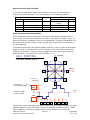
Where does the 1.4 times come from? Current is continuously changing when a
motor steps. If the motor is rated for 1.0 A/Ph, it may receive 0 Amps, 1 Amp, 1.4
Amps, or anything in between if you are microstepping. For ease of explanation, we
will look at the current waveform when we half step, or set the driver/controller to
2x microstepping.
If we take a look at both the A and B phases, and plot on an X-Y chart of when each
phase receives current, and how much it receives, it will look like the chart below.
Beginning at position 1, Phase A receives negative current, and Phase B receives
positive current. Let’s assume it is at coordinate (-1, 1).
PHASE B
HALF- STEPPING
Current Wave Form
8
7
1
2
6
PHASE A
Current
Peak current
(1.4 times Amps/Ph)
PHASE
A
5
3
4
141%
100%
time
Average, or RMS
Is only 1 Amp/Ph
0%
100%
141%
POSITION
1
2
3
4
5
6
7
8
The position versus time graph just above, plots only the A Phase, following the eight
different steps the motor will make. Current is changing with each position. Recall
that a negative in electronics simply means reverse direction of current flow.
RMS Technologies
Silverpak 17C-CE User Manual
Page 22
10/29/2009
Rev 1.09
1.41 AMP
(√2)
1 AMP
1 AMP
Take a look at position #7. If we were to draw the arrow
at position 7 as the hypotenuse of a triangle, it would
look like the triangle to our left. Recall from geometry a
90°-45°-45° triangle is a 1-1-√2 combination. The √2,
or 1.4 value is also the radius of the dotted circle shown
above. Therefore, during certain steps, Phases A or B will
receive 1.4 Amps of current. But the average, or RMS
current throughout these 8 steps is only 1.0 Amps. RMS
and Amps/Phase is the same meaning.
The 1.4A along this hypotenuse is also known as the 2-Phase On position, since both A and
B Phases are “On” and receive current. It is also known as the peak current.
As we see the waveform that’s plotted for the A Phase, the highest value on the curve is
known as the peak value.
Motors have a rated current, or average RMS value since in operation, the current is
continuously changing. The most logical way to describe a rating is to take an average, or
RMS (root means squared) value. But drivers understand current in terms of peak current,
therefore the conversion is: Amps/Phase x 1.4 = Amps Peak
RMS Technologies
Silverpak 17C-CE User Manual
Page 23
10/29/2009
Rev 1.09