1
SECTION 3. PLOT TEMPLATE VIEW
Template view and try to remember all of the
settings in order to recreate that initial plot.
However, if you saved it you only have to recall
it. All the plot template settings will be changed
back automatically to what they were when you
saved the plot initially.
When you save a plot ID-2000 creates two files one for the image of the plot and one for the Plot
Template information necessary to create the
plot. These two files are named IDWSAVED.T??
and IDWSAVED.B?? where ?? is the number of
the saved plot ranging from 00 to 99. When you
decide to recall the plot you simply select it from
the recall dialog box and the image of the saved
plot is painted in the window.
ID-2000 does not delete any saved plots when
you exit ID-2000 or return to the Plot Template
view. A saved plot can always be recalled as
long its data file(s) still exist and parameters are
available. If the saved plot is based upon a
calculated parameter you must make sure that
the parameter is not deleted or the equation
modified.
NOTE: The IDWSAVED files are placed in
the “Temporary Path”. This path is
defaulted to the location specified in the
General Preferences dialog
As we discussed one of the major benefits of
saving and recalling a plot is not having to
redraw the plot. In some circumstances the plot
MUST be redrawn. The image of the plot that is
saved is strictly dependent upon the size of the
ID-2000 application window. If you save a plot
and later in your session (or subsequent
sessions) change the size of the application
window then the saved plot image does not
match your new window size and becomes
invalid. You can still recall the plot but since the
image is invalid ID-2000 is forced to redraw it
using the plot template settings that were saved
with it.
To save or recall a plot you may do one of the
following:
•
Click the Recall or Save toolbar buttons.
•
Select the View - Save Plot or View - Recall
Plot menu item.
•
Use the accelerator keys of F5 or F6.
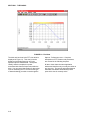
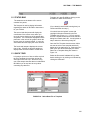
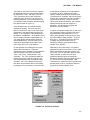
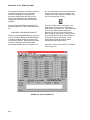
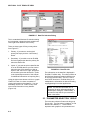
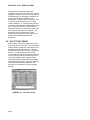
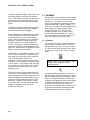
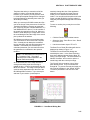
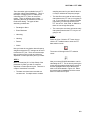
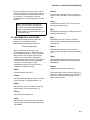
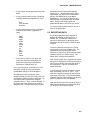
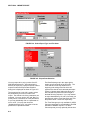
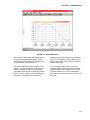
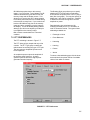
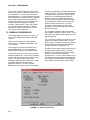
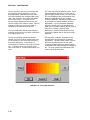
The Save Plot or Recall Plot dialog will then be
displayed as shown in Figure 3-11.
The Save Plot and Recall Plot dialogs are
essentially the same. In the Save Plot dialog
there is an additional button labeled “New” for
saving a new plot image. The second button is
labeled “Overwrite” and is used to replace a
saved image with the current plot image.
The “Saved” list box contains a list of all the
plots already saved. They are numbered 0
through 99. To preview a saved plot image you
only need to highlight it in the “Saved” list box.
To recall a plot select it and click the “Load”
button.
FIGURE 3-11. Save/Recall Dialog Box
3-11