1
6 . W RITIN G SOFT WARE FOR WATT P ILOT
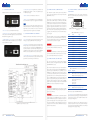
5 .7 . “ MOTOR ” co n n e c to r p i n o u t
5.8. S u pp o r t e d S t e pp e r M oto r s
“MOTOR” connector is used to connect bipolar stepper motor and home
limit switch to controller. The type of connector is 9 pin D-SUB female.
There are two types of stepper motors: unipolar and bipolar. Controller
supports bipolar stepper motors.In order touse unipolar motor as bipolar, center wires from both windings must be left unconnected.
5
1
9
6
Motor winding resistance multiplied by motor current must be less than
11.5 V. Controller can drive up to 2 A maximum current and 1.6 A continuous. ST2818S1006 stepper motor can be chosen as reference for motor
requirements, because it is used as waveplate rotator.
Figure 23. Controller “MOTOR” connector.
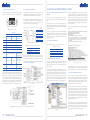
Unipolar stepper motor
Bipolar stepper motor
Table 4. “MOTOR” connector pin out
A
Com
(Yellow)
A\
B
Com
(White)
B\
Description
Controller serial number begins with:
Pin No.
1
“4ATT” ”, see
Figure 22 (p 39)
“5ATT”, see
Figure 22 (p 39)
“6ATT”, see
Figure 21 (p 38)
Motor winding B output (usually red wire)
2
Motor winding B\ output (usually blue wire)
3
Motor winding A\ output (usually green wire)
4
Motor winding A output (usually black wire)
5
No connection
6
7
Zero position switch return
No connection
GND
Zero position
CMOS input with
pullup to +5 V
+5V power supply for optical
sensor, up to 70
mA
8
No connection
Pull up to +5 V,
not used
9
Zero position switch
GND
Connector pin out changes were made in controller hardware revisions.
Only mechanical limit switch can be used with controller serial numbers
“4ATT” and “5ATT”, connected to pins 6 and 9. Latest Watt Pilots with
“6ATT” serial number come with optical home position sensor on rotator, so limit switch input circuit is essentially different from previous
hardware versions. See Figure 21and Figure 22 on page 38for differences. “6ATT” rotators are not compatible with “4ATT” or “5ATT” versions of
controllers. All versions of rotators can be used with “6ATT” controllers.
Motor wire
Controller pin
number
4
Leave
unconnected
3
1
Leave
unconnected
2
Figure 24. Using unipolar motor as bipolar.
6 .1 . L i s t o f s u pp o r t e d o p e r at i n g s y s t e m s f o r USB
drivers
In order to communicate with Watt Pilot, USB drivers are necessary.
These are available for more operating systems than “Watt Pilot” software.
Virtual USB-Com port drivers can be installed on Windows 2000 (32bit), Windows XP (32-bit), Windows Server 2003 (32-bit), Windows Vista
(32/64-bit), Windows Server 2008 (32/64-bit), Windows 7 (32/64-bit),
and Windows 8 (32/64-bit).
6 .2 . S e r i a l p o r t pa r a m e t e r s
Serial port parameters to be used are shown in a table below.
Table 5. Stepper motor ST2818S1006 electrical characteristics
Winding voltage
Winding Current
Winding Resistance
Table 6. Serial port parameters.
2.66 V
0.95 A
2.8 Ω
Resistance of motor windings usually is less than 10 Ohms, so wires to
the motor, must be as short as possible and with significant wire diameter (>0.75 mm2, or ≤20 AWG) to minimize wiring impact to motor noise.
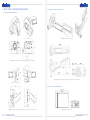
5.9. Wat t P i lot co n t r o l l e r co n n e c t i o n e x a m p l e s
and input circuit diagram
Baud rate
Parity
Handshaking
Stop bits
38400
None
None
1
6 .3 . I d e n t i f y i n g s e r i a l p o r t n a m e
First step to control Watt Pilot using serial port and commands would be
to find out which serial port is assigned for device. This can be seen in
Watt Pilot “Selector” window list – see section “Watt Pilot “Selector” window” on page18.
In case only drivers were installed (no “Watt Pilot” software itself – see
“Computer requirements” on page12) serial port name could be checked
in Windows “Computer manager”. Right click on “My Computer” (1), select “Manage” (2). “Computer manager” window will appear. Click on
“Device Manager” under “Computer Management” tree (3) and look for
“Ports (COM and LPT)” (4). Each connected and powered on attenuator
appears as “Silicon Labs CP210x USB to UART Bridge (Serial port name)”.
Serial port name is shown in parentheses, as seen in the picture below.
Figure 25. Connecting external equipment to use Watt Pilot controller in “StepDir” mode.
1
3
4
Figure 26. Connecting Watt Pilot controller to microcontroller employing all of Watt pilot features
Figure 27. Finding Watt Pilot serial port name using Windows “Computer
Manager”.
www.altechna.com
Linux users can find Watt Pilot port by executing command “root |dmesg
| grep cp210x”:
There is no need to install any drivers on modern Unix-like (Linux, MAC)
operating systems. Watt Pilot is automatically recognized and installed
as “ttyUSB” device after connecting it to computer. You can check which
serial port is assigned in your UNIX machine with command „root
|dmesg | grep cp210x”.
2
16
Third way to identify Watt Pilot is to open each serial port and send “p”
command. If attenuator is present on that port, it will send back string
starting with “USB”, as listed in “Serial commands and protocol” on page
46. If device is not present, no bytes will be received or received string
will not begin with “USB”. Serial port read timeout can be set to 50ms to
speed up scanning process. This method is universal and can be used
with any operating system. Read next chapters about serial port parameters and command list.
Figure 28. Finding Watt Pilot serial port under Linux. Screenshot is taken on
Slackware Linux 13.37 32 bit OS.
In the picture above we can see that one Watt Pilot (cp210x) device is
assigned to “ttyUSB0” port. There is also shown installation command for
“CuteCom” package, which is easy to use terminal application with GUI.
6 .4 . S e r i a l co m m a n d s a n d p r oto co l
Watt Pilot is a slave device according to computer and computer is a
master device. That means that PC sends data requests to attenuator,
and attenuator must respond. Watt Pilot itself will never send data to
computer without request, except of two cases: if “Report zero position”
command “zr” setting is set; also string “USB Mode\r\n” is sent upon controller start if controller starts in “Command” mode.
Watt Pilot controller writes all received bytes to internal buffer. If it receives “carriage return” symbol (or ‘\r’ in C++ denotation, 13’th symbol in
ASCII table, or 0x0D in hex), device will try to parse received bytes as a
command string and will execute it. Attenuator echoes back every byte
it receives back to computer except for ‘\r’. Symbol echoing is essential
for users who literally type commands in terminal window. This enables
user to see what data is sent to device, because not all terminal programs has a text field where sent symbols are shown. “\n” (0x0A) symbol
is treated like all other symbols.
Watt Pilot will respond to byte ‘\r’ by sending additional data, if command requires it. Additional data is terminated with “\r\n” symbols. Termination symbols “\r\n” are essential for users who literally type commands in terminal window. These symbols are not visible, but they
format “received data” window text so it looks organized.
www.altechna.com
17