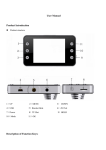
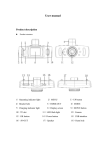
1
Special function description
l
l
Support recording Start and shutdown synchronization with Auto and save the
video files After connect to the car power supply
l
Seamless loop recording, don’t leak second
l
SOS
MENU button
Once you have pressed the Mode button and entered into say Video mode, then Short
press on Menu button to show function settings. Within this setting when you push the
Short press "Mode" to lock current video whilst recording or photograph
up or down buttons you can now alter settings within Resolution , Loop Record times,
whether Motion Detection is on or Off, whether you want G-Sensor setting to be high
or low etc etc. Once you have determined which setting best suits you, press the
REC/photo operation specifications
Record button to confirm that setting. Press menu again to enter the next window –
l
Power on/off
Status window shows shape of a ‘Spanner’. Within this window, you can now set
Long press on “power on/off” button to start, Indicator light will shine when
Date/Time, Format, Languages etc by following above process.
power on
Then long press again on “power on/off” button to shutdown and the indicator
If you pressed Mode a couple times, you may have a camera icon top left. To adjust
light go out
these settings, follow above instructions but only if you haven’t already adjusted all
Notice: video instrument will automatically power off after waning of low battery
the settings whilst in the Video mode menu.
l
REC mode
Short press on “Mode” button to shift mode options - Video, Camera or Playback
Within this section, before you begin any recording, its important once your SD card
mode and press Record to activate any of these modes. Push the Record button
has been inserted into TF slot that you Format your camera. Follow step above and
within Spanner settings, move cursor down until Format option appears. Click Yes to
again to end Video or to take Photos.
l
Video/photo playback
format. This takes a couple seconds. Now your camera is Ok to begin recording,or
Short press on “Mode” button, shift to playback mode, playback icon is on the
taking photographs
top left corner
Short press on up or down keys to choose files
l
Short press on “Record” button to play the selected video files. Once you are in
G-sensor function
playback mode and watching a video, should you wish to erase, press the Menu
When gravitational acceleration reach 6g(1g=9.80m/s), machine will save
key in which a delete or save option will appear. Move up or down button and
pres ent video as undeletable files. You can select with level of G Sensor
then push Record to confirm deletion or save.
suits you
Automatic power on/off function
l
Menu setting
Short press on “MENU” or “MODE” button can exit the setting status.