1
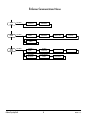
Set Date
E
Sets the month, day, and year in the battery-backed real-time clock.
ActivateLogger
E
Allows user to enter an Activation Code to activate the Data Logger
feature. Each EnGenius meter has a unique Activation Code based
on its serial number. The Activation Code is NOT the same as the
Password used to gain access to the configuration menus.
EnGenius Operating Guide
The Data Logger is a purchased option for EnGenius. If EnGenius
was ordered from Kele with the Data Logger option, it should already
be activated when you receive the meter or a note should be included
with the meter giving you the Activation Code. If you want to activate
the Data Logger in an existing meter, contact Kele to purchase the
option and obtain the Activation Code.
*** The Data Logger feature is available beginning with meter firmware
Revision 1.06. If your meter has older firmware (look in the “About”
menu branch), you will need to use the Desktop Software and programming cable to load new firmware, Rev 1.06 or higher.
19
VERSION 3 May, 2013