1
For the EnGenius User Manual, visit www.kele.com/engenius and click on the “Related Documents” tab.
Operating Guide
EnGenius Intelling Energy/Power Meter
The EnGenius energy/power meter comes with many configuration options which can be viewed/changed
using the front panel LCD display and keys. This guide will explain how to navigate and change those configuration items. Physical installation of the meter is covered in a separate document.
All of the configuration options described in this document may also be viewed and changed using the
EnGenius Desktop Software package and a programming cable which plugs into the meter’s Data Port.
The Desktop Software and programming cable may also be used to upgrade the EnGenius firmware at any
time. This allows the user to add new features to existing meters installed in the field.
** If you have the low-cost version of EnGenius (no LCD display, no keypad) you will not be able to perform
the view/change actions described in this document. You must use the EnGenius Desktop Software package instead. However, this document will still provide valuable background reference material as to how the
EnGenius configuration options work.
Run Mode Operation
When the meter is powered up, it goes to Run Mode where measurements are taken and displayed on the
LCD. Only the measurements enabled for display will be shown. The choice of which measurements are
displayed is configurable as explained later in this document.
The measurements enabled for display may auto-rotate on the display if that feature is enabled (also configurable, explained later in this document).
In Run Mode the left-right keys may be used to select the measurement desired for display. If auto-rotate is
turned off, the selected measurement will stay on the display indefinitely. If auto-rotate is turned on, after 10
minutes of no left-right key activity the auto-rotate feature will start again.
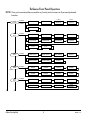
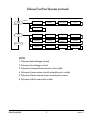
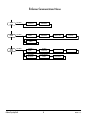
To exit Run Mode and go to Setup Mode, press the Main Menu or Sub Menu key. Operation of Setup Mode
is described in the following pages.
EnGenius Operating Guide
1
VERSION 3 May, 2013