1
2. Connect the other end of the adapter to the mains socket.
3. Remove the charger from both the mains socket and the phone
once the charging is completed.
When not using the battery for a long time, remove it from the
phone and store in a cool dry place.
Installing and Removing the SIM Card
Make sure that the phone is powered off and the charger is
disconnected from the phone.
1. Turn the phone over and remove the back cover.
2. If the battery is already inside, remove it.
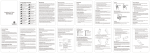
3. Hold your SIM card with the cut corner
oriented as shown in the illustration
below and then slide it into the slot.
4. Replace the battery first.
5. Replace the back cover.
13