1
1. About this Manual
1.1
Introduction
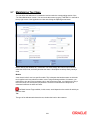
This manual is designed to help you get acquainted with the manner in which various classes can
be set up in Oracle FLEXCUBE.
You can further obtain information specific to a particular field by placing the cursor on the
relevant field and striking <F1> on the keyboard.
1.2
Audience
This manual is intended for the following User/User Roles:
1.3
Role
Function
Back office clerk
Input functions for contracts
Back office managers/officers
Authorization functions
Product Managers
Product definition and authorization
End of day operators
Processing during end of day/ beginning of day
Financial Controller / Product Managers
Generation of reports
Organization
Chapter 1
About this Manual gives a brief introduction to the module. It also lists the
various chapters in the User Manual.
Chapter 2
Creating Classes details the procedure to set up different classes in Oracle
FLEXCUBE.
Important information is preceded with the
1.4
symbol.
Glossary of Icons
This User Manual may refer to all or some of the following icons.
Icons
Function
Exit
Add row
Delete
row
1-1




![[December] [2010] Oracle Part Number E51712-01](http://vs1.manualzilla.com/store/data/005705420_1-4b383e67b8ec6628c44005398bb7935f-150x150.png)