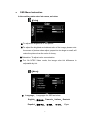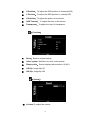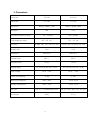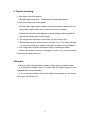
1
1.
Product instruction
● 7" monitor
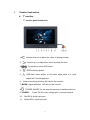
7" monitor panel instruction
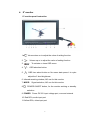
1.
:Volume down or to adjust the value of setting function
2.
:Volume up or to adjust the value of setting function
3.
:To activate or close OSD menu
4.
:OSD selection button
5.
:OSD item select button or No menu state press it to cycle
adjust the 5 level brightness
6.
Infrared receiving window, NO use for this monitor
7. MODE: Signal selection, NO use for this monitor
8.
:POWER ON/OFF, for the monitor working or standby selection
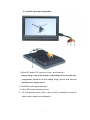
9. POWER : Power DC12V input voltage port, core and external
10.
Red RCA, audio input port
11.
Yellow RCA, video input port
4