1
VNP Camera Link series
9.4
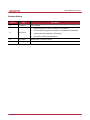
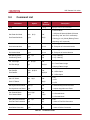
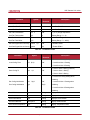
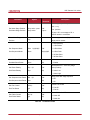
Command List
Command
Help
Syntax
h
Value
Description
Returned
String
Displays a list of all commands
0 : Normal Mode
Set Read-Out Mode
srm
Get Read-Out Mode
grm
0|1|2
OK
0|1|2
1 : AOI(Area Of Interest) Mode (AOI area
is set using “sha” and “sva” commands)
2 : Binning( 2 or 4 ) Mode (Binning Factor
is set using “sbf” command)
Set Horizontal Area
sha
n1 n2
Get Horizontal Area
gha
Set Vertical Area
sva
Get Vertical Area
gva
Set Binning Factor
sbf
Get Binning Factor
gbf
Set Test Image
sti
Get Test Image
gti
Set Data Bit
sdb
Get Data Bit
gdb
Set LUT Select
sls
Get LUT Select
gls
0|1|2
Set Asynchronous Reset
sar 0|1
OK
0 : Inactivate Asynchronous Reset
Get Asynchronous Reset
gar
0|1
1 : Activate Asynchronous Reset
Set Channel Mode
scm 1|2|4
OK
Get Channel Mode
gcm
1|2|4
Set Flat-Field Correction
sfc
Get Flat-Field Correction
gfc
Set Defect Correction
sdc
Get Defect Correction
gdc
n1 n2
2|4
0|1|2|3
OK
n1: Starting point of horizontal direction
n1 n2
n2 : End point of horizontal direction
OK
n1 : Starting point of vertical direction
n1 n2
n2 : End point of vertical direction
OK
2 : 2 by 2 binning
2|4
4 : 4 by 4 binning
OK
0|1|2|3
8|10|12
OK
8|10|12
0|1|2
0|1
0|1
OK
0 : Off
1/2 : Fixed Pattern Image
3 : Moving Pattern Image
8 : 8 Bit Output
10 : 10 Bit Output
12 : 12 Bit Output
0 : Off
1 : LUT1
2 : LUT2
1 : 1 Channel Mode
2 : 2 Channel Mode
4 : 4 Channel Mode
OK
0 : Off
0|1
1 : Active of Flat-Field Correction
OK
0 : Off
0|1
1 : Active of Defect Correction
Table 9.1 Command List #1
Page 57 of 85
RA14-134-015