1
Connecting Your VS-41HD 4x1 HD/SD-SDI Switcher / DA
6.3 Controlling via the RS-485 Port
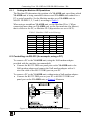
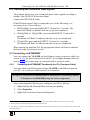
To cascade up to eight individual VS-41HD units, via RS-485 (with control
via a Master Programmable Remote Control system such as the Kramer
RC-3000), as Figure 5 illustrates, do the following:
1. Connect the “A” (+) and “B” (-) PINS on the RS-485 terminal block port of
the RC-3000 to the “A” (+) and “B” (-) PINS, respectively, on each of the
eight VS-41HD units. (If using shielded twisted pair cable, the shield is
usually connected to the “G” (Ground) PIN of the first unit).
2. Set the first VS-41HD unit as MACHINE # 1 and the following seven
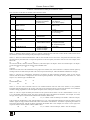
VS-41HD units as MACHINE # 2 to MACHINE # 8, according to Table 3.
RS-485 PINOUT
_ B
+ A
KEYBOARD EXTENSION
OUT
IN
1 2 3 4 5 6 7 8 9 10 11 12 13 14 15 16
REMOTE CONTACT
1 2 3
4 5
6
7
8 G
RS-485
RS-232 IN
RS-232 OUT
12 VDC
R C -3 0 0 0
MACHINE # 1
MACHINE # 8
Figure 5: Controlling via RS-485 (for example, using an RC-3000)
10
KRAMER: SIMPLE CREATIVE TECHNOLOGY