1
Service entry
Unpacking
Place the box in front of you, open it and make sure it
contains the following items:
Service entry
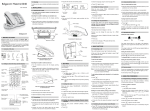
Your base
It fits well into your family environment.
1.
Handset location.
2.
Base button
Pressed briefly: handset paging.
Held down: - handset registration.
3.
Power indicator light
Fixed green indicator: Powered
Flashing green indicator: (handset on line, handset
paging, handset registration).
1.
Paging / Pairing button:
Pair handsets: Press and hold*.
find handsets (Paging): Short press*.
Answering machine On /Off:
Deactivate the answering machine: Press and
hold*.
Activate the answering machine (the recording
answering machine is activated first): Short
press*.
Switch between the recording answering machine
and the simple answering machine: Short press*.
Increase the volume on the base loudspeaker.
Reduce the base loudspeaker volume.
Display:
Answering machine off: nothing is displayed.
Simple answering machine: depends on the
display mode activated. For further information,
refer to paragraph “Display mode”, page 29.
Erase a message:
Erase a message: Press and hold in playback
mode*.
Erase all messages: Press and hold outside
playback mode*.
Next message : Short press*.
Model without answering machine:
• one base,
1
• one handset,
2
• one battery compartment cover,
3
• one equipped power adapter,
• one telephone line cord,
• two rechargeable batteries,
• this user guide.
Model with answering machine:
1
In the case of purchasing a pack duo or trio, you will find
in addition for each additional handset :
2
• a handset charger,
3
• an additional battery flap,
4
2.
• two additional rechargeable batteries.
5
6
7
If you have purchased an additional handset pack, you
will find:
8
9
• a handset charger,
3.
4.
5.
6.
• an additional battery flap,
• two additional rechargeable batteries.
• this user guide.
7.
3