1
ProVideo DVR-Q4 User Manual
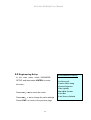
8.4 Recording Settings︰
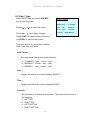
Select RECORD SETTING and press
<ENTER> key to enter the menu :
RECORD SETTING
Press <←>、<→> to move the cursor
Compression
Press <+>、<-> to make changes
Press <EXIT> to return to the main menu,
or <STOP> to exit the main menu.
MJPG
Resolution
720X240
REC Rate
2 FPS
Disk Full
Overwrite
Audio In
OFF
Record Time
Compression:MJPEG
Total Time
:
53hr
Remain Time :
33hr
Resolution:720 × 240
360 × 240
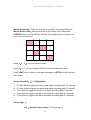
REC Rate:FPS per second, press <+>、<-> Key
to adjust the rate.
720x240 : 1~10 FPS
360x240 : 1~15FPS
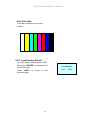
Disk Full:When the disk is full, select “Overwrite” to “ON”, the disk will be
overwritten starting with oldest data first.
Selecting “STOP” will cause the recording to “Stop” when hard
drive becomes full.
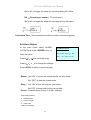
Audio IN:In the RECORDING menu select Audio In, and press
<ENTER> to enter the menu. Toggles the data for the
Microphone input ON/OFF.
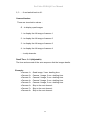
Record Time :
Total Time : According to resolution, the HDD and the recording
17