1
ProVideo DVR-Q4 User Manual
3. Installation:
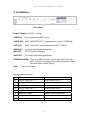
Rear panel
Power Supply: 12VDC – 4 Amp.
VIDEO IN:
Four cameras with BNC inputs.
VIDEO OUT: BNC “MONITOR OUT” is connected to monitor ”VIDEO IN”.
VCR OUT:
BNC “VCR OUT” is connected to the VCR ”VCR IN”.
AUDIO IN:
Used for microphone connection.
MIC OUT:
To VCR, when recording.
LINE OUT:
For audio output during playback.
SENSOR/ALARM: There is a DB9 connector on the right side of the rear
panel, which is connected to the external sensors trigger
input and alarm output (Relay).
FAN:
For air circulation.
DB9 PIN CONFIGURATION:
1
Sensor Trigger Input – 4
External sensor input 4
2
Sensor Trigger Input – 3
External sensor input 3
3
GND
Ground
4
Sensor Trigger Input – 2
External sensor input 2
5
Sensor Trigger Input – 1
External sensor input 1
6
No Connection
7
Relay Out – COM
Replay output COM terminal
8
Relay Out – N.O.
Replay output normal open terminal
9
Relay Out – N.C.
Replay output close terminal
6