1
Passive Mode
If the Express is behind a proxy server, enable passive mode. If
you are unsure if you need passive mode, it is usually safe to enable it
anyway.
Default: On
Timeout
If the FTP process hasn’t completed within the time specified here,
the Express will attempt to restart the process.
Default: 120
UPLOAD VIA SMTP (EMAIL)
If you prefer the event-triggered image captures to be e-mailed,
select this option. If you’ve enabled a large number of images, this can
add up to a large e-mail attachment.
Mail To
Email address where images are to be sent.
Mail From
Specify a “from” e-mail address. This can be made up.
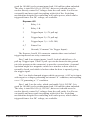
3.16 Trigger Sensor Connection
Express 2
1
Opto-Isolated Trigger Input 1-A
2
Opto-Isolated Trigger Input 1-B
3
Relay 1-A
4
Relay 1-B
The Express 2 I/O connector contains one opto-isolated trigger input
and one relay connection.
Pins 1 and 2 are the opto-isolated input, providing 2500VRMS
isolation. To trigger, apply positive voltage to pin 1 and apply negative
or ground to pin 2. The trigger voltage should be 3.5VDC to 12VDC,
1.4mA minimum. You may connect directly to a 12VDC alarm system,
current-providing door sensor, etc. but the polarity must be correct or
you risk the possibility of false triggers. Sensors such as simple open/
closed switches cannot be used without a pull-up voltage to provide the
[email protected] minimum.
Pins 3 and 4 are the relay, which can handle 2A @ 28VDC. It is
Page 36
Express Video Servers