1
M M 3 0 M EDI A M O DU L E USER GUIDE
SETTI N G U P ETHER N ET
To connect the Media Module to an Ethernet
network you need to configure the settings on the
Ethernet settings menu.
To configure the Ethernet settings
•
Turn the SELECTOR control on the front
panel, or press the A or V buttons on the
remote control, until the Ethernet settings
item is highlighted on the Network settings
menu:
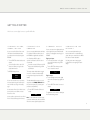
Network settings vol25
Ethernet settings
Wlan settings
Apply settings
Network disconnected
•
Press the R button on the front panel, or the
SELECT button on the remote control.
The Ethernet settings menu will be displayed:
Ethernet settings vol25
DHCP
Enabled
IP
10.0.1.11
IP Mask255.255.2...
Gateway 10.0.1.1
To use DHCP
To set up Ethernet manually
If your network supports DHCP this is the
recommended way of connecting to Ethernet, as
the other settings are configured automatically
for you.
This option is only recommended for experienced
users.
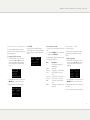
Ethernet settings vol25
The following table explains the remaining options
on the Ethernet settings menu:
DHCP
Enabled
IP
10.0.1.11
IP Mask255.255.2...
Gateway 10.0.1.1
•
Configure the DHCP option on the Ethernet
settings menu to Disabled.
Description
The IP address assigned to the
Media Module.
IP Mask
The IP mask.
Gateway
The gateway or router IP address.
Proxy
Set to Enabled to use a proxy
server.
Proxy server The IP address of a proxy server.
Proxy port
The port to use for the proxy.
DNS1
The address of the main DNS
server.
DNS2
The address of an optional second
DNS server.
Up d a t i n g t h e
f i r mwa r e
From time to time you may be informed that
updated firmware is available for the Media
Module.
To update the firmware
•
Item
IP
Turn the SELECTOR control on the front
panel, or press the A or V buttons on the
remote control, until the Firmware item is
highlighted:
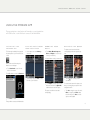
General settings vol25
Input6
IR input
Factory DF
Firmware
•
Normal
Front
Reset
Settings
Press the R button on the front panel, or the
SELECT button on the remote control.
The Media Module will then scan for firmware on
the network.
For more information see the Primare Web site.