1
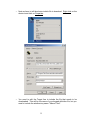
2. Inter-character Pacing. This parameter inserts a short pause between all
bytes sent to the PC. The range for this parameter is 2ms to 20ms. It has the
effect of slowing down the typing slightly in case you are working with a slow
PC.
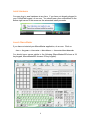
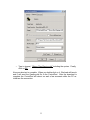
3. LED Function. You may select one of 5 modes for the LED in your
ControlPad. The default is for the LED to perform no function (Not Used).
You may assign the LED to duplicate the PC’s internal LED (Caps Lock or
Num Lock) or you may assign it to illuminate when the keypad’s own 2nd level
is active (Level Indicator). You may also control the LED from within a macro
or from the Host PC.
4. Download Delay. If you are connected via USB you may ignore this
parameter. If you are connected via PS/2 you may include short pauses in
the download process to give the host PC and keypad time to synchronize
during the download operation. Normally you should not have to adjust this
unless you are having trouble performing downloads to your keypad.
Double Size Keys
Genovation sells an accessory kit for those who wish to utilize double size keys.
When programming double size keys it is recommended to program only one of
the two keys that are combined into the double size key. In addition, you should
select a key rollover of 2 on the Keypad Properties page.
Keycap Labels
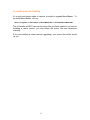
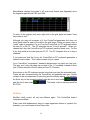
Click on the Key Labels button
. The ControlPad keys have clear lenses
which allow for labels may be inserted under the lens to indicate the key function.
A template is provided for Wordpad or Word in the "Keycap Files" folder. Text,
images or icons may be inserted in the template. The resulting file can be printed
and saved. The labels can then be cut with scissors and placed under the lens
caps.
21