1
DIGITAL-LOGIC AG
7.4
MSMJ104 /D Manual 3.55
Formatting Memory Cards
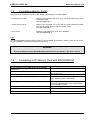
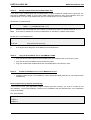
There are two possibilities to format a card. With the MCFORMAT or the MCFORM.
1. SRAM memory cards:
Needs to be formatted only once. They can be erased like any other
removable media.
Use MCFORM.EXE -e
2. Flash memory cards:
Needs to be formatted only once. With the SCM Flash-File-System
they can be erased like any other removable media.
Use MCFORM.EXE -e
3. ATA-Cards:
Needs to be formatted only once, like a harddisk.
Use MCFORM.EXE -e
Note:
The MCFORM.EXE program requires the device driver MMCD.SYS. Before a memory card can be formatted, the installation of this driver is absolutely necessary.
WARNING
During formatting with the MCFROM.EXE all data stored on the memory card will be erased.
7.5
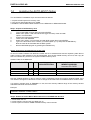
Formatting a PC Memory Card with MCFORM.EXE
STEP
Change directory to PC-CARD drivers on the harddisk
(SWAPFTL)
Type MCFORM [DRIVE]: and press ENTER.
Select language (German or English) -> N ENTER
Define type of memory card (menu point 1, ENTER).
COMMENT
Start the MCFORM.EXE with the drive designator: D: or E: or F:.
First select point 1 to define the type of card
(ATA, SRAM, FLASH or EEPROM).
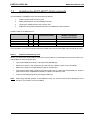
Select type and size of card and press ENTER to confirm. Select type and size of card (ATA, SRAM,
FLASH or EEPROM) with cursor up/down and
press ENTER to confirm.
Quit submenu with ESCAPE key
Select menu point 2 to format the memory card
(all datas will be lost!!!)
Press ESC key to quit the program
17