1
IMM
I
Press Display for the fifth time to exit.
Subtitle
While playing DVD disc with multi-subtitles, choose the desired subtitle, it
shows on the screen.
@ Will show on the screen when this feature is not available on the disc.
Note: This feature setting is valid only forthe current disc. the subtitle
language can be changed from DVD setting menu.
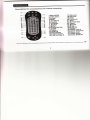
Audio
There is multi-language feature while DVD disc is playing.
When playing discs with this function, you can select the desired voice by
pressing Audio.
The left audio, right audio and the stereo shows on the screen while playing
VCD disc. You can select the desired one when playing story disc with dual
languages.
15